> ## Documentation Index
> Fetch the complete documentation index at: https://docs.getlago.com/llms.txt
> Use this file to discover all available pages before exploring further.
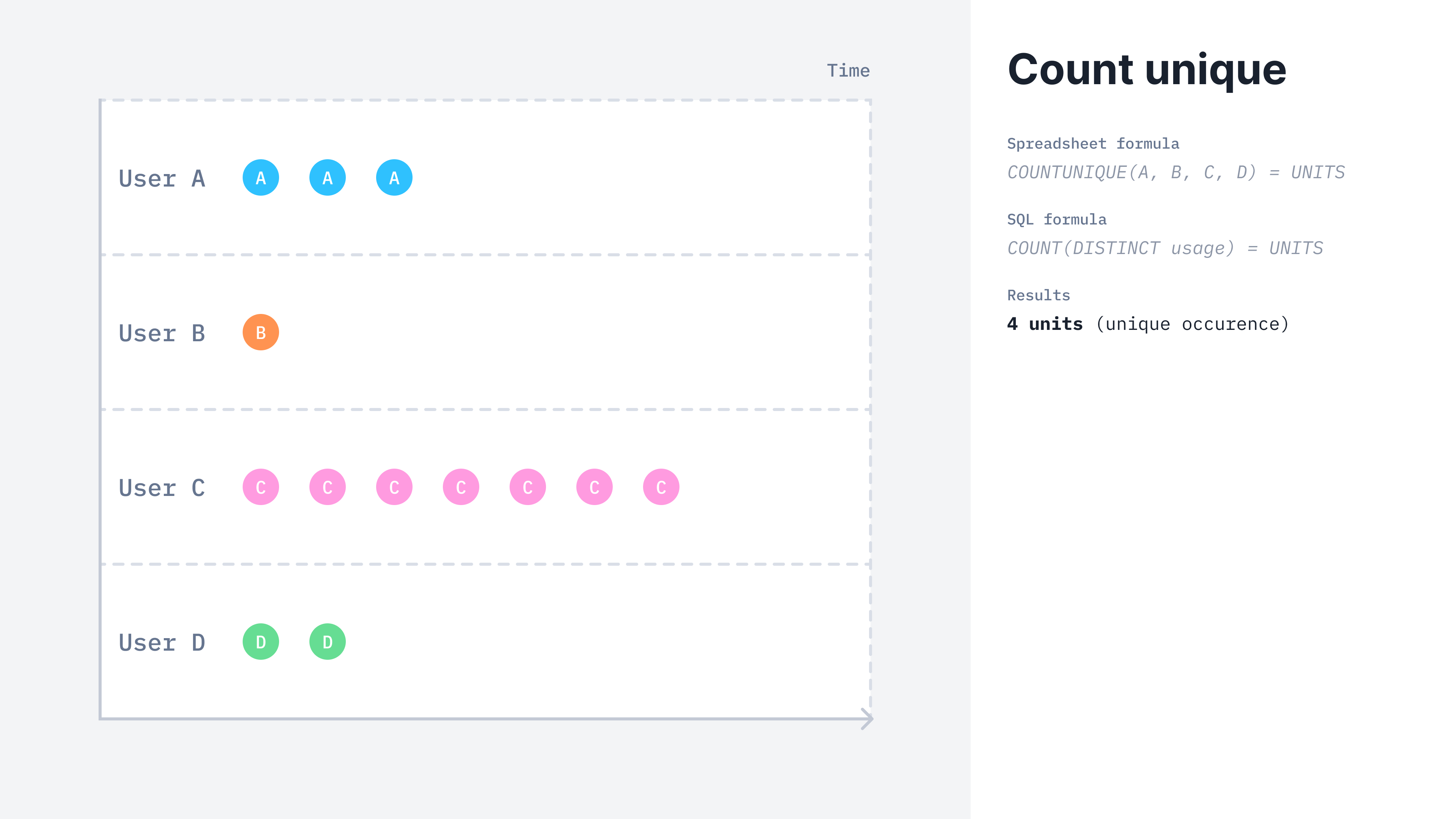
# UNIQUE COUNT
The unique count aggregation type counts only the unique values of a specified event property.
 ## UNIQUE COUNT billable metric
Here is how you can create a unique count aggregation from the UI:
1. Access the **"Billable metrics"** section via the side menu;
2. Create a new billable metric;
3. Define a name, a code and an optional description;
4. Select **"count unique"** as the aggregation type;
5. Define if this metric is `metered` or `recurring`;
6. Define the property to aggregate;
7. Apply dimension groups if any; and
8. Click **"Add billable metric"**.
This billable metric can be both `metered` or `recurring`.
```bash theme={"dark"}
LAGO_URL="https://api.getlago.com"
API_KEY="__YOUR_API_KEY__"
curl --location --request POST "$LAGO_URL/api/v1/billable_metrics" \
--header "Authorization: Bearer $API_KEY" \
--header 'Content-Type: application/json' \
--data-raw '{
"billable_metric": {
"name": "API Request",
"code": "api_requests",
"description": "Number of API requests.",
"aggregation_type": "unique_count_agg",
"field_name": "request_id",
"group": {}
}
}'
```
## Calculation example
Lago calculates the `COUNT_DISTINCT(events.properties.property_name)` for the two following events received.
```json theme={"dark"}
//Event received #1
{
"transaction_id": "transaction_1",
"external_customer_id": "1",
"timestamp": "2022-03-16T00:00:00Z",
"code": "api_requests",
"properties": {
"request_id": "id_1"
}
}
//Event received #2
{
"transaction_id": "transaction_2",
"external_customer_id": "1",
"timestamp": "2022-03-17T00:00:00Z",
"code": "api_requests",
"properties": {
"request_id": "id_1"
}
}
```
In that case, with this aggregation type, Lago only counts the unique values of the `request_id` property in the event payloads, **resulting in a billable value of 1 unit.**
## Adding or removing unique values
Events sent to a `UNIQUE COUNT` billable metric accept an `operation_type` property to control whether the unique value is added to or removed from the count:
* `add`: Adds the unique value. **Optional**: Lago adds by default if `operation_type` is omitted.
* `remove`: Removes the unique value from the count. **Required** whenever you want to explicitly remove a unit.
```json theme={"dark"}
//Event removing a previously counted unique value
{
"transaction_id": "transaction_3",
"external_customer_id": "1",
"timestamp": "2022-03-18T00:00:00Z",
"code": "api_requests",
"properties": {
"request_id": "id_1",
"operation_type": "remove"
}
}
```
## UNIQUE COUNT billable metric
Here is how you can create a unique count aggregation from the UI:
1. Access the **"Billable metrics"** section via the side menu;
2. Create a new billable metric;
3. Define a name, a code and an optional description;
4. Select **"count unique"** as the aggregation type;
5. Define if this metric is `metered` or `recurring`;
6. Define the property to aggregate;
7. Apply dimension groups if any; and
8. Click **"Add billable metric"**.
This billable metric can be both `metered` or `recurring`.
```bash theme={"dark"}
LAGO_URL="https://api.getlago.com"
API_KEY="__YOUR_API_KEY__"
curl --location --request POST "$LAGO_URL/api/v1/billable_metrics" \
--header "Authorization: Bearer $API_KEY" \
--header 'Content-Type: application/json' \
--data-raw '{
"billable_metric": {
"name": "API Request",
"code": "api_requests",
"description": "Number of API requests.",
"aggregation_type": "unique_count_agg",
"field_name": "request_id",
"group": {}
}
}'
```
## Calculation example
Lago calculates the `COUNT_DISTINCT(events.properties.property_name)` for the two following events received.
```json theme={"dark"}
//Event received #1
{
"transaction_id": "transaction_1",
"external_customer_id": "1",
"timestamp": "2022-03-16T00:00:00Z",
"code": "api_requests",
"properties": {
"request_id": "id_1"
}
}
//Event received #2
{
"transaction_id": "transaction_2",
"external_customer_id": "1",
"timestamp": "2022-03-17T00:00:00Z",
"code": "api_requests",
"properties": {
"request_id": "id_1"
}
}
```
In that case, with this aggregation type, Lago only counts the unique values of the `request_id` property in the event payloads, **resulting in a billable value of 1 unit.**
## Adding or removing unique values
Events sent to a `UNIQUE COUNT` billable metric accept an `operation_type` property to control whether the unique value is added to or removed from the count:
* `add`: Adds the unique value. **Optional**: Lago adds by default if `operation_type` is omitted.
* `remove`: Removes the unique value from the count. **Required** whenever you want to explicitly remove a unit.
```json theme={"dark"}
//Event removing a previously counted unique value
{
"transaction_id": "transaction_3",
"external_customer_id": "1",
"timestamp": "2022-03-18T00:00:00Z",
"code": "api_requests",
"properties": {
"request_id": "id_1",
"operation_type": "remove"
}
}
```