> ## Documentation Index
> Fetch the complete documentation index at: https://docs.getlago.com/llms.txt
> Use this file to discover all available pages before exploring further.
# SQL Expressions
> For more advanced calculations, you can use SQL custom expressions. These expressions are helpful when the aggregation results for a billable metric require complex calculations.
## Creating a SQL Custom Expression
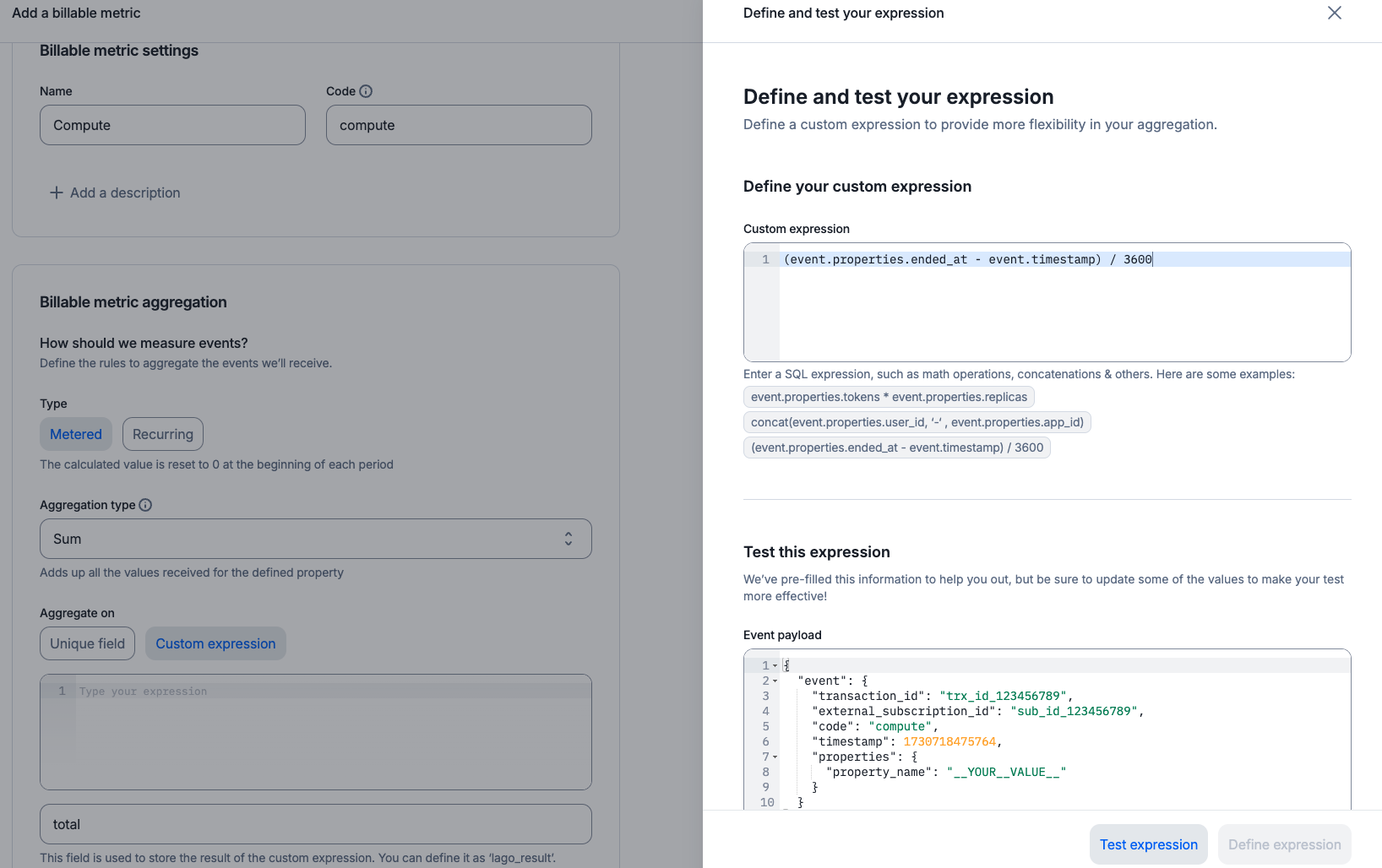
When creating a billable metric, you can choose between using a simple aggregation field or a custom expression.
**Custom expressions allow you to define more advanced computation logic**, which is useful when the required aggregation involves complex calculations that Lago should handle.
To add a custom expression through the user interface:
* Define the `name` and `code` for the billable metric;
* Choose an aggregation type;
* Select `Custom expressions` as the aggregation option instead of `Unique field`;
* Enter your custom expression in the expanded side panel;
* Test the custom expression; and
* Save the billable metric.
 Here are a few examples of custom expressions you can create for a billable metric:
```bash Storage {13, 14} theme={"dark"}
LAGO_URL="https://api.getlago.com"
API_KEY="__YOUR_API_KEY__"
curl --location --request POST "$LAGO_URL/api/v1/billable_metrics" \
--header "Authorization: Bearer $API_KEY" \
--header 'Content-Type: application/json' \
--data-raw '{
"billable_metric": {
"name": "Storage",
"code": "storage",
"description": "Number of GB consumed",
"aggregation_type": "sum_agg",
"expression": "event.properties.gb * event.properties.replicas * (event.properties.ended_at - event.properties.started_at) / 3600",
"field_name": "consumed_gb_hours",
"recurring": false
}
}'
```
```bash Seats {13} theme={"dark"}
LAGO_URL="https://api.getlago.com"
API_KEY="__YOUR_API_KEY__"
curl --location --request POST "$LAGO_URL/api/v1/billable_metrics" \
--header "Authorization: Bearer $API_KEY" \
--header 'Content-Type: application/json' \
--data-raw '{
"billable_metric": {
"name": "Seats",
"code": "seats",
"description": "Number of seats used",
"aggregation_type": "unique_count_agg",
"expression": "CONCAT(event.properties.user_id, '-' , event.properties.app_id)",
"field_name": "seat_id",
"recurring": true
}
}'
```
Custom expressions can be used with any aggregation type except `COUNT`.
## Supported Expressions
A variety of SQL custom expressions are available for use. Here are a few examples:
* **Concatenation:** `CONCAT(event.properties.user_id, '-', event.properties.app_id)`
* **Math operations:** `(event.properties.cpu_number * 25 * event.properties.duration_msec) + (event.properties.memory_mb * 0.000001 * event.properties.duration_msec)`
* **Rounding:** `ROUND(event.properties.duration_msec * 1000)`
* **Least/Greatest:** `LEAST(event.properties.memory_mb, 10.0)`
You can find the full list of supported expressions below:
* [Event attributes](#event-attributes)
* [Atoms](#atoms)
* [Operators](#operators)
* [Functions](#functions)
* [`CONCAT`](#CONCAT)
* [`ROUND`](#ROUND)
* [`FLOOR`](#FLOOR)
* [`CEIL`](#CEIL)
* [`LEAST`](#LEAST)
* [`GREATEST`](#GREATEST)
If you need a custom expression that isn't supported by default in Lago, **feel free to contact our team** or **consider contributing to the open-source version**.
### Event attributes
Lago expressions may include the following event attributes:
* `event.code` (event code)
* `event.timestamp` (event timestamp)
* `event.properties.[property_name]` (event property)
For example, `event.properties.my_property` is a valid event attribute.
### Atoms
Lago expressions may include atoms:
* `123` (integer)
* `123.45` (decimal)
* `'Hello, world!'` (string)
### Operators
Lago expressions may include basic operators:
* `+` (addition)
* `-` (subtraction)
* `*` (multiplication)
* `/` (division)
* unary minus (`-12`)
### Functions
#### `CONCAT`
The `CONCAT` function is used to concatenate two or more strings.
```SQL theme={"dark"}
CONCAT(str1, str2[,strs,...])
```
**Parameters:**
* `str1`: The first string to concatenate
* `str2`: The second string to concatenate
* `strs`: (Optional) Additional strings to concatenate.
**Returns:** A string with the concatenated strings.
**Examples:**
* `CONCAT(event.properties.user_id, '-', event.properties.app_id)`
#### `ROUND`
The `ROUND` function is used to round a number to a specified number of decimal places.
```SQL theme={"dark"}
ROUND(value, precision)
```
**Parameters:**
* `value`: The number to round
* `precision`: (Optional) Number of decimal places. Defaults to `0`.
**Returns:** A number rounded to the specified precision.
**Examples:**
* `ROUND(14.2355)` returns `14`
* `ROUND(14.2355, 0)` returns `14`
* `ROUND(14.2355, 2)` returns `14.24`
* `ROUND(14.2355, -1)` returns `10`
#### `FLOOR`
The `FLOOR` function is used to round a number down to the nearest integer.
```SQL theme={"dark"}
FLOOR(value, precision)
```
**Parameters:**
* `value`: The number to round
* `precision`: (Optional) Number of decimal places. Defaults to `0`.
**Returns:** A number rounded down to the specified precision.
**Examples:**
* `FLOOR(16.2365)` returns `16`
* `FLOOR(16.2365, 0)` returns `16`
* `FLOOR(16.2365, 2)` returns `16.23`
* `FLOOR(16.2365, -1)` returns `10`
#### `CEIL`
The `CEIL` function is used to round a number up to the nearest integer.
```SQL theme={"dark"}
CEIL(value, precision)
```
**Parameters:**
* `value`: The number to round
* `precision`: (Optional) Number of decimal places. Defaults to `0`.
**Returns:** A number rounded up to the specified precision.
**Examples:**
* `CEIL(14.2345)` returns `15`
* `CEIL(14.2345, 0)` returns `15`
* `CEIL(14.2345, 2)` returns `14.24`
* `CEIL(14.2345, -1)` returns `20`
#### `LEAST`
The `LEAST` function is used to find the minimum of two or more numbers.
```SQL theme={"dark"}
LEAST(num1, num2[,nums,...])
```
**Parameters:**
* `num1`: The first number to check minimum value
* `num2`: The second number to check minimum value
* `nums`: (Optional) Additional numbers to check minimum value.
**Returns:** The minimum of the given numbers.
**Examples:**
* `LEAST(event.properties.disk1_usage_mb, event.properties.disk2_usage_mb, 10.0)`
#### `GREATEST`
The `GREATEST` function is used to find the maximum of two or more numbers.
```SQL theme={"dark"}
GREATEST(num1, num2[,nums,...])
```
**Parameters:**
* `num1`: The first number to check maximum value
* `num2`: The second number to check maximum value
* `nums`: (Optional) Additional numbers to check maximum value.
**Returns:** The maximum of the given numbers.
**Examples:**
* `GREATEST(event.properties.memory_mb, 10.0)`
## Testing your SQL Custom Expression
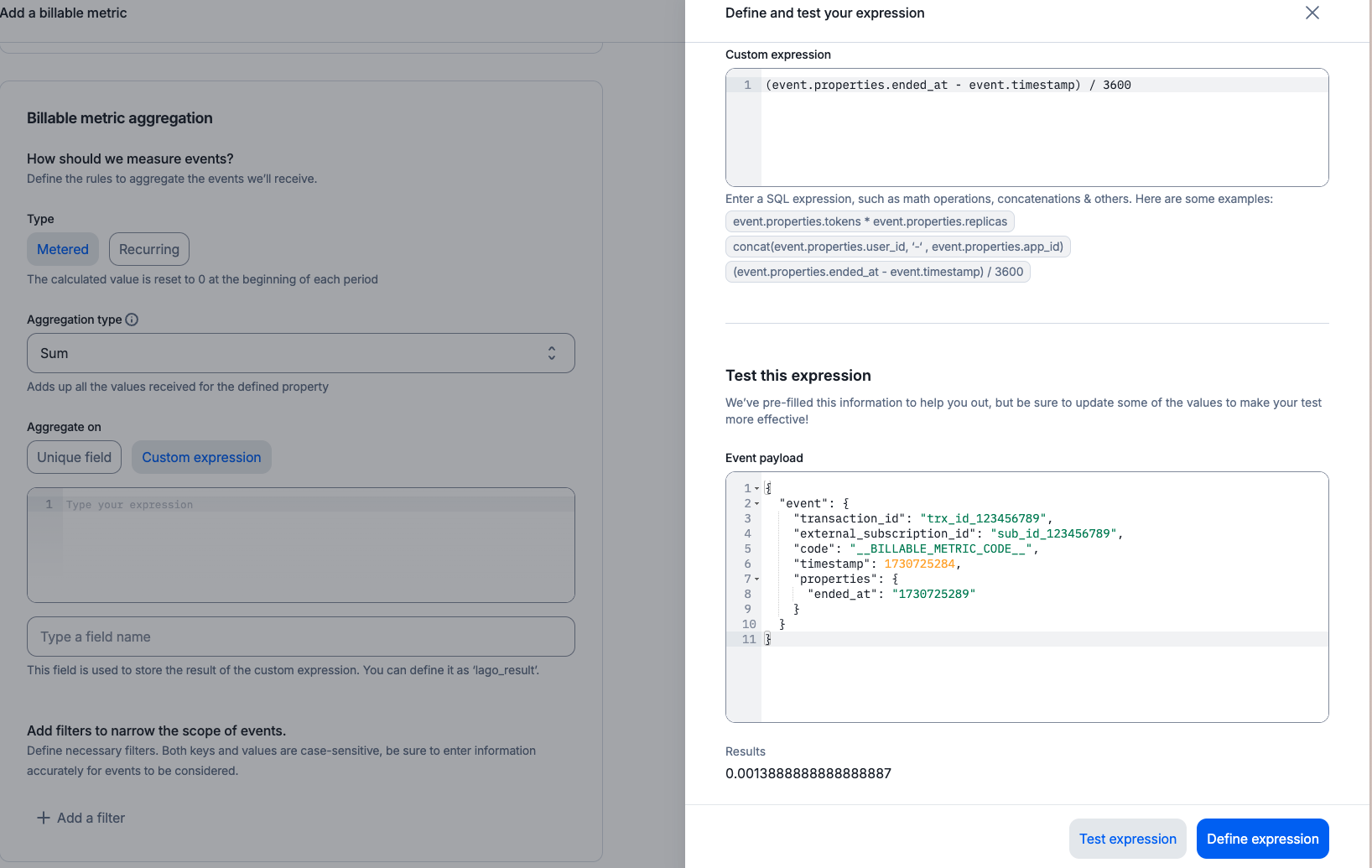
Lago provides a testing tool to help you validate the custom expressions you've created. A sample event is used to test your expression. You can override any field in the test event.
If your custom expression is incorrect, Lago will return an error, and you won't be able to save it until it's valid.
Keep the following in mind:
* You can dynamically reference any event field within your expression; and
* Use precise paths to reference fields accurately. For instance, to use the event timestamp, the path is `event.timestamp`. To reference a custom property sent with the event, the path is `event.properties.your_field`.
Here are a few examples of custom expressions you can create for a billable metric:
```bash Storage {13, 14} theme={"dark"}
LAGO_URL="https://api.getlago.com"
API_KEY="__YOUR_API_KEY__"
curl --location --request POST "$LAGO_URL/api/v1/billable_metrics" \
--header "Authorization: Bearer $API_KEY" \
--header 'Content-Type: application/json' \
--data-raw '{
"billable_metric": {
"name": "Storage",
"code": "storage",
"description": "Number of GB consumed",
"aggregation_type": "sum_agg",
"expression": "event.properties.gb * event.properties.replicas * (event.properties.ended_at - event.properties.started_at) / 3600",
"field_name": "consumed_gb_hours",
"recurring": false
}
}'
```
```bash Seats {13} theme={"dark"}
LAGO_URL="https://api.getlago.com"
API_KEY="__YOUR_API_KEY__"
curl --location --request POST "$LAGO_URL/api/v1/billable_metrics" \
--header "Authorization: Bearer $API_KEY" \
--header 'Content-Type: application/json' \
--data-raw '{
"billable_metric": {
"name": "Seats",
"code": "seats",
"description": "Number of seats used",
"aggregation_type": "unique_count_agg",
"expression": "CONCAT(event.properties.user_id, '-' , event.properties.app_id)",
"field_name": "seat_id",
"recurring": true
}
}'
```
Custom expressions can be used with any aggregation type except `COUNT`.
## Supported Expressions
A variety of SQL custom expressions are available for use. Here are a few examples:
* **Concatenation:** `CONCAT(event.properties.user_id, '-', event.properties.app_id)`
* **Math operations:** `(event.properties.cpu_number * 25 * event.properties.duration_msec) + (event.properties.memory_mb * 0.000001 * event.properties.duration_msec)`
* **Rounding:** `ROUND(event.properties.duration_msec * 1000)`
* **Least/Greatest:** `LEAST(event.properties.memory_mb, 10.0)`
You can find the full list of supported expressions below:
* [Event attributes](#event-attributes)
* [Atoms](#atoms)
* [Operators](#operators)
* [Functions](#functions)
* [`CONCAT`](#CONCAT)
* [`ROUND`](#ROUND)
* [`FLOOR`](#FLOOR)
* [`CEIL`](#CEIL)
* [`LEAST`](#LEAST)
* [`GREATEST`](#GREATEST)
If you need a custom expression that isn't supported by default in Lago, **feel free to contact our team** or **consider contributing to the open-source version**.
### Event attributes
Lago expressions may include the following event attributes:
* `event.code` (event code)
* `event.timestamp` (event timestamp)
* `event.properties.[property_name]` (event property)
For example, `event.properties.my_property` is a valid event attribute.
### Atoms
Lago expressions may include atoms:
* `123` (integer)
* `123.45` (decimal)
* `'Hello, world!'` (string)
### Operators
Lago expressions may include basic operators:
* `+` (addition)
* `-` (subtraction)
* `*` (multiplication)
* `/` (division)
* unary minus (`-12`)
### Functions
#### `CONCAT`
The `CONCAT` function is used to concatenate two or more strings.
```SQL theme={"dark"}
CONCAT(str1, str2[,strs,...])
```
**Parameters:**
* `str1`: The first string to concatenate
* `str2`: The second string to concatenate
* `strs`: (Optional) Additional strings to concatenate.
**Returns:** A string with the concatenated strings.
**Examples:**
* `CONCAT(event.properties.user_id, '-', event.properties.app_id)`
#### `ROUND`
The `ROUND` function is used to round a number to a specified number of decimal places.
```SQL theme={"dark"}
ROUND(value, precision)
```
**Parameters:**
* `value`: The number to round
* `precision`: (Optional) Number of decimal places. Defaults to `0`.
**Returns:** A number rounded to the specified precision.
**Examples:**
* `ROUND(14.2355)` returns `14`
* `ROUND(14.2355, 0)` returns `14`
* `ROUND(14.2355, 2)` returns `14.24`
* `ROUND(14.2355, -1)` returns `10`
#### `FLOOR`
The `FLOOR` function is used to round a number down to the nearest integer.
```SQL theme={"dark"}
FLOOR(value, precision)
```
**Parameters:**
* `value`: The number to round
* `precision`: (Optional) Number of decimal places. Defaults to `0`.
**Returns:** A number rounded down to the specified precision.
**Examples:**
* `FLOOR(16.2365)` returns `16`
* `FLOOR(16.2365, 0)` returns `16`
* `FLOOR(16.2365, 2)` returns `16.23`
* `FLOOR(16.2365, -1)` returns `10`
#### `CEIL`
The `CEIL` function is used to round a number up to the nearest integer.
```SQL theme={"dark"}
CEIL(value, precision)
```
**Parameters:**
* `value`: The number to round
* `precision`: (Optional) Number of decimal places. Defaults to `0`.
**Returns:** A number rounded up to the specified precision.
**Examples:**
* `CEIL(14.2345)` returns `15`
* `CEIL(14.2345, 0)` returns `15`
* `CEIL(14.2345, 2)` returns `14.24`
* `CEIL(14.2345, -1)` returns `20`
#### `LEAST`
The `LEAST` function is used to find the minimum of two or more numbers.
```SQL theme={"dark"}
LEAST(num1, num2[,nums,...])
```
**Parameters:**
* `num1`: The first number to check minimum value
* `num2`: The second number to check minimum value
* `nums`: (Optional) Additional numbers to check minimum value.
**Returns:** The minimum of the given numbers.
**Examples:**
* `LEAST(event.properties.disk1_usage_mb, event.properties.disk2_usage_mb, 10.0)`
#### `GREATEST`
The `GREATEST` function is used to find the maximum of two or more numbers.
```SQL theme={"dark"}
GREATEST(num1, num2[,nums,...])
```
**Parameters:**
* `num1`: The first number to check maximum value
* `num2`: The second number to check maximum value
* `nums`: (Optional) Additional numbers to check maximum value.
**Returns:** The maximum of the given numbers.
**Examples:**
* `GREATEST(event.properties.memory_mb, 10.0)`
## Testing your SQL Custom Expression
Lago provides a testing tool to help you validate the custom expressions you've created. A sample event is used to test your expression. You can override any field in the test event.
If your custom expression is incorrect, Lago will return an error, and you won't be able to save it until it's valid.
Keep the following in mind:
* You can dynamically reference any event field within your expression; and
* Use precise paths to reference fields accurately. For instance, to use the event timestamp, the path is `event.timestamp`. To reference a custom property sent with the event, the path is `event.properties.your_field`.