> ## Documentation Index
> Fetch the complete documentation index at: https://docs.getlago.com/llms.txt
> Use this file to discover all available pages before exploring further.
# Coupons
> Coupons allow you to offer discounts to your customers. When you apply a coupon to a customer, its value will be deducted from their next subscription invoice(s).
The value of the coupon is deducted from the amount of the invoice before tax.
## Create a coupon[](#create-coupon "Direct link to heading")
To create a coupon through the user interface:
1. Access the **"Coupons"** section via the side menu;
2. Click **"Add a coupon"**;
3. Choose a name and a code for your coupon;
4. Select the type of coupon (i.e. fixed amount or percentage);
5. Define its value and frequency (i.e. will be applied once, over several
periods or forever);
6. Choose if the coupon can be applied several times to the same customer
account or not;
7. Choose whether or not to set an expiration date (i.e. date after which the
coupon can no longer be redeemed);
8. Select the **plan(s)** or **billable metric(s)** to which the coupon applies (applies to all plans and metrics by default); and
9. Click **"Add coupon"** to confirm.
The expiration date displayed in the app is based on the organization's timezone.
```bash Create a coupon theme={"dark"}
LAGO_URL="https://api.getlago.com"
API_KEY="__YOUR_API_KEY__"
curl --location --request POST "$LAGO_URL/api/v1/coupons" \
--header "Authorization: Bearer $API_KEY" \
--header 'Content-Type: application/json' \
--data-raw '{
"coupon": {
"name": "Startup Deal",
"code": "startup_deal",
"amount_cents": 5000,
"amount_currency": "USD",
"coupon_type": "fixed_amount",
"reusable": true,
"frequency": "recurring",
"frequency_duration": 6,
"expiration": "time_limit",
"expiration_at": "2022-08-08T23:59:59Z",
"applies_to": {
"plan_codes": ["premium"],
"billable_metric_codes": []
}
}
}'
```
## Apply coupons[](#apply-coupons "Direct link to heading")
If the currency of the customer is already defined, the currency of the coupon
must be the same, otherwise you will not be able to apply the coupon to the
customer.
To apply a coupon to a customer:
1. Select a customer from the list;
2. Click **"Actions"** in the upper-right corner and select **"Apply coupon"**;
3. Select a coupon;
4. Override values and currency; and
5. Click **"Apply coupon"** to confirm.
You can also apply coupons via the API ([learn more](/api-reference/coupons/apply)).
```bash Apply a coupon to a customer theme={"dark"}
LAGO_URL="https://api.getlago.com"
API_KEY="__YOUR_API_KEY__"
curl --location --request POST "$LAGO_URL/api/v1/applied_coupons" \
--header "Authorization: Bearer $API_KEY" \
--header 'Content-Type: application/json' \
--data-raw '{
"applied_coupon": {
"external_customer_id": "5eb02857-a71e-4ea2-bcf9-57d3a41bc6ba",
"coupon_code": "startup_deal",
"amount_cents": 6000,
"amount_currency": "EUR",
"frequency": "recurring",
"frequency_duration": 3
}
}'
```
## Application scope[](#application-scope "Direct link to heading")
You can apply several coupons to a customer. However, if a coupon has been
marked as non-reusable, you will only be able to apply it once to the customer
account, even if it has not been fully consumed. A coupon applied to a customer continues to apply beyond the expiration date.
Coupons are deducted from future subscription invoices. As mentioned previously, the value of
the coupon is deducted from the amount of the invoice before tax.
For coupons whose value is a fixed amount:
* **When the coupon only applies once** and its value is higher than the invoice
amount, the remaining unused amount will be applied to the following invoices,
until the coupon is totally consumed or removed; and
* **When the coupon is recurring** and its value is higher than the invoice amount,
any remaining unused amount will be lost, even if it is the last application
period.
When several coupons are applied to the customer account, they will be deducted according to the following rules:
* **Coupons limited to specific billable metrics will be deducted first** (if any, and if there is at least one subscription
associated with the relevant metric);
* **Coupons limited to specific plans will be deducted next** (if any, and if there is at least one subscription associated with the relevant plan); and
* **Coupons that apply to all plans** will be deducted according to the date on which they were applied (i.e. the coupon that was applied first will be deducted first).
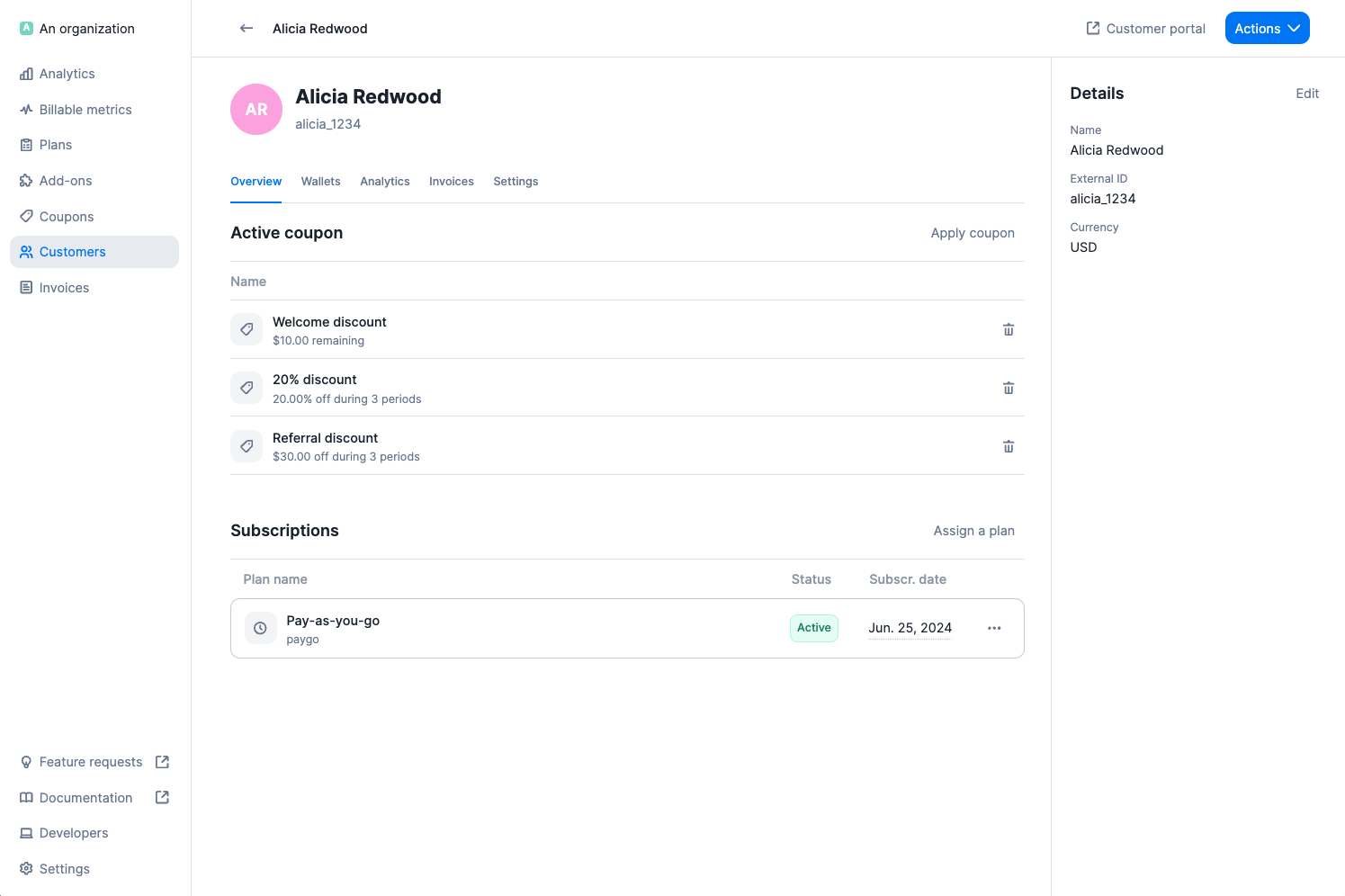
You can see the remaining value / number of remaining periods for each coupon in
the **"Overview"** tab of the customer view.
 Coupons do not apply to add-ons or any other one-off charges.
## Edit, terminate and delete coupons[](#edit-terminate-and-delete-coupons "Direct link to heading")
In the coupon view, you can click the **ellipsis icon** to see all available
actions:
1. **Edit**: allows you to modify the name, code and settings of the coupon;
2. **Terminate**: allows you to deactivate the coupon so that it cannot be
applied to any new customer (customers to whom the coupon has already been
applied continue to benefit from it); and
3. **Delete**: allows you to delete the coupon and remove it from the list (this
action cannot be undone).
You cannot modify the code or the value and frequency of a coupon if
it has already been applied to a customer.
## Remove coupons[](#remove-coupons "Direct link to heading")
To remove a coupon that has been applied to a customer and is still active:
1. Select the customer;
2. Locate the coupon under **"Overview"**;
3. Click the **bin icon** on the right; and
4. Click **"Remove coupon"** to confirm.
The coupon will instantly disappear from the customer view and will not be
applied to the next invoice.
Coupons do not apply to add-ons or any other one-off charges.
## Edit, terminate and delete coupons[](#edit-terminate-and-delete-coupons "Direct link to heading")
In the coupon view, you can click the **ellipsis icon** to see all available
actions:
1. **Edit**: allows you to modify the name, code and settings of the coupon;
2. **Terminate**: allows you to deactivate the coupon so that it cannot be
applied to any new customer (customers to whom the coupon has already been
applied continue to benefit from it); and
3. **Delete**: allows you to delete the coupon and remove it from the list (this
action cannot be undone).
You cannot modify the code or the value and frequency of a coupon if
it has already been applied to a customer.
## Remove coupons[](#remove-coupons "Direct link to heading")
To remove a coupon that has been applied to a customer and is still active:
1. Select the customer;
2. Locate the coupon under **"Overview"**;
3. Click the **bin icon** on the right; and
4. Click **"Remove coupon"** to confirm.
The coupon will instantly disappear from the customer view and will not be
applied to the next invoice.