> ## Documentation Index
> Fetch the complete documentation index at: https://docs.getlago.com/llms.txt
> Use this file to discover all available pages before exploring further.
# Customer management
## Create and update a customer[](#create-and-update-a-customer "Direct link to heading")
To create a customer through the user interface:
1. Access the **"Customers"** section via the side menu;
2. In the upper right corner, click **"Add a customer"**;
3. Enter the customer's name and external ID (i.e. unique ID as defined in your
backend system);
4. Select the customer's timezone (optional -
[learn more](/guide/customers/invoice-customer#bill-following-your-customers-timezone));
5. Enter the customer's billing information, including company information and
address (optional);
6. Select the default payment provider for this customer (optional -
[learn more](/guide/payments/payment-providers); and
7. Click **"Create customer"** to confirm.
```bash Create or update a customer theme={"dark"}
LAGO_URL="https://api.getlago.com"
API_KEY="__YOUR_API_KEY__"
curl --location --request POST "$LAGO_URL/api/v1/customers" \
--header "Authorization: Bearer $API_KEY" \
--header 'Content-Type: application/json' \
--data-raw '{
"customer": {
"external_id": "5eb02857-a71e-4ea2-bcf9-57d3a41bc6ba",
"address_line1": "5230 Penfield Ave",
"address_line2": "",
"city": "Woodland Hills",
"country": "US",
"currency": "EUR",
"email": "dinesh@piedpiper.test",
"legal_name": "Coleman-Blair",
"legal_number": "49-008-2965",
"tax_identification_number": "EU123456789",
"logo_url": "http://hooli.com/logo.png",
"name": "Gavin Belson",
"phone": "1-171-883-3711 x245",
"state": "CA",
"timezone": "Europe/Paris",
"url": "http://hooli.com",
"zipcode": "91364",
"tax_codes": [],
"billing_configuration": {
"invoice_grace_period": 3,
"payment_provider": "stripe",
"provider_customer_id": "cus_12345",
"sync": true,
"sync_with_provider": true,
"document_locale": "fr",
}
"metadata": [
{
"key": "Name",
"value": "John",
"display_in_invoice": true
}
]
}
}'
```
Once a customer is created, you can access the customer view, where you can edit their information.
You cannot change the `external_id` and the `currency` of customers after an object has been
assigned to them (i.e. plans, coupons, one-off invoices, wallet and credits).
## Companies vs Individuals
When creating or updating a customer, you can specify whether the customer is a `company` or an `individual` by setting the customer type.
By default, if no customer type is specified, the customer will be created without a defined type, and you will need to assign one manually.
## Assign objects to a customer[](#assign-objects-to-a-customer "Direct link to heading")
The usage monitoring and billing processes start when you assign a plan to a
customer, which triggers a [subscription](/guide/subscriptions/assign-plan).
You can also apply [coupons](/guide/coupons), [one-off invoices](/guide/one-off-invoices/create-one-off-invoices) and
[prepaid credits](/guide/wallet-and-prepaid-credits) to a customer account.
To assign objects to a customer through the user interface:
1. Access the **"Customers"** section via the side menu;
2. Select a customer from the list;
3. In the upper right corner of the customer view, click **"Actions"**; and
4. Select an action from the dropdown list.
## Monitor the customer's current usage[](#monitor-the-customers-current-usage "Direct link to heading")
When a plan that includes usage-based charges is assigned to a customer, you can
start pushing [events](/guide/events/ingesting-usage) associated with the customer account.
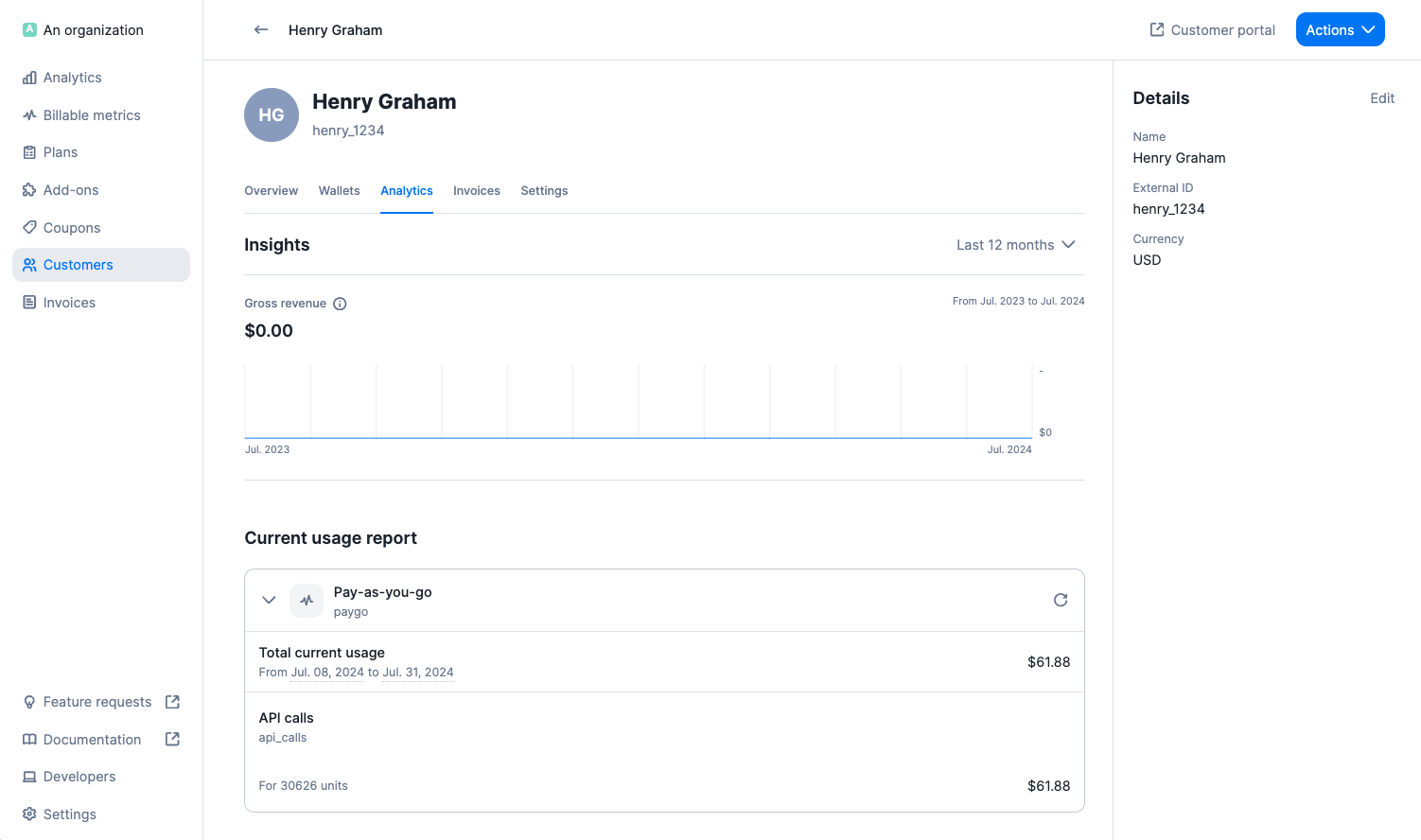
During the billing period, the customer's current usage is visible in the
**"Analytics"** tab of the customer view, under **"Current usage report** including (but not limited to):
* Total amount for the period under consideration; and
* Breakdown by charge, including total number of billing units and amount.
 You can retrieve the customer's current usage via the API using [this endpoint](/api-reference/customer-usage/get-current).
```bash Get customer current usage theme={"dark"}
LAGO_URL="https://api.getlago.com"
API_KEY="__YOUR_API_KEY__"
EXTERNAL_CUSTOMER_ID="5eb02857-a71e-4ea2-bcf9-57d3a41bc6ba"
EXTERNAL_SUBSCRIPTION_ID="sub_1234567890"
curl --location --request GET "$LAGO_URL/api/v1/customers/$EXTERNAL_CUSTOMER_ID/current_usage?external_subscription_id=$EXTERNAL_SUBSCRIPTION_ID" \
--header "Authorization: Bearer $API_KEY" \
--header 'Content-Type: application/json'
```
## Monitor the customer's billing status[](#monitor-the-customers-overdue-balance "Direct link to heading")
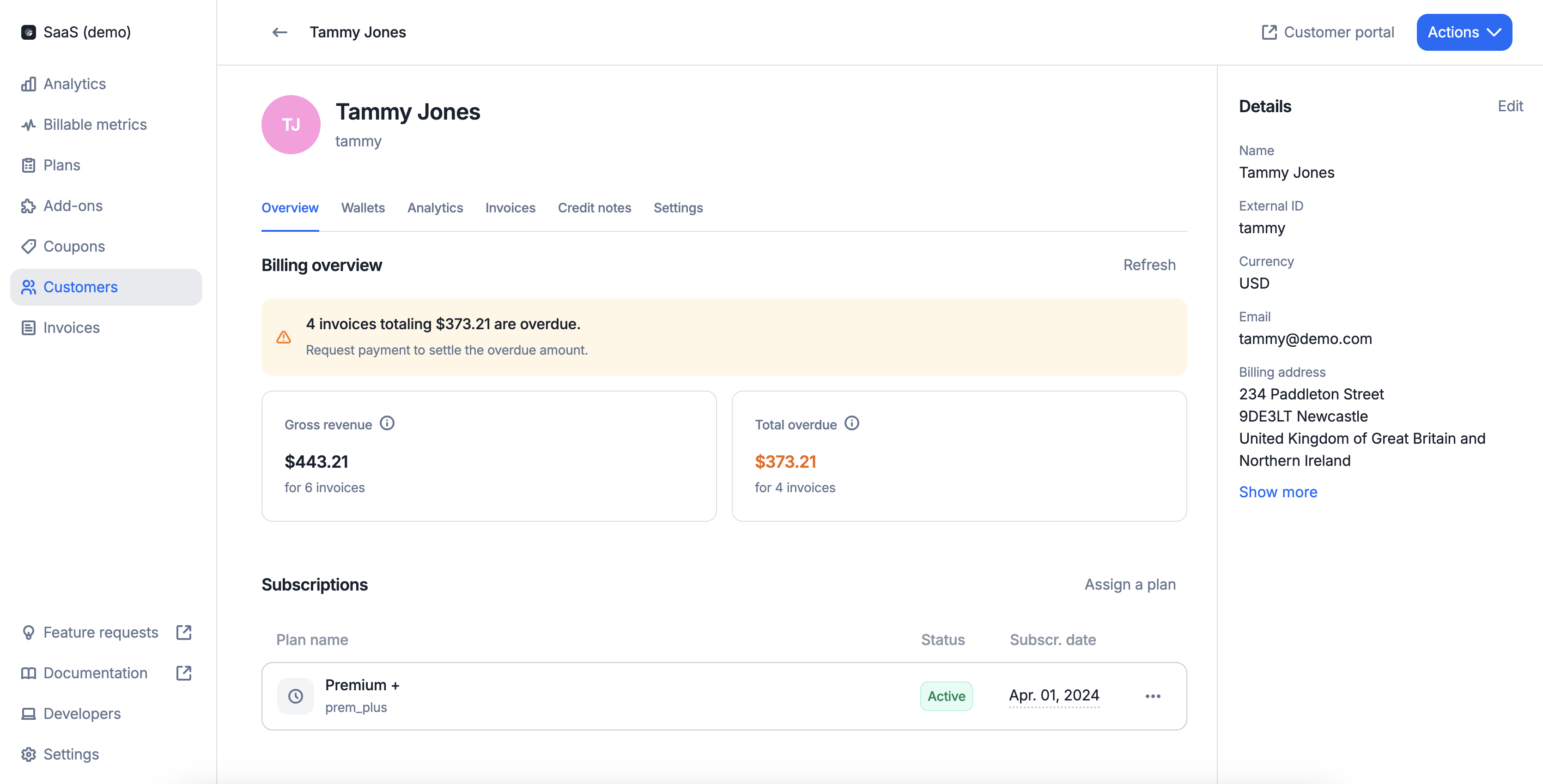
The "**Billing overview**" lets you see at a glance where a customer stands in terms of revenue and collection. It takes into account invoices since the customer's creation date.
* Gross revenue indicates how much has been billed to this customer
* Total overdue highlights the aggregated amount from invoices that are past due
You can retrieve the customer's current usage via the API using [this endpoint](/api-reference/customer-usage/get-current).
```bash Get customer current usage theme={"dark"}
LAGO_URL="https://api.getlago.com"
API_KEY="__YOUR_API_KEY__"
EXTERNAL_CUSTOMER_ID="5eb02857-a71e-4ea2-bcf9-57d3a41bc6ba"
EXTERNAL_SUBSCRIPTION_ID="sub_1234567890"
curl --location --request GET "$LAGO_URL/api/v1/customers/$EXTERNAL_CUSTOMER_ID/current_usage?external_subscription_id=$EXTERNAL_SUBSCRIPTION_ID" \
--header "Authorization: Bearer $API_KEY" \
--header 'Content-Type: application/json'
```
## Monitor the customer's billing status[](#monitor-the-customers-overdue-balance "Direct link to heading")
The "**Billing overview**" lets you see at a glance where a customer stands in terms of revenue and collection. It takes into account invoices since the customer's creation date.
* Gross revenue indicates how much has been billed to this customer
* Total overdue highlights the aggregated amount from invoices that are past due
 You can retrieve the customer's gross revenue via the API using [this endpoint](/api-reference/analytics/gross-revenue).
```bash Get customer gross revenue theme={"dark"}
LAGO_URL="https://api.getlago.com"
API_KEY="__YOUR_API_KEY__"
curl --location --request GET "$LAGO_URL/api/v1/analytics/gross_revenue?external_customer_id=hooli_1234¤cy=USD" \
--header "Authorization: Bearer $API_KEY" \
--header 'Content-Type: application/json' \
```
You can retrieve the customer's overdue balance via the API using [this endpoint](/api-reference/analytics/overdue-balance).
```bash Get customer overdue balance theme={"dark"}
LAGO_URL="https://api.getlago.com"
API_KEY="__YOUR_API_KEY__"
curl --location --request GET "$LAGO_URL/api/v1/analytics/overdue_balance?external_customer_id=hooli_1234¤cy=USD" \
--header "Authorization: Bearer $API_KEY" \
--header 'Content-Type: application/json' \
```
## Deleting a customer
You may delete a customer linked to existing objects (i.e. applied coupons, wallets, subscriptions, add-ons).
If you do so:
* All [subscriptions](/guide/subscriptions/assign-plan) associated with this customer account will be immediately terminated (this action may trigger the generation of invoices and/or credit notes);
* All [coupons](/guide/coupons) applied to this customer account will be immediately terminated;
* The customer's active [wallet](/guide/wallet-and-prepaid-credits) will be immediately terminated and all remaining credits will be voided; and
* All `draft` invoices associated with this customer account will be immediately finalized.
`finalized` invoices and [credit notes](/guide/invoicing/credit-notes/overview) associated with the deleted customer remain available in the **"Invoices"** section of the user interface and can also be retrieved via the API.
It is possible to generate new credit notes and process refunds after the deletion of the customer.
After deleting a customer account, you can create a new one using the same `external_id`.
You can retrieve the customer's gross revenue via the API using [this endpoint](/api-reference/analytics/gross-revenue).
```bash Get customer gross revenue theme={"dark"}
LAGO_URL="https://api.getlago.com"
API_KEY="__YOUR_API_KEY__"
curl --location --request GET "$LAGO_URL/api/v1/analytics/gross_revenue?external_customer_id=hooli_1234¤cy=USD" \
--header "Authorization: Bearer $API_KEY" \
--header 'Content-Type: application/json' \
```
You can retrieve the customer's overdue balance via the API using [this endpoint](/api-reference/analytics/overdue-balance).
```bash Get customer overdue balance theme={"dark"}
LAGO_URL="https://api.getlago.com"
API_KEY="__YOUR_API_KEY__"
curl --location --request GET "$LAGO_URL/api/v1/analytics/overdue_balance?external_customer_id=hooli_1234¤cy=USD" \
--header "Authorization: Bearer $API_KEY" \
--header 'Content-Type: application/json' \
```
## Deleting a customer
You may delete a customer linked to existing objects (i.e. applied coupons, wallets, subscriptions, add-ons).
If you do so:
* All [subscriptions](/guide/subscriptions/assign-plan) associated with this customer account will be immediately terminated (this action may trigger the generation of invoices and/or credit notes);
* All [coupons](/guide/coupons) applied to this customer account will be immediately terminated;
* The customer's active [wallet](/guide/wallet-and-prepaid-credits) will be immediately terminated and all remaining credits will be voided; and
* All `draft` invoices associated with this customer account will be immediately finalized.
`finalized` invoices and [credit notes](/guide/invoicing/credit-notes/overview) associated with the deleted customer remain available in the **"Invoices"** section of the user interface and can also be retrieved via the API.
It is possible to generate new credit notes and process refunds after the deletion of the customer.
After deleting a customer account, you can create a new one using the same `external_id`.