> ## Documentation Index
> Fetch the complete documentation index at: https://docs.getlago.com/llms.txt
> Use this file to discover all available pages before exploring further.
# Manual dunning
> Dunning refers to the process of communicating with customers to remind them of overdue invoices and attempt to recover the outstanding amounts.
## Overdue balance payment
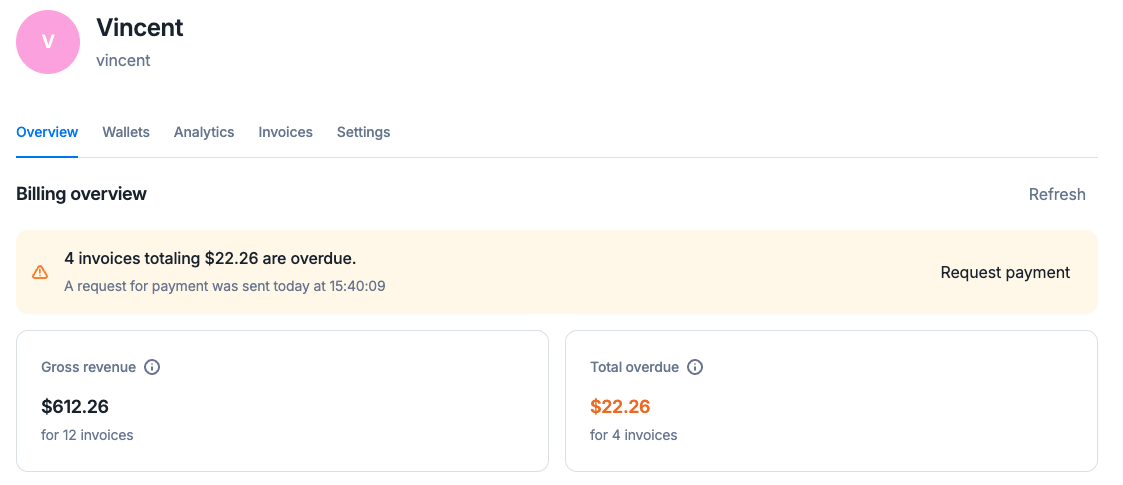
When a customer has some invoices past their due date, their [overdue balance](https://docs.getlago.com/guide/customers/customer-management#monitor-the-customers-billing-status) becomes positive, and you have the ability to request its payment manually.
**Premium feature ✨**
This feature is only available to users with a premium license. Please **[contact us](mailto:hello@getlago.com)** to get access to Lago Cloud and Lago Self-Hosted Premium.
In the customer view, a "request payment” link appears within the overdue balance warning.
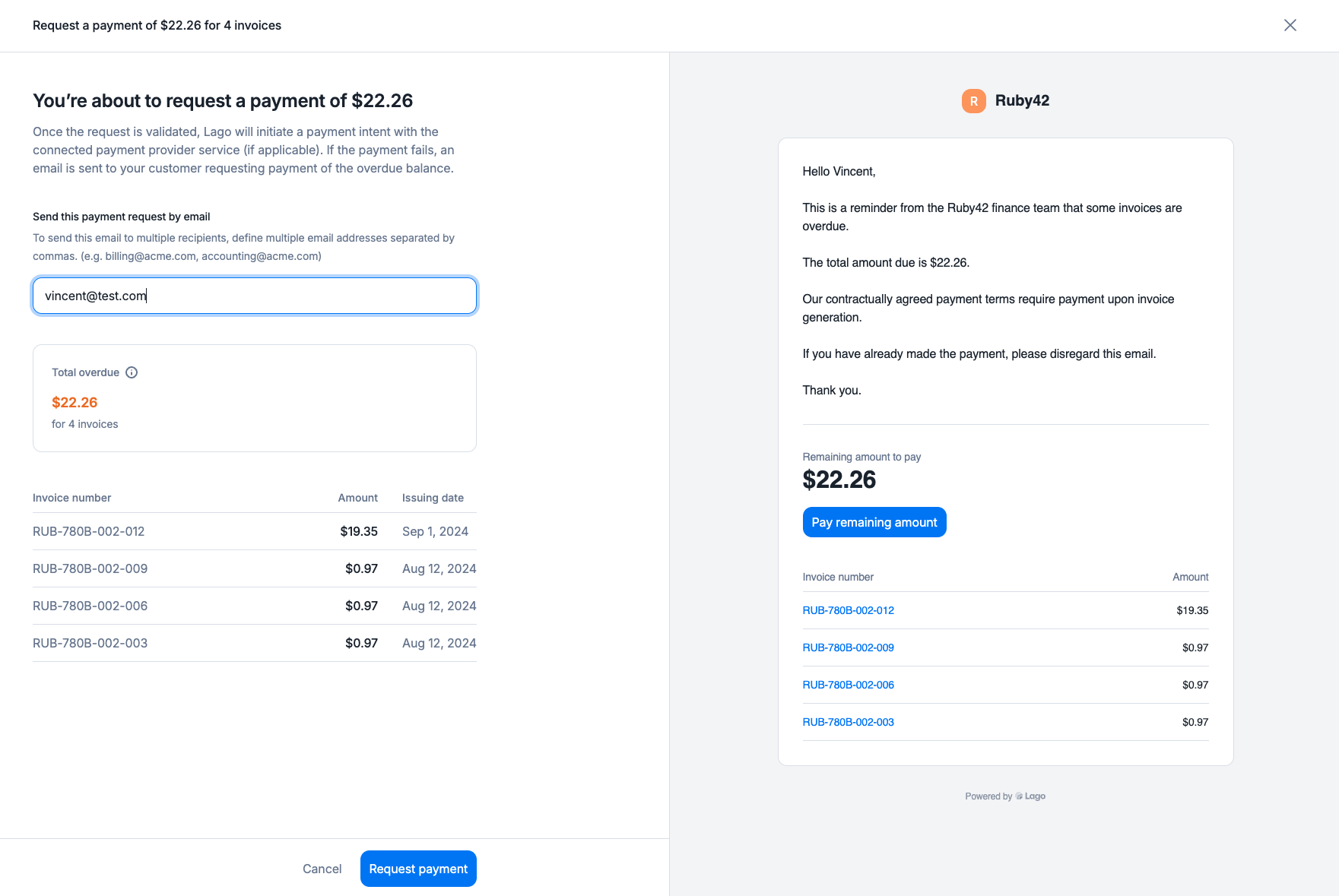
 By clicking on it, a panel opens so you can:
* Review the invoices included in the overdue balance,
* Review the email which will be sent in case the payment fails, or if no payment provider is linked
* Confirm you want to request the payment.
By clicking on it, a panel opens so you can:
* Review the invoices included in the overdue balance,
* Review the email which will be sent in case the payment fails, or if no payment provider is linked
* Confirm you want to request the payment.
 You can create a payment request for the overdue balance from the API, targeting the invoices you want to be paid.
```bash Create a payment request theme={"dark"}
LAGO_URL="https://api.getlago.com"
API_KEY="__YOUR_API_KEY__"
curl --location --request POST "$LAGO_URL/api/v1/payment_requests/" \
--header "Authorization: Bearer $API_KEY" \
--header 'Content-Type: application/json' \
--data-raw '{
{
"payment_request": {
"lago_invoice_ids": ["4064eff9-e7a6-4692-a289-15d7d5da9b83", "b1f36d2f-8ea6-4192-9407-8e87ba5c28c2"],
"external_customer_id": "5eb02857-a71e-4ea2-bcf9-57d3a41bc6ba",
"email": "rebecca@piedpiper.test"
}
}'
```
## Dunning behaviour
1. **Automatic payment attempt**: Lago will initiate a payment intent for the specified amount via the connected PSP.
2. **Failed payment**: If the payment fails, an email will be sent to the customer with a payment request and a URL to complete the payment (excluding GoCardless).
3. **Successful payment**: Upon success, the attached invoices will automatically reflect a “succeeded” payment status.
1. **Payment request email**: An email will be sent to the customer requesting payment for the overdue balance.
2. **Manual update**: Once the payment is received, you must manually update the payment status of the relevant invoices
You can create a payment request for the overdue balance from the API, targeting the invoices you want to be paid.
```bash Create a payment request theme={"dark"}
LAGO_URL="https://api.getlago.com"
API_KEY="__YOUR_API_KEY__"
curl --location --request POST "$LAGO_URL/api/v1/payment_requests/" \
--header "Authorization: Bearer $API_KEY" \
--header 'Content-Type: application/json' \
--data-raw '{
{
"payment_request": {
"lago_invoice_ids": ["4064eff9-e7a6-4692-a289-15d7d5da9b83", "b1f36d2f-8ea6-4192-9407-8e87ba5c28c2"],
"external_customer_id": "5eb02857-a71e-4ea2-bcf9-57d3a41bc6ba",
"email": "rebecca@piedpiper.test"
}
}'
```
## Dunning behaviour
1. **Automatic payment attempt**: Lago will initiate a payment intent for the specified amount via the connected PSP.
2. **Failed payment**: If the payment fails, an email will be sent to the customer with a payment request and a URL to complete the payment (excluding GoCardless).
3. **Successful payment**: Upon success, the attached invoices will automatically reflect a “succeeded” payment status.
1. **Payment request email**: An email will be sent to the customer requesting payment for the overdue balance.
2. **Manual update**: Once the payment is received, you must manually update the payment status of the relevant invoices