> ## Documentation Index
> Fetch the complete documentation index at: https://docs.getlago.com/llms.txt
> Use this file to discover all available pages before exploring further.
# Entitlements
> Unify entitlements and billing in one streamlined platform with Lago.
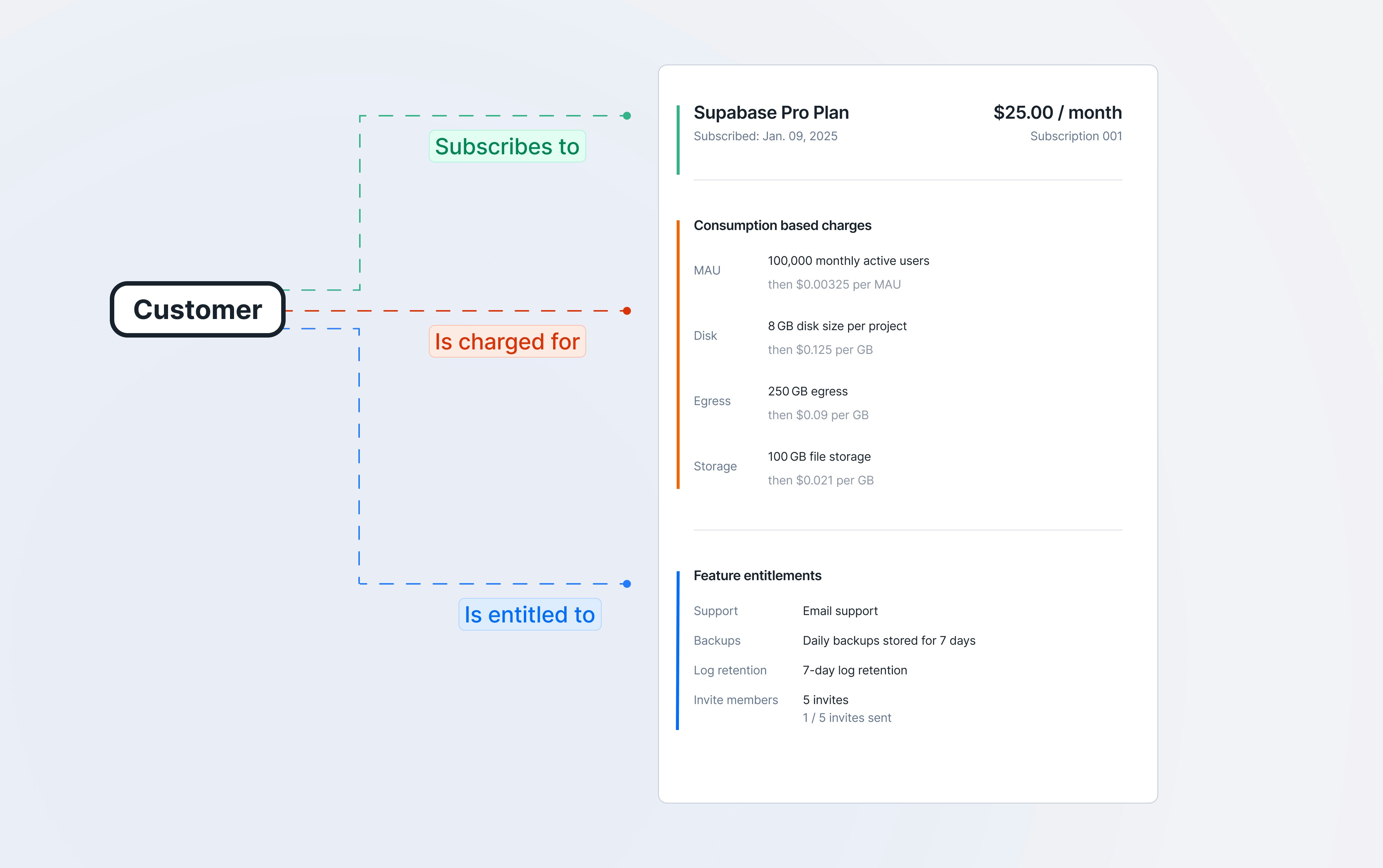
In a billing system, entitlements define what a customer can access and how much they can use, based on their subscription or contract.
This includes feature gates, which control whether a feature is enabled or disabled for a given customer; feature privileges, which determine the level of access within a feature, such as basic or advanced functionality; allowances, which represent the included usage in a plan, like 100 API calls per month; and quotas, which are the maximum usage limits that may trigger overage charges or access restrictions. Together, these components help enforce product limits, manage access, and support accurate usage-based billing.
In addition to the usage-based engine for allowances and quotas, Lago lets you define Features and Entitlements.
## Set up your features
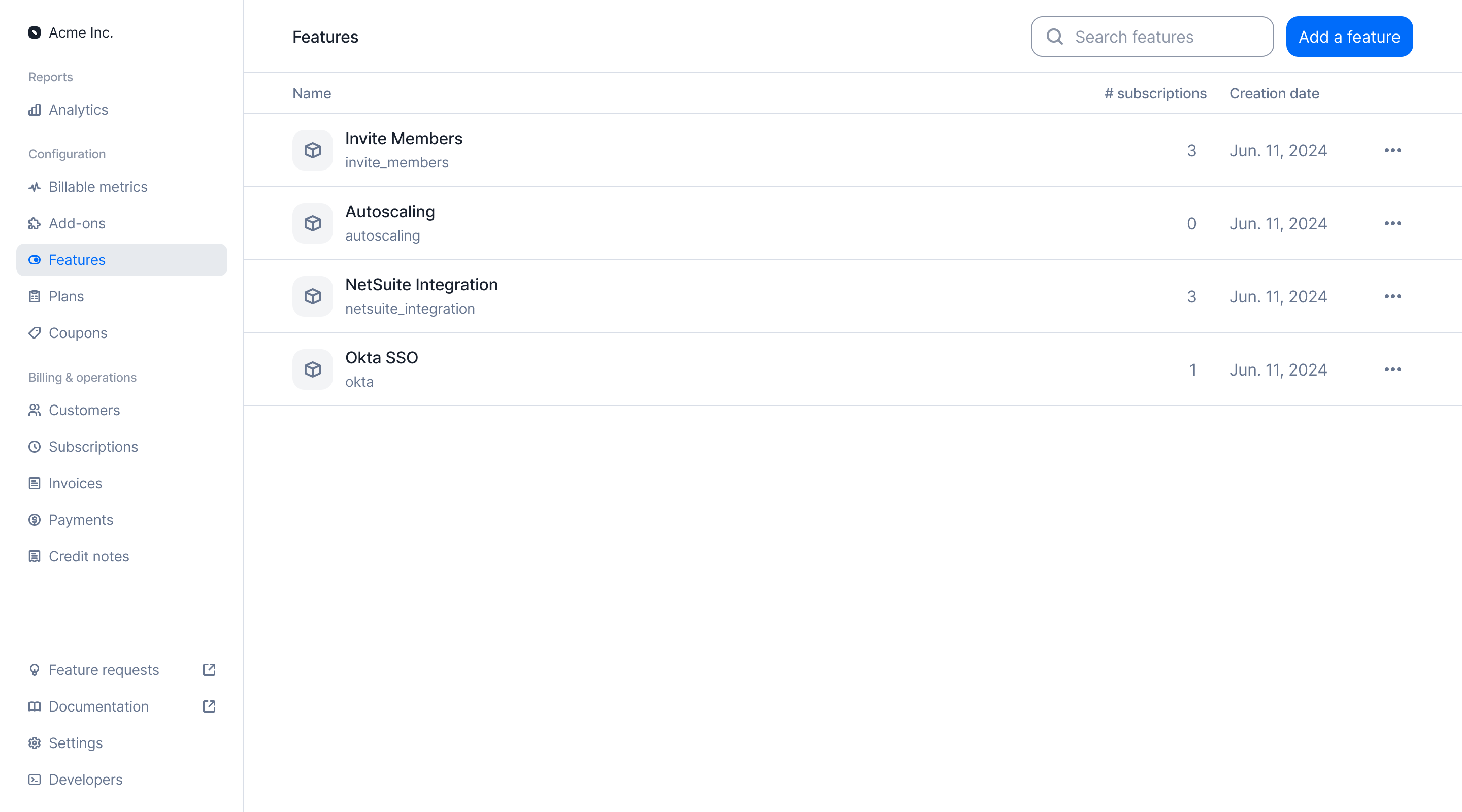
Lago supports the creation of any type of feature to tailor your billing logic. To create a new feature:
1. Navigate to the **Features** section in the sidebar;
2. Click on **Add a Feature** to start a new entry;
3. Give it a unique `code` (used for programmatic actions) and a `name`;
4. Assign one or more **privileges** to the feature (optional); and
5. Click **Create feature** to finalize and save the feature to your instance.
A feature in Lago represents a capability that can be gated behind a plan. It's not necessarily something you bill for directly, but rather something a customer gains access to based on their subscription.
 ```bash Create a feature theme={"dark"}
curl --request POST \
--url https://api.getlago.com/api/v1/features \
--header 'Authorization: Bearer ' \
--header 'Content-Type: application/json' \
--data '{
"code": "seats",
"name": "Number of seats",
"description": "Number of users that can be added to the account"
}'
```
## Define feature privileges
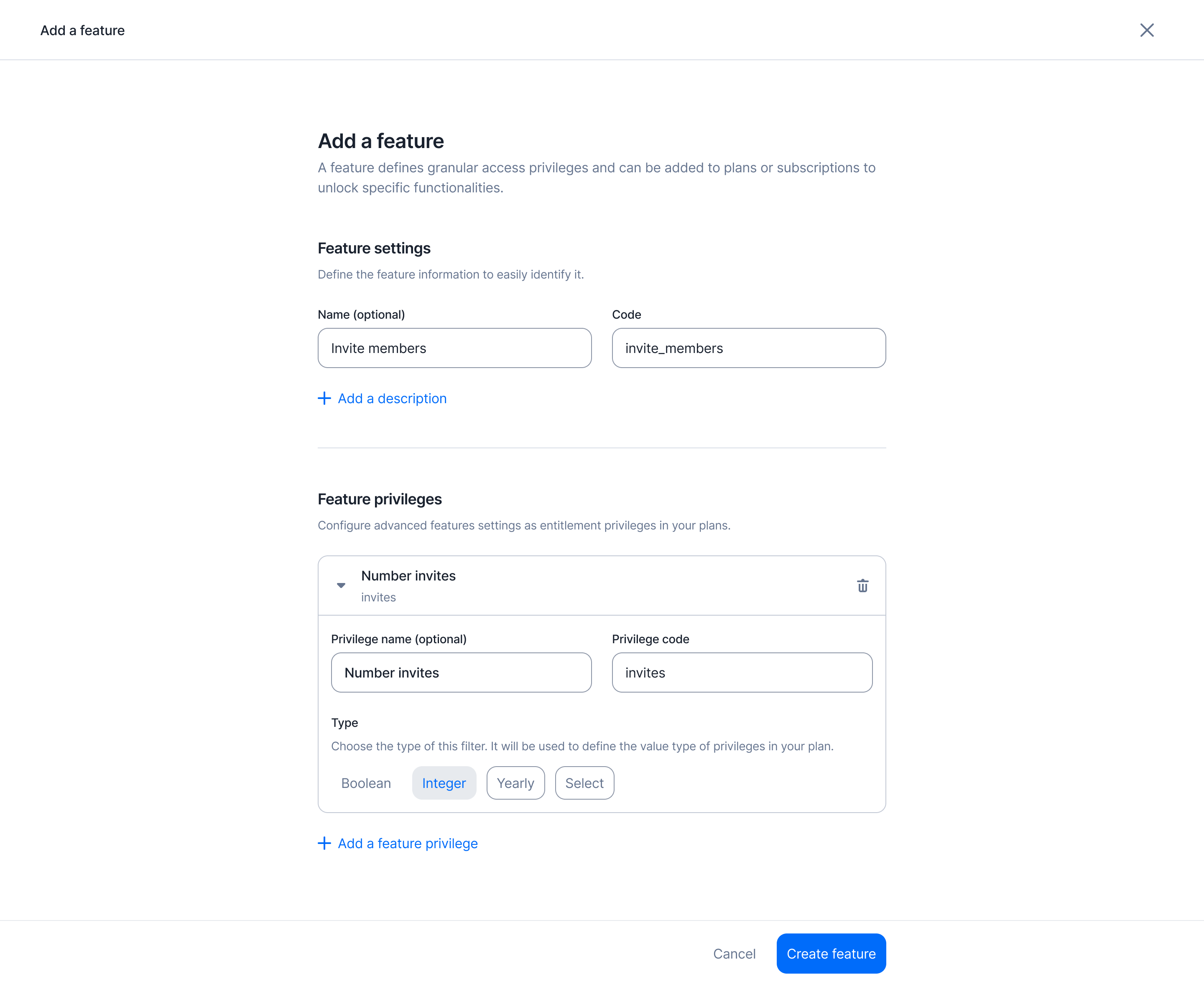
Additionally, you can define privileges for a specific feature. Privileges allow you to configure more granular access controls across different plans. For example, the invite\_member feature might allow inviting 1 member on the *Free plan*, while offering unlimited invites on the *Pro plan*.
Feature privileges can be associated with the following types:
* **`boolean`** – The privilege value is either `true` or `false`.
* **`integer`** – The privilege value is a numeric limit (e.g., `10 GPUs`).
* **`string`** – The privilege value is freeform text.
* **`select`** – The privilege value is chosen from a predefined list of options.
At this stage, you're only defining the **type** of each privilege. The actual values will be set later, when the feature is entitled to a specific plan or subscription.
You can add an unlimited number of privileges to a feature.
```bash Create a feature theme={"dark"}
curl --request POST \
--url https://api.getlago.com/api/v1/features \
--header 'Authorization: Bearer ' \
--header 'Content-Type: application/json' \
--data '{
"code": "seats",
"name": "Number of seats",
"description": "Number of users that can be added to the account"
}'
```
## Define feature privileges
Additionally, you can define privileges for a specific feature. Privileges allow you to configure more granular access controls across different plans. For example, the invite\_member feature might allow inviting 1 member on the *Free plan*, while offering unlimited invites on the *Pro plan*.
Feature privileges can be associated with the following types:
* **`boolean`** – The privilege value is either `true` or `false`.
* **`integer`** – The privilege value is a numeric limit (e.g., `10 GPUs`).
* **`string`** – The privilege value is freeform text.
* **`select`** – The privilege value is chosen from a predefined list of options.
At this stage, you're only defining the **type** of each privilege. The actual values will be set later, when the feature is entitled to a specific plan or subscription.
You can add an unlimited number of privileges to a feature.
 ```bash Create feature with privileges theme={"dark"}
curl --request POST \
--url https://api.getlago.com/api/v1/features \
--header 'Authorization: Bearer ' \
--header 'Content-Type: application/json' \
--data '{
"code": "seats",
"name": "Number of seats",
"description": "Number of users that can be added to the account",
"privileges": [
{
"code": "max_",
"name": "Maximum seats",
"value_type": "integer"
},
{
"code": "min",
"name": "Minimum seats",
"value_type": "integer"
},
{
"code": "allow_admin_user",
"name": "Allow admin user",
"value_type": "boolean"
}
]
}'
```
## Map entitled features to your plans
Once your features have been created, they can be added to your plans through a process called **Entitlements**.
This is where you define features that are unlocked for a specific plan and the limits, values or privileges for each feature.
Entitlements define which features a customer is allowed to use based on the plan they are subscribed to. By assigning features to specific plans, you control access to functionality across your pricing tiers.
```bash Create feature with privileges theme={"dark"}
curl --request POST \
--url https://api.getlago.com/api/v1/features \
--header 'Authorization: Bearer ' \
--header 'Content-Type: application/json' \
--data '{
"code": "seats",
"name": "Number of seats",
"description": "Number of users that can be added to the account",
"privileges": [
{
"code": "max_",
"name": "Maximum seats",
"value_type": "integer"
},
{
"code": "min",
"name": "Minimum seats",
"value_type": "integer"
},
{
"code": "allow_admin_user",
"name": "Allow admin user",
"value_type": "boolean"
}
]
}'
```
## Map entitled features to your plans
Once your features have been created, they can be added to your plans through a process called **Entitlements**.
This is where you define features that are unlocked for a specific plan and the limits, values or privileges for each feature.
Entitlements define which features a customer is allowed to use based on the plan they are subscribed to. By assigning features to specific plans, you control access to functionality across your pricing tiers.
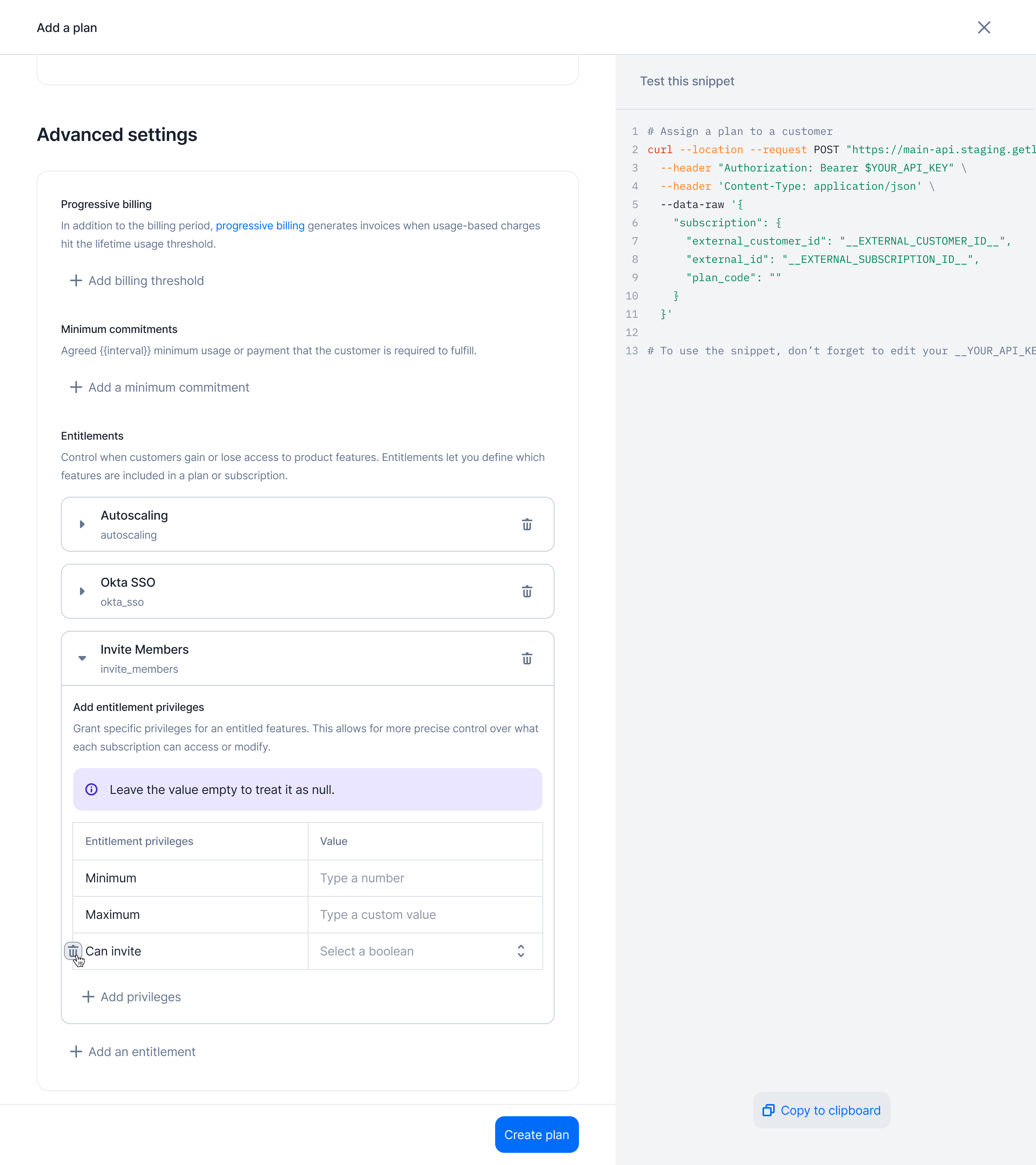
 To assign features to a plan:
1. Create a new plan or edit an existing one;
2. Navigate to the **Advanced Settings** section;
3. Select the features you want to entitle for that plan; and
4. Configure the values for each feature's privileges according to the plan's rules.
To assign features to a plan:
1. Create a new plan or edit an existing one;
2. Navigate to the **Advanced Settings** section;
3. Select the features you want to entitle for that plan; and
4. Configure the values for each feature's privileges according to the plan's rules.
 ```bash Create plan entitlements theme={"dark"}
curl --request POST \
--url https://api.getlago.com/api/v1/plans/{code}/entitlements \
--header 'Authorization: Bearer ' \
--header 'Content-Type: application/json' \
--data '{
"seats": {
"max": 20,
"min": 10,
"allow_admin_user": false
},
"sso": {
"provider": "okta"
}
}'
```
## Override entitlements for a subscription
Some customers may subscribe to a standard plan but negotiate custom entitlements as part of their contract.
Just like charges, **you can override any entitlement value** for a specific subscription.
This creates an **overridden subscription**, where the custom entitlements apply **only** to that particular customer, without affecting the base plan or other subscribers.
```bash Create subscription entitlements theme={"dark"}
curl --request PATCH \
--url https://api.getlago.com/api/v1/subscriptions/{external_id}/entitlements \
--header 'Authorization: Bearer ' \
--header 'Content-Type: application/json' \
--data '{
"seats": {
"max": 30,
"min": 20,
"allow_admin_user": true
},
"sso": {
"provider": "okta"
}
}'
```
## Get entitlements for a subscription
You can retrieve the current list of entitled features for a subscription by calling the following endpoint:
```bash theme={"dark"}
curl --request GET \
--url https://api.getlago.com/api/v1/subscriptions/{external_id}/entitlements \
--header 'Authorization: Bearer '
```
You can also track entitlement changes through the `subscription.updated` webhook.
```bash Create plan entitlements theme={"dark"}
curl --request POST \
--url https://api.getlago.com/api/v1/plans/{code}/entitlements \
--header 'Authorization: Bearer ' \
--header 'Content-Type: application/json' \
--data '{
"seats": {
"max": 20,
"min": 10,
"allow_admin_user": false
},
"sso": {
"provider": "okta"
}
}'
```
## Override entitlements for a subscription
Some customers may subscribe to a standard plan but negotiate custom entitlements as part of their contract.
Just like charges, **you can override any entitlement value** for a specific subscription.
This creates an **overridden subscription**, where the custom entitlements apply **only** to that particular customer, without affecting the base plan or other subscribers.
```bash Create subscription entitlements theme={"dark"}
curl --request PATCH \
--url https://api.getlago.com/api/v1/subscriptions/{external_id}/entitlements \
--header 'Authorization: Bearer ' \
--header 'Content-Type: application/json' \
--data '{
"seats": {
"max": 30,
"min": 20,
"allow_admin_user": true
},
"sso": {
"provider": "okta"
}
}'
```
## Get entitlements for a subscription
You can retrieve the current list of entitled features for a subscription by calling the following endpoint:
```bash theme={"dark"}
curl --request GET \
--url https://api.getlago.com/api/v1/subscriptions/{external_id}/entitlements \
--header 'Authorization: Bearer '
```
You can also track entitlement changes through the `subscription.updated` webhook.