> ## Documentation Index
> Fetch the complete documentation index at: https://docs.getlago.com/llms.txt
> Use this file to discover all available pages before exploring further.
# Ingest usage
> Design, send, and manage usage events that Lago turns into accurate, auditable invoices.
Lago turns usage into invoices. You send events describing what your customers consumed (API calls, compute hours, transactions, tokens), and Lago matches each event to the right subscription and pricing plan, deduplicates it, and aggregates everything into accurate, auditable invoices.
This page is your complete integration guide: how to **design** your events for billing, **send** them through any delivery method, and **handle** edge cases like retries and late arrivals.
```mermaid theme={"dark"}
flowchart LR
A["Your Application"] -->|"REST API / Kafka / Kinesis / S3"| B["Lago Ingestion"]
B --> C["Deduplicate (transaction_id)"]
C --> D["Match to Subscription & Plan"]
D --> E["Aggregate by Billable Metric"]
E --> F["Invoice"]
```
## Designing your events
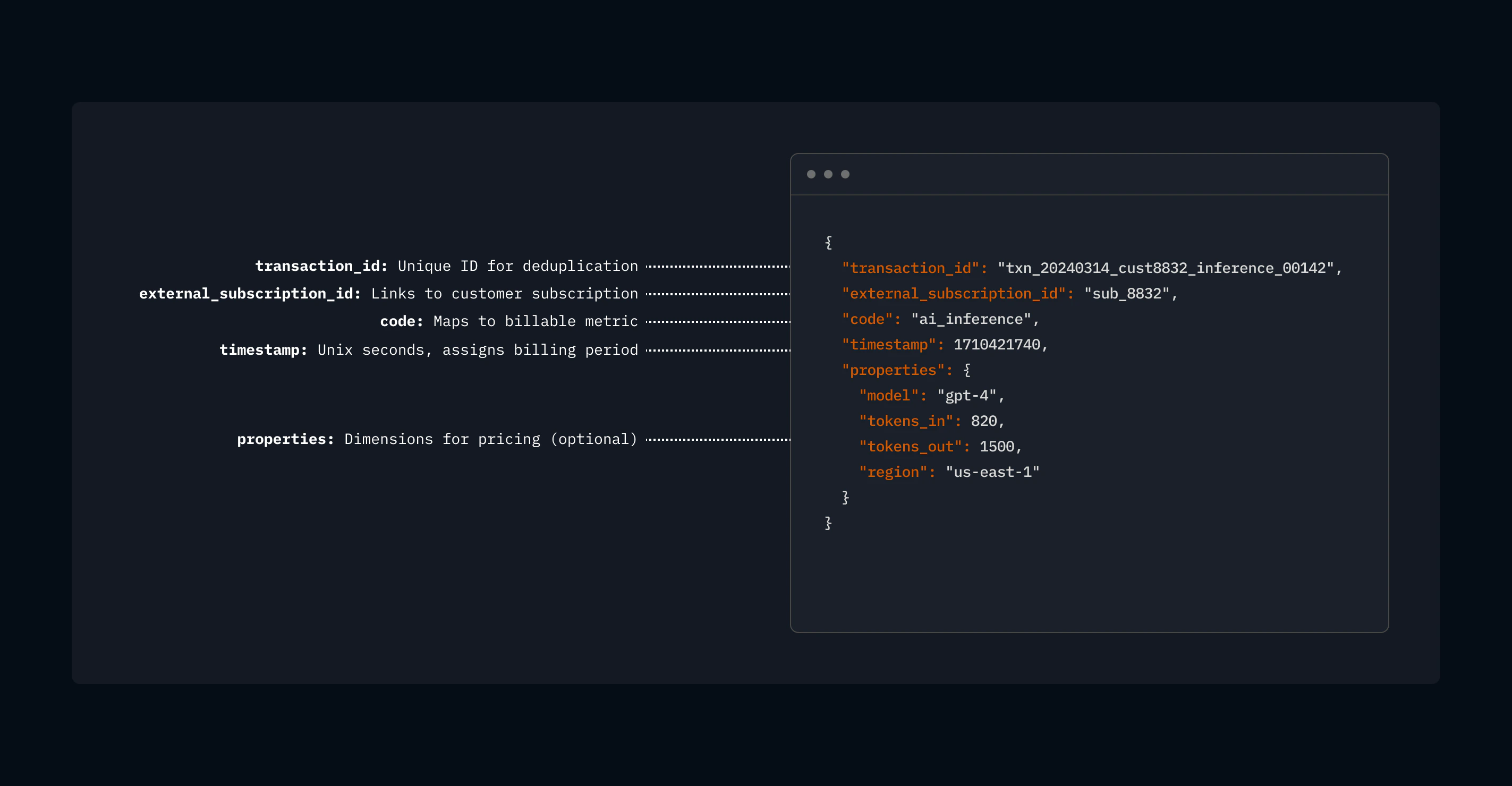 A well-designed event captures what happened, who it happened for, and the dimensions you need for pricing. Getting this right upfront saves you from reworking your integration later.
The guiding question: **what do you charge your customers for?** That's your event.
### Event schema
```json theme={"dark"}
{
"transaction_id": "txn_20240314_cust8832_inference_00142",
"external_subscription_id": "sub_8832",
"code": "ai_inference",
"timestamp": 1710421740,
"properties": {
"model": "gpt-4",
"tokens_in": 820,
"tokens_out": 1500,
"region": "us-east-1"
}
}
```
A unique ID you generate. Lago uses it for **deduplication**: if the same event arrives twice, only the first is billed.
**Good practice:** Don't use random UUIDs. Embed the customer, event type, and timestamp so you can trace a billed amount back to its source event without guessing:
```
{type}_{date}_{customer}_{category}_{sequence}
# Examples
inf_20240314_cust42_gpt4_00831
compute_20240314_org7_a100_useast_001
pay_20240314_acct3391_card_00092
```
If your Lago organization uses the ClickHouse-based event pipeline (designed for high-volume processing), event uniqueness is maintained with **both** `transaction_id` and `timestamp` fields:
* If both are new to Lago, the event is ingested
* If both have already been received, the new event **replaces** the previous one
Ties the event to a customer subscription. This is how Lago knows which pricing plan to apply.
If the `external_subscription_id` does not match an active subscription in Lago, the event is ingested but not post-processed.
Maps to a [billable metric](/guide/billable-metrics/create-billable-metrics) you've defined in Lago (e.g., `ai_inference`, `api_calls`, `storage_gb`). Treat the `code` as a stable API contract between your application and your billing configuration.
If the `code` does not match a billable metric in Lago, the event is ingested but not post-processed.
When the event happened, as a **Unix timestamp**. Lago uses this to assign the event to the correct billing period.
We typically log events using **timestamps in seconds**, such as `1741219251`. When higher precision is required, you can use **millisecond accuracy** in the format `1741219251.590`, where the dot acts as the decimal separator.
If you do not specify a timestamp, Lago automatically uses the reception time of the event.
Key-value pairs carrying the data your pricing needs: token counts, regions, instance types, anything you price on. Properties can be any JSON supported datatype including `strings`, `integers`, `floats`, `uuids`, or `timestamps`.
Lago ignores properties that don't match a billable metric, so **include dimensions you might price on in the future** — extra fields cost nothing but give you pricing flexibility later.
Events sent to a `UNIQUE COUNT` billable metric accept an `operation_type` property to control whether the unique value is added to or removed from the count:
* `add`: Adds the unique value. **Optional**: Lago adds by default if `operation_type` is omitted.
* `remove`: Removes the unique value from the count. **Required** whenever you want to explicitly remove a unit.
Skip Lago's aggregation and set the monetary amount directly. This value must be a **string** to avoid floating-point rounding issues.
If not specified, Lago sets it to 0 and the event is not included in charge aggregation for dynamic charge models.
***
## Use cases in detail
**Billing model:** Per-token pricing, rates vary by model and sometimes by input vs. output tokens.
**Event design:** One event per inference request. Properties carry `model`, `tokens_in`, `tokens_out`, and any other dimensions you price on.
```json theme={"dark"}
{
"transaction_id": "inf_20240314150900_cust42_gpt4_00831",
"external_subscription_id": "sub_42",
"code": "llm_tokens",
"timestamp": 1710421740,
"properties": {
"model": "gpt-4",
"tokens_in": 820,
"tokens_out": 1500,
"latency_ms": 1230,
"stream": true
}
}
```
**Billable metric setup:** Create a metric `llm_tokens` with aggregation type `SUM` and a custom expression like `properties.tokens_in + properties.tokens_out`. Use `model` as a charge filter to apply different per-token rates for GPT-4, GPT-3.5, Claude, etc.
Include `latency_ms` and `stream` in properties even if you don't price on them today. Lago ignores unused properties, but having the data means you can add latency-based tiers or streaming surcharges later without re-instrumenting.
**Volume consideration:** A busy AI platform might generate thousands of inference events per second. At low volume, send every event via REST API. At high volume, stream through Kafka or pre-aggregate to one event per customer per model per hour.
**Billing model:** Per compute-hour pricing, rates vary by instance type, region, and on-demand vs. spot.
**Event design:** One event per compute session (or per billing interval within a long-running session). Properties carry the full instance specification.
```json theme={"dark"}
{
"transaction_id": "compute_20240314_org7_a100_useast_0001",
"external_subscription_id": "sub_org7",
"code": "compute_hours",
"timestamp": 1710421740,
"properties": {
"instance_type": "gpu-a100-80gb",
"region": "us-east-1",
"hours": 1.0,
"spot": false,
"gpu_count": 8,
"vcpus": 96,
"memory_gb": 1024
}
}
```
**Billable metric setup:** Metric `compute_hours` with `SUM` aggregation on the `hours` property. Use charge filters on `instance_type` and `region` to apply dimension-specific rates. With Lago's "most specific match wins" filter algorithm, you can set a default rate and override for specific instance types without creating hundreds of separate metrics.
A Nasdaq-listed GPU cloud provider runs this exact pattern in production, processing **10M events/month** across **400+ machine instance types**, all billed on a single `compute_hours` metric. They pre-aggregate to one event per customer per instance type per day.
**Handling long-running sessions:** For VMs that run for days or weeks, emit a heartbeat event every hour rather than a single event at termination. This way, if a session crashes, you've already captured usage up to the last heartbeat.
**Billing model:** Per-transaction pricing, potentially with volume tiers, and rates that vary by payment method and geography.
**Event design:** One event per transaction processed. Properties carry the transaction details your pricing needs.
```json theme={"dark"}
{
"transaction_id": "pay_20240314_acct3391_card_00092",
"external_subscription_id": "sub_3391",
"code": "transactions",
"timestamp": 1710421740,
"properties": {
"amount_cents": 15000,
"currency": "USD",
"payment_method": "card",
"card_brand": "visa",
"country": "US",
"is_3ds": true
}
}
```
**Billable metric setup:** For per-transaction flat fees, use `COUNT` aggregation on the `transactions` metric with charge filters on `payment_method` (different rates for card vs. ACH vs. wire). For percentage-based fees, use a custom expression like `properties.amount_cents * 0.029` or set up pricing tiers in your charge configuration.
A major global payments company runs Lago self-hosted, processing **thousands of transactions per second**. They started on Postgres (validated at 10K events/sec) and later migrated to ClickHouse + Kafka for higher throughput — same event format, same pricing config, zero billing logic changes.
**Currency handling:** Include `currency` in properties and use charge filters or custom expressions to handle multi-currency pricing. For FX, you can either convert at the event level (include `amount_usd_cents` as a derived property) or let Lago handle it through metric expressions.
**Billing model:** Per-request pricing with tiers (free tier, then pay-per-use), rates may vary by endpoint category or response size.
**Event design:** One event per API request. Properties carry the endpoint, status, and any dimensions relevant to pricing.
```json theme={"dark"}
{
"transaction_id": "api_20240314_app221_search_00004871",
"external_subscription_id": "sub_app221",
"code": "api_requests",
"timestamp": 1710421740,
"properties": {
"endpoint": "/v2/search",
"category": "premium",
"method": "POST",
"response_bytes": 4096,
"status_code": 200,
"api_version": "2024-03"
}
}
```
**Billable metric setup:** For tiered pricing (first 10K requests free, then \$0.001/request), use `COUNT` aggregation. For pricing by category, use charge filters on `category` (e.g., "standard" vs. "premium"). For pricing by response size, use `SUM` aggregation on `response_bytes`.
**Should you bill failed requests?** If you want to exclude 4xx/5xx responses, add a billable metric filter that only counts events where `status_code` is in the 200 range. Include `status_code` in every event either way — it's useful for analytics even if you don't price on it.
**Volume consideration:** API platforms often have the highest event frequency. A platform serving 100M API calls/day generates \~1,150 events/sec. The REST API handles this easily. Above 10K requests/sec, consider Kafka or client-side pre-aggregation (one event per app per endpoint per hour).
**Billing model:** Per-GB pricing for storage or bandwidth, measured periodically or on transfer.
**Event design:** For storage, emit a periodic measurement event (e.g., daily snapshot of GB stored). For bandwidth/transfer, emit one event per transfer or per time window.
```json theme={"dark"}
{
"transaction_id": "storage_20240314_org55_snapshot",
"external_subscription_id": "sub_org55",
"code": "storage_gb",
"timestamp": 1710460800,
"properties": {
"gb_stored": 2450.7,
"tier": "hot",
"region": "eu-west-1",
"object_count": 1847293
}
}
```
**Billable metric setup:** For storage, use `MAX` or `LAST` aggregation on `gb_stored` to bill on peak or end-of-period usage. For bandwidth, use `SUM` on `gb_transferred`.
**Snapshot events vs. delta events:** For storage billing, periodic snapshots (one event per day with total GB stored) are simpler and more reliable than tracking every write/delete. This is also a natural pre-aggregation pattern — one event per day per customer instead of thousands.
**Billing model:** Platform takes a percentage of each transaction (e.g., 2.9% + \$0.30), or a flat take rate.
**Event design:** One event per marketplace transaction, with the GMV amount.
```json theme={"dark"}
{
"transaction_id": "mkt_20240314_seller8821_order_00293",
"external_subscription_id": "sub_seller8821",
"code": "marketplace_gmv",
"timestamp": 1710421740,
"properties": {
"order_amount_cents": 8500,
"currency": "USD",
"category": "electronics",
"buyer_country": "US"
}
}
```
**Billable metric setup:** Use a custom expression to calculate the platform fee: e.g., `properties.order_amount_cents * 0.029 + 30` for a 2.9% + \$0.30 model. Alternatively, use `precise_total_amount_cents` to compute the fee in your application and pass the exact amount to Lago.
**Why `precise_total_amount_cents`?** When fee calculations involve complex business rules (tiered take rates, negotiated seller rates, promotional discounts), it's often cleaner to compute the fee in your backend and pass the result to Lago rather than encoding all that logic in metric expressions.
***
## Event design best practices
Properties are flexible: include dimensions you might price on in the future. Lago ignores properties that don't match a billable metric, so extra fields cost nothing but give you pricing flexibility later.
Don't use random UUIDs. Embed the customer, event type, and timestamp so you can trace a billed amount back to its source event without guessing.
If a customer makes 3 API calls, send 3 events, not 1 event with a count of 3. This gives you maximum flexibility. The exception is pre-aggregation at very high volumes.
Lago assigns events to billing periods based on `timestamp`, not arrival time. Late-arriving events are placed in the correct historical period. This matters for reconciliation and billing accuracy.
The `code` ties your event to a [billable metric](/guide/billable-metrics/create-billable-metrics). If you rename a metric, you need to update the `code` in your events. Treat it as a stable API contract.
Send one event via the REST API and verify it appears in `GET /events/{transaction_id}` before scaling to batch or streaming delivery.
***
## Delivery methods
Lago accepts events through multiple channels. All methods use the same event schema and produce identical billing results.
```mermaid theme={"dark"}
flowchart TD
A{"What's your event volume?"} -->|"< 1K events/sec"| B["REST API (single)"]
A -->|"1K - 10K events/sec"| C["REST API (batch)"]
A -->|"> 10K events/sec"| D{"Infrastructure?"}
D -->|"AWS-native"| E["Amazon Kinesis"]
D -->|"Kafka / Redpanda already deployed"| F["Kafka / Redpanda"]
D -->|"No streaming infra"| G{"Real-time needed?"}
G -->|"Yes"| F
G -->|"No, batch is fine"| H["Amazon S3"]
A -->|"Historical backfill"| H
```
| Method | When to use |
| -------------------- | ------------------------------------------------------------------------------------------------------------ |
| **REST API** | Most integrations. Simplest setup. Start here. |
| **REST API (batch)** | Same as REST but batches up to 100 events per request for higher throughput. |
| **Agent SDK** | LLM token billing. Wraps your provider client (Bedrock, Mistral, etc.) and emits token events automatically. |
| **Kafka / Redpanda** | Real-time, high-volume production pipelines. |
| **Amazon Kinesis** | AWS-native streaming architectures. |
| **Amazon S3** | Historical backfills, migrations, periodic batch loads. |
**Start with the REST API.** You can migrate to streaming later without changing your event schema, billable metrics, or pricing configuration. Many customers start on REST and switch to Kafka only when they outgrow it.
For the full list of available ingestion sources, see [Metering ingestion sources](/guide/events/metering-source).
### REST API
Replace `__LAGO_API_URL__` with `api.getlago.com` or `api.eu.getlago.com` for Lago Cloud, or your own instance URL for self-hosted deployments.
```bash theme={"dark"}
LAGO_URL="https://__LAGO_API_URL__"
API_KEY="__YOUR_API_KEY__"
curl -X POST "$LAGO_URL/api/v1/events" \
-H "Authorization: Bearer $API_KEY" \
-H "Content-Type: application/json" \
-d '{
"event": {
"transaction_id": "txn_20240314_cust42_api_00001",
"external_subscription_id": "sub_42",
"code": "api_calls",
"timestamp": 1710421740,
"properties": {"tokens": 1500}
}
}'
```
```bash theme={"dark"}
LAGO_URL="https://__LAGO_API_URL__"
API_KEY="__YOUR_API_KEY__"
curl -X POST "$LAGO_URL/api/v1/events/batch" \
-H "Authorization: Bearer $API_KEY" \
-H "Content-Type: application/json" \
-d '{
"events": [
{
"transaction_id": "txn_001",
"external_subscription_id": "sub_42",
"code": "api_calls",
"timestamp": 1710421740,
"properties": {"tokens": 1500}
},
{
"transaction_id": "txn_002",
"external_subscription_id": "sub_42",
"code": "api_calls",
"timestamp": 1710421741,
"properties": {"tokens": 2200}
}
]
}'
```
**Batches are atomic.** If a single event is invalid, Lago rejects the entire batch with a `422` and persists nothing. The valid events in the same request are dropped too. "Invalid" covers a bad schema, an unknown subscription, or a duplicate `transaction_id` (`value_already_exist`). The response reports failures by the event's **index in the array you sent**, not by `transaction_id`. Keep your array order so you can trace an index back to its source event. Validate and de-duplicate before batching.
### Client libraries
```python Python theme={"dark"}
from lago_python_client import Client
client = Client(api_key='__YOUR_API_KEY__')
client.events.create({
"transaction_id": "txn_20240314_cust42_api_00001",
"external_subscription_id": "sub_42",
"code": "api_calls",
"timestamp": 1710421740,
"properties": {"tokens": 1500}
})
```
```javascript Node.js theme={"dark"}
import { Client } from 'lago-javascript-client';
const client = new Client('__YOUR_API_KEY__');
await client.events.create({
transaction_id: 'txn_20240314_cust42_api_00001',
external_subscription_id: 'sub_42',
code: 'api_calls',
timestamp: 1710421740,
properties: { tokens: 1500 }
});
```
```ruby Ruby theme={"dark"}
require 'lago-ruby-client'
client = Lago::Api::Client.new(api_key: '__YOUR_API_KEY__')
client.events.create({
transaction_id: 'txn_20240314_cust42_api_00001',
external_subscription_id: 'sub_42',
code: 'api_calls',
timestamp: 1710421740,
properties: { tokens: 1500 }
})
```
```go Go theme={"dark"}
import "github.com/getlago/lago-go-client"
client := lago.New().SetApiKey("__YOUR_API_KEY__")
event := lago.EventInput{
TransactionID: "txn_20240314_cust42_api_00001",
ExternalSubscriptionID: "sub_42",
Code: "api_calls",
Timestamp: 1710421740,
Properties: map[string]interface{}{"tokens": 1500},
}
client.Event().Create(ctx, &event)
```
### Agent SDK
For applications that bill on LLM tokens, the [Agent SDK](/guide/ai-agents/agent-sdk) is the lowest-effort path to ingestion. You wrap your existing provider client and keep calling it the same way. The SDK extracts token usage from each response, normalizes it across providers, and ships events to Lago in the background.
* **Providers:** AWS Bedrock (`Converse` and `InvokeModel`, sync and stream), Mistral, OpenAI, Anthropic, Google Gemini, and potentially more.
* **Languages:** [Python](https://github.com/getlago/lago-agent-sdk-python) and [JavaScript / TypeScript](https://github.com/getlago/lago-agent-sdk-js)).
```python Python theme={"dark"}
import boto3
from lago_agent_sdk import LagoSDK
sdk = LagoSDK(api_key="__YOUR_API_KEY__", default_subscription_id="sub_42")
client = sdk.wrap(boto3.client("bedrock-runtime", region_name="eu-west-1"))
client.converse(
modelId="eu.amazon.nova-lite-v1:0",
messages=[{"role": "user", "content": [{"text": "Hello"}]}],
)
```
```typescript TypeScript theme={"dark"}
import { BedrockRuntimeClient, ConverseCommand } from "@aws-sdk/client-bedrock-runtime";
import { LagoSDK } from "@getlago/agent-sdk";
const sdk = new LagoSDK({
apiKey: process.env.LAGO_API_KEY!,
defaultSubscriptionId: "sub_42",
});
const client = sdk.wrap(new BedrockRuntimeClient({ region: "eu-west-1" }));
await client.send(new ConverseCommand({
modelId: "eu.amazon.nova-lite-v1:0",
messages: [{ role: "user", content: [{ text: "Hello" }] }],
}));
```
The SDK emits one event per non-zero token dimension (input, output, cached input, cache creation, tool calls, etc.) and maps each to a default Lago metric code. See the [Agent SDK guide](/guide/ai-agents/agent-sdk) for the full list of dimensions, configuration options, and multi-tenant subscription routing.
### Kafka / Redpanda configuration
Kafka ingestion requires the **ClickHouse event store** (see Architecture section above).
Lago Cloud includes a managed Kafka endpoint. Contact the team for your connection details (broker address, credentials, topic name). No infrastructure to deploy.
Lago can directly consume events from your Kafka topic (which will require opening access to your Kafka broker / topic). Alternatively, you can send your events to a dedicated topic on our infrastructure (AWS VPC Peering or PrivateLink).
In this second case, these settings have the biggest impact on throughput:
| Setting | Recommended | Why |
| -------------------- | -------------------------- | ------------------------------------------------ |
| `linger.ms` | 20-100ms | Batches messages for fewer, larger network calls |
| `batch.num.messages` | 500-5000 | Larger batches = higher throughput |
| `compression.type` | `lz4` | 60-80% bandwidth reduction at 1M events/sec |
| `enable.idempotence` | `true` | Exactly-once delivery to broker |
| Message key | `external_subscription_id` | Preserves per-customer ordering |
**Partition count:** Aim for partition count >= number of event processor instances. More partitions = more consumer parallelism.
**Consumer lag monitoring:** This is your #1 operational metric. Alert when lag exceeds your latency budget (e.g., > 100K messages).
Minimal production deployment:
```yaml theme={"dark"}
apiVersion: cluster.redpanda.com/v1alpha1
kind: Redpanda
metadata:
name: redpanda
spec:
chartRef: {}
clusterSpec:
statefulset:
replicas: 3
auth:
sasl:
enabled: true
users:
- name: lago
password:
resources:
memory: { container: { max: 4Gi } }
cpu: { cores: 2 }
storage:
persistentVolume: { size: 100Gi }
```
See [Redpanda Operator docs](https://docs.redpanda.com/current/deploy/deployment-option/self-hosted/kubernetes/) for TLS, rack awareness, and tiered storage.
ClickHouse on Kubernetes documentation is coming soon.
### Amazon Kinesis configuration
We can read events directly from your Kinesis stream. We'll need:
* Kinesis Stream ARN
* Credentials:
* Role ARN to assume, or
* IAM Access Keys
### Amazon S3 configuration
Newline-delimited JSON (`.jsonl` or `.jsonl.gz`). Target 100MB-1GB per compressed file.
**Idempotent:** Re-running an import after failure is always safe (dedup by `transaction_id`).
We generally provide an S3 bucket on our infrastructure where you can deliver your files, along with credentials to upload new files.
If you prefer to provide your own S3 bucket, an SQS queue is required to capture new file uploads (configurable on the S3 bucket properties/notifications). We would need:
* S3 bucket
* S3 Region
* SQS URL
* Credentials:
* Role ARN to assume, or
* IAM Access Keys
## Idempotency and deduplication
Lago guarantees **exactly-once processing** through the `transaction_id`:
* Same `transaction_id` + `external_subscription_id` arrives twice → only the first is billed.
* Works **across delivery methods**: a REST event won't be billed again if the same ID arrives via Kafka.
* Retries are always safe. REST timeout? Resend. Kafka consumer restart? Reprocess. S3 import interrupted? Re-trigger.
Design your IDs to be **deterministic** (derived from source data), not random. This makes retries automatic and debugging straightforward.
## Handling edge cases
Events that arrive after a billing period has closed are assigned to the correct historical period based on `timestamp`. If the invoice has already been finalized, the event will not be included in the billing cycle. However if they match a recurring billable metric, they will impact the next billing cycle.
* With Postgres: duplicates are rejected with 422 (no replacement). Use a new `transaction_id` to correct.
* With ClickHouse: to amend a previously sent event, send a new event with the same `transaction_id` and `timestamp` with the updated properties. The new event replaces the original.
Events with a `timestamp` before the subscription's `started_at` date are ingested, but ignored during post-processing and aggregation. Validate your timestamps if you're backfilling historical data.
Events for subscriptions that have been terminated are ingested, but ignored during post-processing. This is a safety mechanism — you don't need to stop your event pipeline the instant a subscription ends.
You can still send usage events with timestamp before the subscription `terminated_at` if you want to amend a draft invoice.
## Verifying your integration
**Test with a single event first.** Send one event via the REST API, then retrieve it with `GET /events/{transaction_id}` to confirm Lago received and parsed it correctly.
**Reconciliation pattern:** Compare your source-of-truth event count against Lago. Use `GET /events` filtered by `external_subscription_id`, `timestamp_from`, and `timestamp_to`, then compare against your internal logs. Any delta means dropped events or events that failed validation.
**What to watch on your side:**
* **REST API response codes:** `200` = accepted, `422` = validation error (bad schema, unknown subscription), `429` = rate limited (retry safely), `5xx` = server-side error (investigate before retrying)
* **At invoice time:** compare line item quantities against your own event counts per subscription per billing period. If they diverge, check for late arrivals outside the billing window.
## Rate limits
Lago enforces per-organization rate limits on the REST API, with the highest limits on event ingestion. If you exceed them you receive a `429 Too Many Requests` response with `X-RateLimit-Limit`, `X-RateLimit-Remaining`, and `X-RateLimit-Reset` headers. Retrying after a `429` is safe thanks to `transaction_id` deduplication. See [Rate limits](/api-reference/rate-limits) for the full limits and retry guidance.
Kafka, Kinesis, and S3 connectors are not subject to REST API rate limits. Their throughput is bounded by your broker or infrastructure capacity.
A well-designed event captures what happened, who it happened for, and the dimensions you need for pricing. Getting this right upfront saves you from reworking your integration later.
The guiding question: **what do you charge your customers for?** That's your event.
### Event schema
```json theme={"dark"}
{
"transaction_id": "txn_20240314_cust8832_inference_00142",
"external_subscription_id": "sub_8832",
"code": "ai_inference",
"timestamp": 1710421740,
"properties": {
"model": "gpt-4",
"tokens_in": 820,
"tokens_out": 1500,
"region": "us-east-1"
}
}
```
A unique ID you generate. Lago uses it for **deduplication**: if the same event arrives twice, only the first is billed.
**Good practice:** Don't use random UUIDs. Embed the customer, event type, and timestamp so you can trace a billed amount back to its source event without guessing:
```
{type}_{date}_{customer}_{category}_{sequence}
# Examples
inf_20240314_cust42_gpt4_00831
compute_20240314_org7_a100_useast_001
pay_20240314_acct3391_card_00092
```
If your Lago organization uses the ClickHouse-based event pipeline (designed for high-volume processing), event uniqueness is maintained with **both** `transaction_id` and `timestamp` fields:
* If both are new to Lago, the event is ingested
* If both have already been received, the new event **replaces** the previous one
Ties the event to a customer subscription. This is how Lago knows which pricing plan to apply.
If the `external_subscription_id` does not match an active subscription in Lago, the event is ingested but not post-processed.
Maps to a [billable metric](/guide/billable-metrics/create-billable-metrics) you've defined in Lago (e.g., `ai_inference`, `api_calls`, `storage_gb`). Treat the `code` as a stable API contract between your application and your billing configuration.
If the `code` does not match a billable metric in Lago, the event is ingested but not post-processed.
When the event happened, as a **Unix timestamp**. Lago uses this to assign the event to the correct billing period.
We typically log events using **timestamps in seconds**, such as `1741219251`. When higher precision is required, you can use **millisecond accuracy** in the format `1741219251.590`, where the dot acts as the decimal separator.
If you do not specify a timestamp, Lago automatically uses the reception time of the event.
Key-value pairs carrying the data your pricing needs: token counts, regions, instance types, anything you price on. Properties can be any JSON supported datatype including `strings`, `integers`, `floats`, `uuids`, or `timestamps`.
Lago ignores properties that don't match a billable metric, so **include dimensions you might price on in the future** — extra fields cost nothing but give you pricing flexibility later.
Events sent to a `UNIQUE COUNT` billable metric accept an `operation_type` property to control whether the unique value is added to or removed from the count:
* `add`: Adds the unique value. **Optional**: Lago adds by default if `operation_type` is omitted.
* `remove`: Removes the unique value from the count. **Required** whenever you want to explicitly remove a unit.
Skip Lago's aggregation and set the monetary amount directly. This value must be a **string** to avoid floating-point rounding issues.
If not specified, Lago sets it to 0 and the event is not included in charge aggregation for dynamic charge models.
***
## Use cases in detail
**Billing model:** Per-token pricing, rates vary by model and sometimes by input vs. output tokens.
**Event design:** One event per inference request. Properties carry `model`, `tokens_in`, `tokens_out`, and any other dimensions you price on.
```json theme={"dark"}
{
"transaction_id": "inf_20240314150900_cust42_gpt4_00831",
"external_subscription_id": "sub_42",
"code": "llm_tokens",
"timestamp": 1710421740,
"properties": {
"model": "gpt-4",
"tokens_in": 820,
"tokens_out": 1500,
"latency_ms": 1230,
"stream": true
}
}
```
**Billable metric setup:** Create a metric `llm_tokens` with aggregation type `SUM` and a custom expression like `properties.tokens_in + properties.tokens_out`. Use `model` as a charge filter to apply different per-token rates for GPT-4, GPT-3.5, Claude, etc.
Include `latency_ms` and `stream` in properties even if you don't price on them today. Lago ignores unused properties, but having the data means you can add latency-based tiers or streaming surcharges later without re-instrumenting.
**Volume consideration:** A busy AI platform might generate thousands of inference events per second. At low volume, send every event via REST API. At high volume, stream through Kafka or pre-aggregate to one event per customer per model per hour.
**Billing model:** Per compute-hour pricing, rates vary by instance type, region, and on-demand vs. spot.
**Event design:** One event per compute session (or per billing interval within a long-running session). Properties carry the full instance specification.
```json theme={"dark"}
{
"transaction_id": "compute_20240314_org7_a100_useast_0001",
"external_subscription_id": "sub_org7",
"code": "compute_hours",
"timestamp": 1710421740,
"properties": {
"instance_type": "gpu-a100-80gb",
"region": "us-east-1",
"hours": 1.0,
"spot": false,
"gpu_count": 8,
"vcpus": 96,
"memory_gb": 1024
}
}
```
**Billable metric setup:** Metric `compute_hours` with `SUM` aggregation on the `hours` property. Use charge filters on `instance_type` and `region` to apply dimension-specific rates. With Lago's "most specific match wins" filter algorithm, you can set a default rate and override for specific instance types without creating hundreds of separate metrics.
A Nasdaq-listed GPU cloud provider runs this exact pattern in production, processing **10M events/month** across **400+ machine instance types**, all billed on a single `compute_hours` metric. They pre-aggregate to one event per customer per instance type per day.
**Handling long-running sessions:** For VMs that run for days or weeks, emit a heartbeat event every hour rather than a single event at termination. This way, if a session crashes, you've already captured usage up to the last heartbeat.
**Billing model:** Per-transaction pricing, potentially with volume tiers, and rates that vary by payment method and geography.
**Event design:** One event per transaction processed. Properties carry the transaction details your pricing needs.
```json theme={"dark"}
{
"transaction_id": "pay_20240314_acct3391_card_00092",
"external_subscription_id": "sub_3391",
"code": "transactions",
"timestamp": 1710421740,
"properties": {
"amount_cents": 15000,
"currency": "USD",
"payment_method": "card",
"card_brand": "visa",
"country": "US",
"is_3ds": true
}
}
```
**Billable metric setup:** For per-transaction flat fees, use `COUNT` aggregation on the `transactions` metric with charge filters on `payment_method` (different rates for card vs. ACH vs. wire). For percentage-based fees, use a custom expression like `properties.amount_cents * 0.029` or set up pricing tiers in your charge configuration.
A major global payments company runs Lago self-hosted, processing **thousands of transactions per second**. They started on Postgres (validated at 10K events/sec) and later migrated to ClickHouse + Kafka for higher throughput — same event format, same pricing config, zero billing logic changes.
**Currency handling:** Include `currency` in properties and use charge filters or custom expressions to handle multi-currency pricing. For FX, you can either convert at the event level (include `amount_usd_cents` as a derived property) or let Lago handle it through metric expressions.
**Billing model:** Per-request pricing with tiers (free tier, then pay-per-use), rates may vary by endpoint category or response size.
**Event design:** One event per API request. Properties carry the endpoint, status, and any dimensions relevant to pricing.
```json theme={"dark"}
{
"transaction_id": "api_20240314_app221_search_00004871",
"external_subscription_id": "sub_app221",
"code": "api_requests",
"timestamp": 1710421740,
"properties": {
"endpoint": "/v2/search",
"category": "premium",
"method": "POST",
"response_bytes": 4096,
"status_code": 200,
"api_version": "2024-03"
}
}
```
**Billable metric setup:** For tiered pricing (first 10K requests free, then \$0.001/request), use `COUNT` aggregation. For pricing by category, use charge filters on `category` (e.g., "standard" vs. "premium"). For pricing by response size, use `SUM` aggregation on `response_bytes`.
**Should you bill failed requests?** If you want to exclude 4xx/5xx responses, add a billable metric filter that only counts events where `status_code` is in the 200 range. Include `status_code` in every event either way — it's useful for analytics even if you don't price on it.
**Volume consideration:** API platforms often have the highest event frequency. A platform serving 100M API calls/day generates \~1,150 events/sec. The REST API handles this easily. Above 10K requests/sec, consider Kafka or client-side pre-aggregation (one event per app per endpoint per hour).
**Billing model:** Per-GB pricing for storage or bandwidth, measured periodically or on transfer.
**Event design:** For storage, emit a periodic measurement event (e.g., daily snapshot of GB stored). For bandwidth/transfer, emit one event per transfer or per time window.
```json theme={"dark"}
{
"transaction_id": "storage_20240314_org55_snapshot",
"external_subscription_id": "sub_org55",
"code": "storage_gb",
"timestamp": 1710460800,
"properties": {
"gb_stored": 2450.7,
"tier": "hot",
"region": "eu-west-1",
"object_count": 1847293
}
}
```
**Billable metric setup:** For storage, use `MAX` or `LAST` aggregation on `gb_stored` to bill on peak or end-of-period usage. For bandwidth, use `SUM` on `gb_transferred`.
**Snapshot events vs. delta events:** For storage billing, periodic snapshots (one event per day with total GB stored) are simpler and more reliable than tracking every write/delete. This is also a natural pre-aggregation pattern — one event per day per customer instead of thousands.
**Billing model:** Platform takes a percentage of each transaction (e.g., 2.9% + \$0.30), or a flat take rate.
**Event design:** One event per marketplace transaction, with the GMV amount.
```json theme={"dark"}
{
"transaction_id": "mkt_20240314_seller8821_order_00293",
"external_subscription_id": "sub_seller8821",
"code": "marketplace_gmv",
"timestamp": 1710421740,
"properties": {
"order_amount_cents": 8500,
"currency": "USD",
"category": "electronics",
"buyer_country": "US"
}
}
```
**Billable metric setup:** Use a custom expression to calculate the platform fee: e.g., `properties.order_amount_cents * 0.029 + 30` for a 2.9% + \$0.30 model. Alternatively, use `precise_total_amount_cents` to compute the fee in your application and pass the exact amount to Lago.
**Why `precise_total_amount_cents`?** When fee calculations involve complex business rules (tiered take rates, negotiated seller rates, promotional discounts), it's often cleaner to compute the fee in your backend and pass the result to Lago rather than encoding all that logic in metric expressions.
***
## Event design best practices
Properties are flexible: include dimensions you might price on in the future. Lago ignores properties that don't match a billable metric, so extra fields cost nothing but give you pricing flexibility later.
Don't use random UUIDs. Embed the customer, event type, and timestamp so you can trace a billed amount back to its source event without guessing.
If a customer makes 3 API calls, send 3 events, not 1 event with a count of 3. This gives you maximum flexibility. The exception is pre-aggregation at very high volumes.
Lago assigns events to billing periods based on `timestamp`, not arrival time. Late-arriving events are placed in the correct historical period. This matters for reconciliation and billing accuracy.
The `code` ties your event to a [billable metric](/guide/billable-metrics/create-billable-metrics). If you rename a metric, you need to update the `code` in your events. Treat it as a stable API contract.
Send one event via the REST API and verify it appears in `GET /events/{transaction_id}` before scaling to batch or streaming delivery.
***
## Delivery methods
Lago accepts events through multiple channels. All methods use the same event schema and produce identical billing results.
```mermaid theme={"dark"}
flowchart TD
A{"What's your event volume?"} -->|"< 1K events/sec"| B["REST API (single)"]
A -->|"1K - 10K events/sec"| C["REST API (batch)"]
A -->|"> 10K events/sec"| D{"Infrastructure?"}
D -->|"AWS-native"| E["Amazon Kinesis"]
D -->|"Kafka / Redpanda already deployed"| F["Kafka / Redpanda"]
D -->|"No streaming infra"| G{"Real-time needed?"}
G -->|"Yes"| F
G -->|"No, batch is fine"| H["Amazon S3"]
A -->|"Historical backfill"| H
```
| Method | When to use |
| -------------------- | ------------------------------------------------------------------------------------------------------------ |
| **REST API** | Most integrations. Simplest setup. Start here. |
| **REST API (batch)** | Same as REST but batches up to 100 events per request for higher throughput. |
| **Agent SDK** | LLM token billing. Wraps your provider client (Bedrock, Mistral, etc.) and emits token events automatically. |
| **Kafka / Redpanda** | Real-time, high-volume production pipelines. |
| **Amazon Kinesis** | AWS-native streaming architectures. |
| **Amazon S3** | Historical backfills, migrations, periodic batch loads. |
**Start with the REST API.** You can migrate to streaming later without changing your event schema, billable metrics, or pricing configuration. Many customers start on REST and switch to Kafka only when they outgrow it.
For the full list of available ingestion sources, see [Metering ingestion sources](/guide/events/metering-source).
### REST API
Replace `__LAGO_API_URL__` with `api.getlago.com` or `api.eu.getlago.com` for Lago Cloud, or your own instance URL for self-hosted deployments.
```bash theme={"dark"}
LAGO_URL="https://__LAGO_API_URL__"
API_KEY="__YOUR_API_KEY__"
curl -X POST "$LAGO_URL/api/v1/events" \
-H "Authorization: Bearer $API_KEY" \
-H "Content-Type: application/json" \
-d '{
"event": {
"transaction_id": "txn_20240314_cust42_api_00001",
"external_subscription_id": "sub_42",
"code": "api_calls",
"timestamp": 1710421740,
"properties": {"tokens": 1500}
}
}'
```
```bash theme={"dark"}
LAGO_URL="https://__LAGO_API_URL__"
API_KEY="__YOUR_API_KEY__"
curl -X POST "$LAGO_URL/api/v1/events/batch" \
-H "Authorization: Bearer $API_KEY" \
-H "Content-Type: application/json" \
-d '{
"events": [
{
"transaction_id": "txn_001",
"external_subscription_id": "sub_42",
"code": "api_calls",
"timestamp": 1710421740,
"properties": {"tokens": 1500}
},
{
"transaction_id": "txn_002",
"external_subscription_id": "sub_42",
"code": "api_calls",
"timestamp": 1710421741,
"properties": {"tokens": 2200}
}
]
}'
```
**Batches are atomic.** If a single event is invalid, Lago rejects the entire batch with a `422` and persists nothing. The valid events in the same request are dropped too. "Invalid" covers a bad schema, an unknown subscription, or a duplicate `transaction_id` (`value_already_exist`). The response reports failures by the event's **index in the array you sent**, not by `transaction_id`. Keep your array order so you can trace an index back to its source event. Validate and de-duplicate before batching.
### Client libraries
```python Python theme={"dark"}
from lago_python_client import Client
client = Client(api_key='__YOUR_API_KEY__')
client.events.create({
"transaction_id": "txn_20240314_cust42_api_00001",
"external_subscription_id": "sub_42",
"code": "api_calls",
"timestamp": 1710421740,
"properties": {"tokens": 1500}
})
```
```javascript Node.js theme={"dark"}
import { Client } from 'lago-javascript-client';
const client = new Client('__YOUR_API_KEY__');
await client.events.create({
transaction_id: 'txn_20240314_cust42_api_00001',
external_subscription_id: 'sub_42',
code: 'api_calls',
timestamp: 1710421740,
properties: { tokens: 1500 }
});
```
```ruby Ruby theme={"dark"}
require 'lago-ruby-client'
client = Lago::Api::Client.new(api_key: '__YOUR_API_KEY__')
client.events.create({
transaction_id: 'txn_20240314_cust42_api_00001',
external_subscription_id: 'sub_42',
code: 'api_calls',
timestamp: 1710421740,
properties: { tokens: 1500 }
})
```
```go Go theme={"dark"}
import "github.com/getlago/lago-go-client"
client := lago.New().SetApiKey("__YOUR_API_KEY__")
event := lago.EventInput{
TransactionID: "txn_20240314_cust42_api_00001",
ExternalSubscriptionID: "sub_42",
Code: "api_calls",
Timestamp: 1710421740,
Properties: map[string]interface{}{"tokens": 1500},
}
client.Event().Create(ctx, &event)
```
### Agent SDK
For applications that bill on LLM tokens, the [Agent SDK](/guide/ai-agents/agent-sdk) is the lowest-effort path to ingestion. You wrap your existing provider client and keep calling it the same way. The SDK extracts token usage from each response, normalizes it across providers, and ships events to Lago in the background.
* **Providers:** AWS Bedrock (`Converse` and `InvokeModel`, sync and stream), Mistral, OpenAI, Anthropic, Google Gemini, and potentially more.
* **Languages:** [Python](https://github.com/getlago/lago-agent-sdk-python) and [JavaScript / TypeScript](https://github.com/getlago/lago-agent-sdk-js)).
```python Python theme={"dark"}
import boto3
from lago_agent_sdk import LagoSDK
sdk = LagoSDK(api_key="__YOUR_API_KEY__", default_subscription_id="sub_42")
client = sdk.wrap(boto3.client("bedrock-runtime", region_name="eu-west-1"))
client.converse(
modelId="eu.amazon.nova-lite-v1:0",
messages=[{"role": "user", "content": [{"text": "Hello"}]}],
)
```
```typescript TypeScript theme={"dark"}
import { BedrockRuntimeClient, ConverseCommand } from "@aws-sdk/client-bedrock-runtime";
import { LagoSDK } from "@getlago/agent-sdk";
const sdk = new LagoSDK({
apiKey: process.env.LAGO_API_KEY!,
defaultSubscriptionId: "sub_42",
});
const client = sdk.wrap(new BedrockRuntimeClient({ region: "eu-west-1" }));
await client.send(new ConverseCommand({
modelId: "eu.amazon.nova-lite-v1:0",
messages: [{ role: "user", content: [{ text: "Hello" }] }],
}));
```
The SDK emits one event per non-zero token dimension (input, output, cached input, cache creation, tool calls, etc.) and maps each to a default Lago metric code. See the [Agent SDK guide](/guide/ai-agents/agent-sdk) for the full list of dimensions, configuration options, and multi-tenant subscription routing.
### Kafka / Redpanda configuration
Kafka ingestion requires the **ClickHouse event store** (see Architecture section above).
Lago Cloud includes a managed Kafka endpoint. Contact the team for your connection details (broker address, credentials, topic name). No infrastructure to deploy.
Lago can directly consume events from your Kafka topic (which will require opening access to your Kafka broker / topic). Alternatively, you can send your events to a dedicated topic on our infrastructure (AWS VPC Peering or PrivateLink).
In this second case, these settings have the biggest impact on throughput:
| Setting | Recommended | Why |
| -------------------- | -------------------------- | ------------------------------------------------ |
| `linger.ms` | 20-100ms | Batches messages for fewer, larger network calls |
| `batch.num.messages` | 500-5000 | Larger batches = higher throughput |
| `compression.type` | `lz4` | 60-80% bandwidth reduction at 1M events/sec |
| `enable.idempotence` | `true` | Exactly-once delivery to broker |
| Message key | `external_subscription_id` | Preserves per-customer ordering |
**Partition count:** Aim for partition count >= number of event processor instances. More partitions = more consumer parallelism.
**Consumer lag monitoring:** This is your #1 operational metric. Alert when lag exceeds your latency budget (e.g., > 100K messages).
Minimal production deployment:
```yaml theme={"dark"}
apiVersion: cluster.redpanda.com/v1alpha1
kind: Redpanda
metadata:
name: redpanda
spec:
chartRef: {}
clusterSpec:
statefulset:
replicas: 3
auth:
sasl:
enabled: true
users:
- name: lago
password:
resources:
memory: { container: { max: 4Gi } }
cpu: { cores: 2 }
storage:
persistentVolume: { size: 100Gi }
```
See [Redpanda Operator docs](https://docs.redpanda.com/current/deploy/deployment-option/self-hosted/kubernetes/) for TLS, rack awareness, and tiered storage.
ClickHouse on Kubernetes documentation is coming soon.
### Amazon Kinesis configuration
We can read events directly from your Kinesis stream. We'll need:
* Kinesis Stream ARN
* Credentials:
* Role ARN to assume, or
* IAM Access Keys
### Amazon S3 configuration
Newline-delimited JSON (`.jsonl` or `.jsonl.gz`). Target 100MB-1GB per compressed file.
**Idempotent:** Re-running an import after failure is always safe (dedup by `transaction_id`).
We generally provide an S3 bucket on our infrastructure where you can deliver your files, along with credentials to upload new files.
If you prefer to provide your own S3 bucket, an SQS queue is required to capture new file uploads (configurable on the S3 bucket properties/notifications). We would need:
* S3 bucket
* S3 Region
* SQS URL
* Credentials:
* Role ARN to assume, or
* IAM Access Keys
## Idempotency and deduplication
Lago guarantees **exactly-once processing** through the `transaction_id`:
* Same `transaction_id` + `external_subscription_id` arrives twice → only the first is billed.
* Works **across delivery methods**: a REST event won't be billed again if the same ID arrives via Kafka.
* Retries are always safe. REST timeout? Resend. Kafka consumer restart? Reprocess. S3 import interrupted? Re-trigger.
Design your IDs to be **deterministic** (derived from source data), not random. This makes retries automatic and debugging straightforward.
## Handling edge cases
Events that arrive after a billing period has closed are assigned to the correct historical period based on `timestamp`. If the invoice has already been finalized, the event will not be included in the billing cycle. However if they match a recurring billable metric, they will impact the next billing cycle.
* With Postgres: duplicates are rejected with 422 (no replacement). Use a new `transaction_id` to correct.
* With ClickHouse: to amend a previously sent event, send a new event with the same `transaction_id` and `timestamp` with the updated properties. The new event replaces the original.
Events with a `timestamp` before the subscription's `started_at` date are ingested, but ignored during post-processing and aggregation. Validate your timestamps if you're backfilling historical data.
Events for subscriptions that have been terminated are ingested, but ignored during post-processing. This is a safety mechanism — you don't need to stop your event pipeline the instant a subscription ends.
You can still send usage events with timestamp before the subscription `terminated_at` if you want to amend a draft invoice.
## Verifying your integration
**Test with a single event first.** Send one event via the REST API, then retrieve it with `GET /events/{transaction_id}` to confirm Lago received and parsed it correctly.
**Reconciliation pattern:** Compare your source-of-truth event count against Lago. Use `GET /events` filtered by `external_subscription_id`, `timestamp_from`, and `timestamp_to`, then compare against your internal logs. Any delta means dropped events or events that failed validation.
**What to watch on your side:**
* **REST API response codes:** `200` = accepted, `422` = validation error (bad schema, unknown subscription), `429` = rate limited (retry safely), `5xx` = server-side error (investigate before retrying)
* **At invoice time:** compare line item quantities against your own event counts per subscription per billing period. If they diverge, check for late arrivals outside the billing window.
## Rate limits
Lago enforces per-organization rate limits on the REST API, with the highest limits on event ingestion. If you exceed them you receive a `429 Too Many Requests` response with `X-RateLimit-Limit`, `X-RateLimit-Remaining`, and `X-RateLimit-Reset` headers. Retrying after a `429` is safe thanks to `transaction_id` deduplication. See [Rate limits](/api-reference/rate-limits) for the full limits and retry guidance.
Kafka, Kinesis, and S3 connectors are not subject to REST API rate limits. Their throughput is bounded by your broker or infrastructure capacity.