> ## Documentation Index
> Fetch the complete documentation index at: https://docs.getlago.com/llms.txt
> Use this file to discover all available pages before exploring further.
# Net payment term
> Number of days a customer has to pay an invoice after it has been finalized
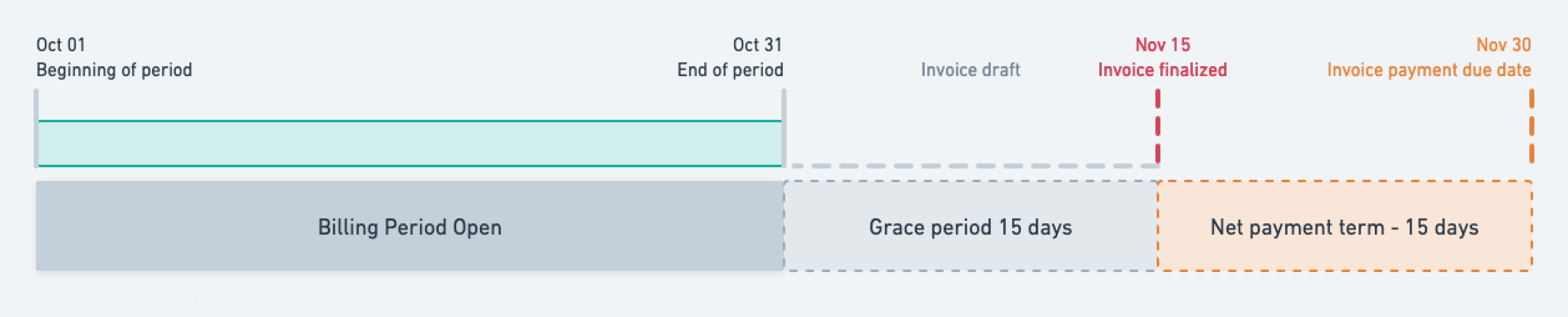
A net payment term refers to the specified number of days within which the end customer is required to settle the invoice after its finalization.
This term not only affects the `payment_due_date` within the invoice payload but also influences the due date mentioned in the downloadable PDF version of the invoice.
To illustrate, consider the following scenario:
a billing cycle spanning one month, accompanied by a net payment term of 15 days.
 ## Application scope[](#application-scope "Direct link to heading")
The net payment term period applies to all types of invoices, and is used to compute the payment due date.
When the `payment_due_date` has passed, the invoice is flagged as overdue (`payment_overdue` = `true`), and Lago emits an `invoice.payment_overdue`
[webhook message](/api-reference/webhooks/messages).
The invoice stays flagged as overdue until the payment is `succeeded`, or `payment_dispute_lost_at` is applied, or the invoice is voided.
## Define a net payment term at entity level[](#define-a-net-payment-term-at-entity-level "Direct link to heading")
The entity's net payment term applies to all customers linked to this object by default.
To define a net payment term at the entity level via the user interface, follow these steps:
1. Access the **Settings** section using the side menu;
2. Navigate to the **Billing entity** > **Invoicing settings** section;
3. Click **Edit** in the **Net payment term** section;
4. Select the desired number of days for the payment term or opt for a custom duration; and
5. Confirm by clicking **"Edit net payment term"**.
You can also modify the entity’s net payment term at any time through the API
```bash Add a net payment term on the billing entity theme={"dark"}
LAGO_URL="https://api.getlago.com"
API_KEY="__YOUR_API_KEY__"
curl --location --request PUT "$LAGO_URL/api/v1/billing_entities/{code}" \
--header "Authorization: Bearer $API_KEY" \
--header 'Content-Type: application/json' \
--data-raw '{
"billing_entity": {
"net_payment_term": 15
}
}'
```
## Define a net payment term at customer level[](#define-a-net-payment-term-at-customer-level "Direct link to heading")
To define a net payment term at the customer level through the user interface, follow these steps:
1. Access the **"Customers"** section via the side menu;
2. Select a customer from the list;
3. Open the **"Settings"** tab of the customer view;
4. Click **"Add a net payment term"** in the **"Net payment term"** section;
5. Choose the desired number of days for the payment term or opt for a custom duration; and
6. Click **"Add net payment term"** to confirm.
You can also modify the customer's net payment term at any time through [the API](/api-reference/customers/update).
Define a net payment term in days by using the `net_payment_term argument` within the `customer` object.
```bash Add a net payment term on a customer theme={"dark"}
LAGO_URL="https://api.getlago.com"
API_KEY="__YOUR_API_KEY__"
curl --location --request PUT "$LAGO_URL/api/v1/customers" \
--header "Authorization: Bearer $API_KEY" \
--header 'Content-Type: application/json' \
--data-raw '{
"customer": {
"external_id": "5eb02857-a71e-4ea2-bcf9-57d3a41bc6ba",
"net_payment_term": 15
}
}'
```
The customer's net payment term supersedes the one defined at the entity level.
It exclusively applies to the associated customer.
## Application scope[](#application-scope "Direct link to heading")
The net payment term period applies to all types of invoices, and is used to compute the payment due date.
When the `payment_due_date` has passed, the invoice is flagged as overdue (`payment_overdue` = `true`), and Lago emits an `invoice.payment_overdue`
[webhook message](/api-reference/webhooks/messages).
The invoice stays flagged as overdue until the payment is `succeeded`, or `payment_dispute_lost_at` is applied, or the invoice is voided.
## Define a net payment term at entity level[](#define-a-net-payment-term-at-entity-level "Direct link to heading")
The entity's net payment term applies to all customers linked to this object by default.
To define a net payment term at the entity level via the user interface, follow these steps:
1. Access the **Settings** section using the side menu;
2. Navigate to the **Billing entity** > **Invoicing settings** section;
3. Click **Edit** in the **Net payment term** section;
4. Select the desired number of days for the payment term or opt for a custom duration; and
5. Confirm by clicking **"Edit net payment term"**.
You can also modify the entity’s net payment term at any time through the API
```bash Add a net payment term on the billing entity theme={"dark"}
LAGO_URL="https://api.getlago.com"
API_KEY="__YOUR_API_KEY__"
curl --location --request PUT "$LAGO_URL/api/v1/billing_entities/{code}" \
--header "Authorization: Bearer $API_KEY" \
--header 'Content-Type: application/json' \
--data-raw '{
"billing_entity": {
"net_payment_term": 15
}
}'
```
## Define a net payment term at customer level[](#define-a-net-payment-term-at-customer-level "Direct link to heading")
To define a net payment term at the customer level through the user interface, follow these steps:
1. Access the **"Customers"** section via the side menu;
2. Select a customer from the list;
3. Open the **"Settings"** tab of the customer view;
4. Click **"Add a net payment term"** in the **"Net payment term"** section;
5. Choose the desired number of days for the payment term or opt for a custom duration; and
6. Click **"Add net payment term"** to confirm.
You can also modify the customer's net payment term at any time through [the API](/api-reference/customers/update).
Define a net payment term in days by using the `net_payment_term argument` within the `customer` object.
```bash Add a net payment term on a customer theme={"dark"}
LAGO_URL="https://api.getlago.com"
API_KEY="__YOUR_API_KEY__"
curl --location --request PUT "$LAGO_URL/api/v1/customers" \
--header "Authorization: Bearer $API_KEY" \
--header 'Content-Type: application/json' \
--data-raw '{
"customer": {
"external_id": "5eb02857-a71e-4ea2-bcf9-57d3a41bc6ba",
"net_payment_term": 15
}
}'
```
The customer's net payment term supersedes the one defined at the entity level.
It exclusively applies to the associated customer.