> ## Documentation Index
> Fetch the complete documentation index at: https://docs.getlago.com/llms.txt
> Use this file to discover all available pages before exploring further.
# Void invoices
From an accounting standpoint, voiding an invoice serves the same functional purpose as canceling or deleting it, but it is legally accepted and properly documented.
Voiding preserves a paper trail, enabling you to locate the invoice by its number. Voided invoices are considered as having zero value for reporting and are not payable.
Importantly, this status is final, meaning the invoice's status remains unalterable.
Once you void an invoice, it remains accessible through the UI views and shows a status `voided` indicating it has been voided.
To void an invoice using the user interface:
1. Go to the **"Invoices"** list;
2. Click the **ellipsis icon** on the right, on the line corresponding to the invoice;
3. Select **"Void invoice"**; and
4. Confirm to void the invoice.
```bash Void an existing invoice theme={"dark"}
LAGO_URL="https://api.getlago.com"
API_KEY="__YOUR_API_KEY__"
INVOICE_ID="__YOUR_INVOICE_ID__"
curl --location --request POST "$LAGO_URL/api/v1/invoices/$INVOICE_ID/void" \
--header "Authorization: Bearer $API_KEY"
```
## Restrictions on voiding invoices
Here is the list of restrictions on voiding invoices:
* The invoice is in `draft` status, as it hasn't been finalized yet; or
* The invoice has already been voided.
## Refund options when voiding an invoice
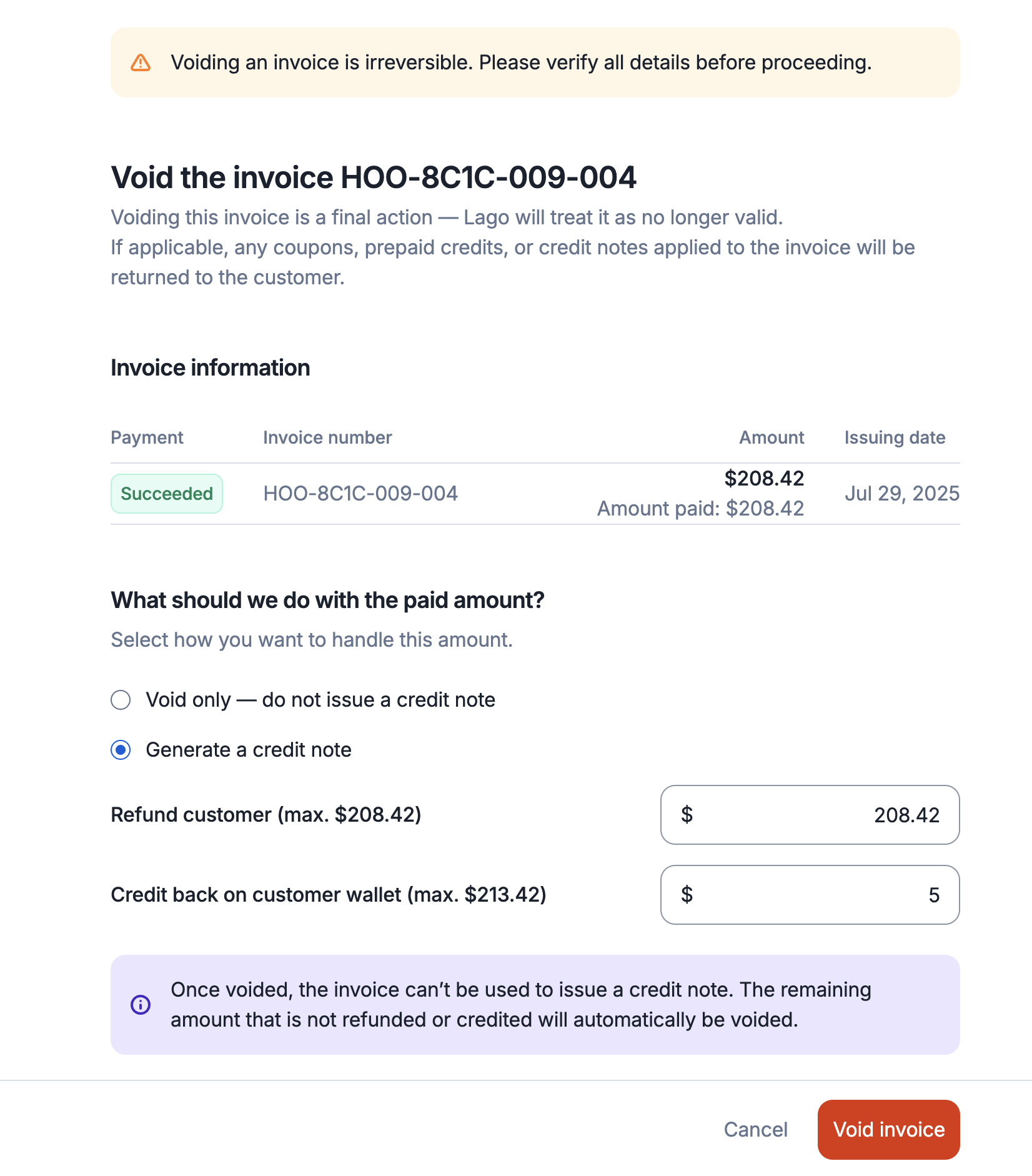
When you void an invoice, you can choose how to handle the associated refund, depending on your preference and the invoice's payment status:
### 1. Void without credit note (default)
* The invoice is marked as voided;
* Only prepaid credits used to pay the invoice will be refunded to the customer's balance (as they have been prepaid); and
* No credit note is issued for this voided invoice.
### 2. Void and generate a credit note
* The invoice is marked as voided;
* A credit note is created for the voided invoice;
* If the invoice was already paid, you can optionally refund the original payment method using the credit note; and
* Alternatively, the credit note can be retained on the customer's credit note account and used toward future invoices.
 ```bash Refund options when voiding an invoice theme={"dark"}
curl --request POST \
--url https://api.getlago.com/api/v1/invoices/{lago_id}/void \
--header 'Authorization: Bearer ' \
--header 'Content-Type: application/json' \
--data '{
"generate_credit_note": true,
"refund_amount": 2000,
"credit_amount": 1150
}'
```
## Regenerate a voided invoice
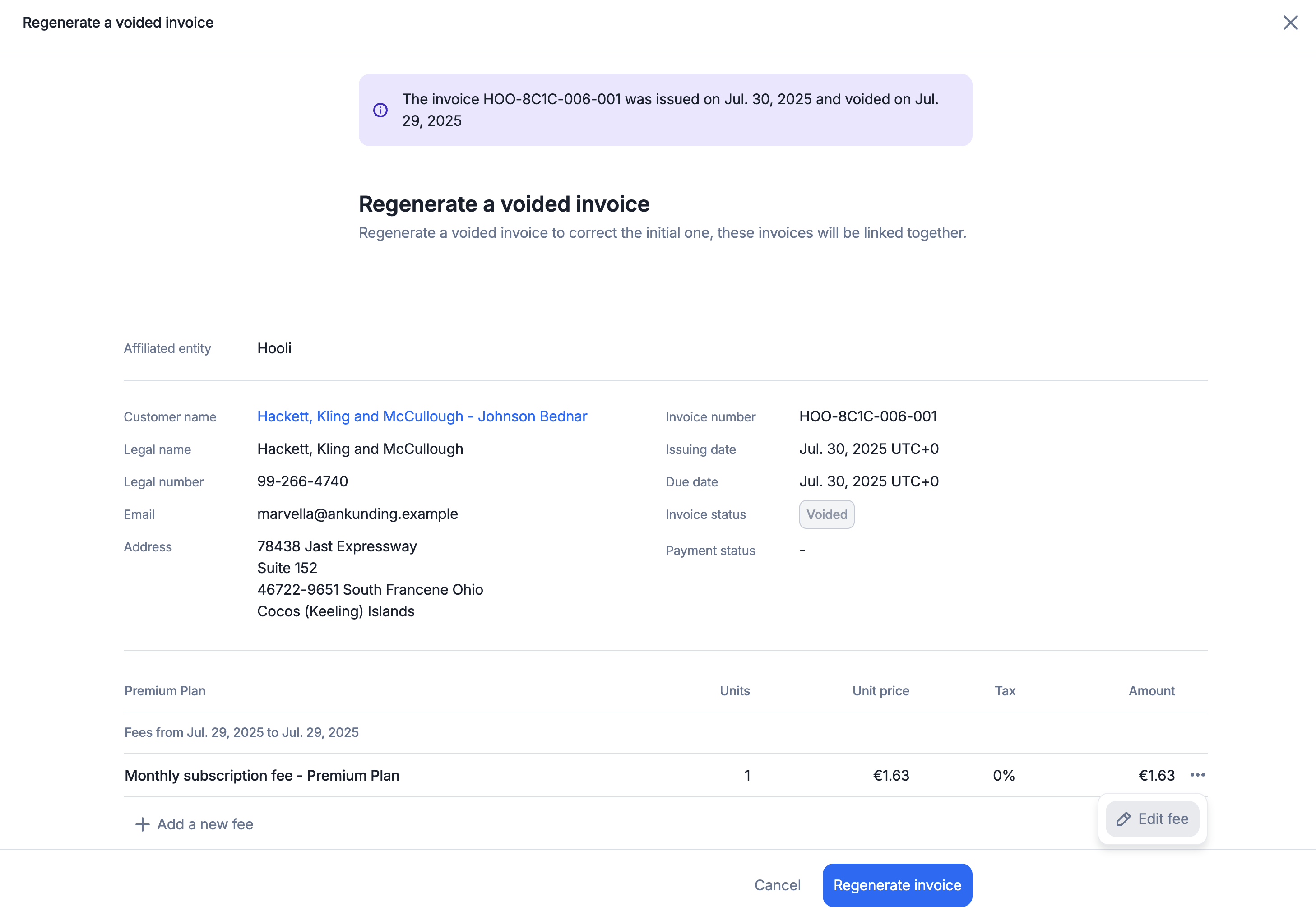
When accessing a voided invoice, you can choose to regenerate it directly from the UI. This is a **UI-only feature** designed to simplify invoice recreation.
The original line items and fees from the voided invoice will be pre-filled to help you quickly generate a new invoice.
You can modify the pre-filled values as needed:
1. Change the number of units;
2. Change the amount; and
3. Add new fee line items.
The regenerated invoice will be **linked to the original voided invoice** for traceability and accounting purposes. Note that you cannot change the service period of the regenerated invoice.
Please note the following:
* Voided prepaid credit invoices can only be regenerated by initiating a new wallet transaction. This is why you are redirected to the wallet transaction flow;
* Voided one-off invoices must be recreated by generating a new one-off invoice. Accordingly, you are redirected to the one-off invoice creation flow; and
* Voided subscription and usage invoices are regenerated through a dedicated invoice regeneration view, where you can add or edit the fees from the original invoice.
Prepaid credits, coupons, or credit note balances available at the customer level may be applied to the regenerated invoice, so ensure the final amount matches the expected total after taxes and discounts.
```bash Refund options when voiding an invoice theme={"dark"}
curl --request POST \
--url https://api.getlago.com/api/v1/invoices/{lago_id}/void \
--header 'Authorization: Bearer ' \
--header 'Content-Type: application/json' \
--data '{
"generate_credit_note": true,
"refund_amount": 2000,
"credit_amount": 1150
}'
```
## Regenerate a voided invoice
When accessing a voided invoice, you can choose to regenerate it directly from the UI. This is a **UI-only feature** designed to simplify invoice recreation.
The original line items and fees from the voided invoice will be pre-filled to help you quickly generate a new invoice.
You can modify the pre-filled values as needed:
1. Change the number of units;
2. Change the amount; and
3. Add new fee line items.
The regenerated invoice will be **linked to the original voided invoice** for traceability and accounting purposes. Note that you cannot change the service period of the regenerated invoice.
Please note the following:
* Voided prepaid credit invoices can only be regenerated by initiating a new wallet transaction. This is why you are redirected to the wallet transaction flow;
* Voided one-off invoices must be recreated by generating a new one-off invoice. Accordingly, you are redirected to the one-off invoice creation flow; and
* Voided subscription and usage invoices are regenerated through a dedicated invoice regeneration view, where you can add or edit the fees from the original invoice.
Prepaid credits, coupons, or credit note balances available at the customer level may be applied to the regenerated invoice, so ensure the final amount matches the expected total after taxes and discounts.