> ## Documentation Index
> Fetch the complete documentation index at: https://docs.getlago.com/llms.txt
> Use this file to discover all available pages before exploring further.
# Issue one-off invoices
> One-off invoices allow you to bill immediately one or several add-ons to a customer. This guide will show you how to create a one-off invoice for a specific customer using the add-ons.
## Create a one-off invoice
To create a one-off invoice for a specific customer:
1. Select the customer from the list of customers; and
2. Click the **"Actions"** button located in the upper-right corner and select **"Create one-off invoice"**.
## Adding add-ons to one-off invoices
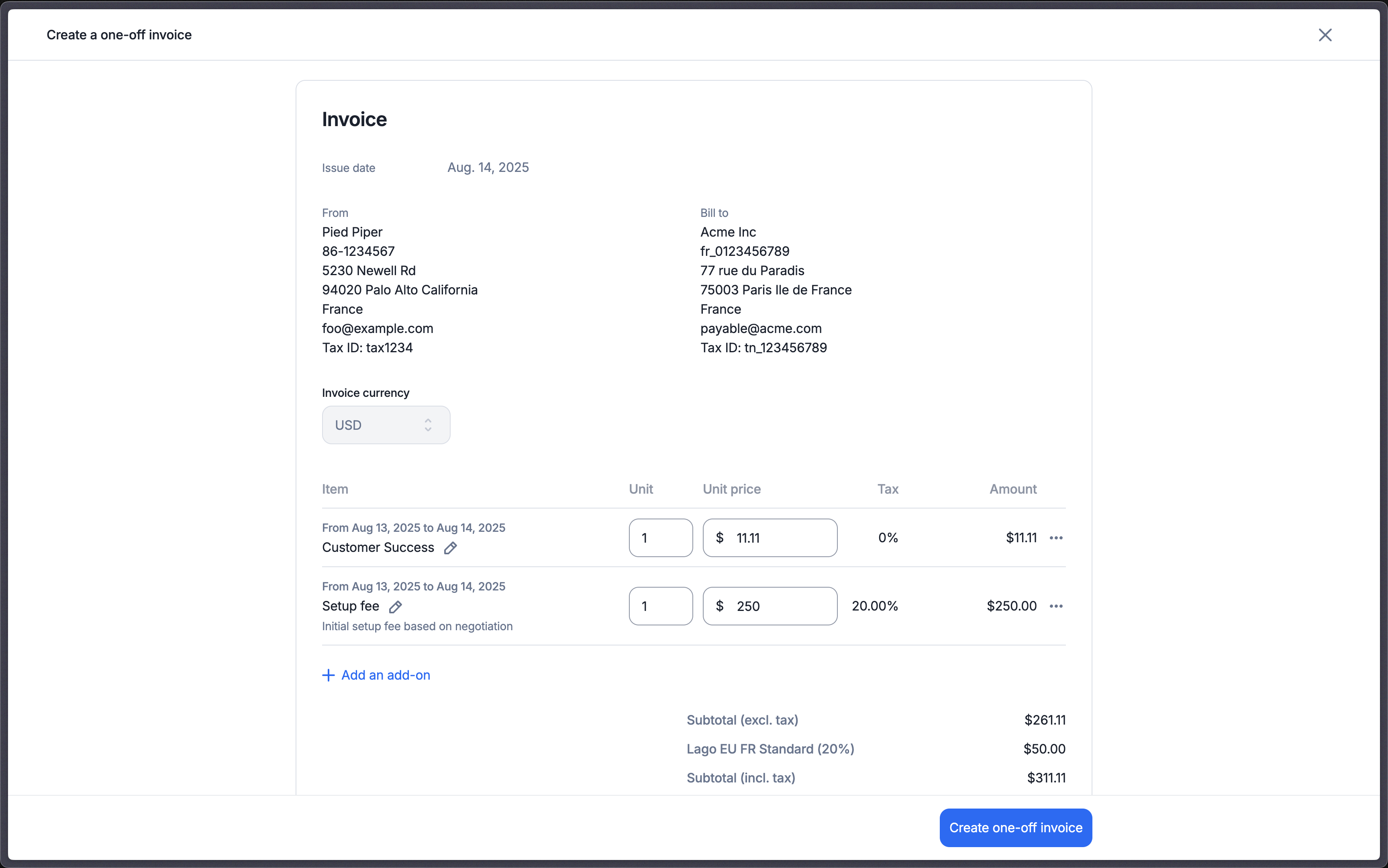
Now that you have started the flow to create a one-off invoice, it's time to add one or several add-ons to it:
1. Define a purchase order number, if needed
2. Click **"Add an add-on"** to add a line item to the invoice
3. Set the number of units for the add-on
4. Define the add-on billing period — it can be in the past, present, or future
5. Edit the unit price, if needed — you can set it to 0
6. Edit the description displayed on the invoice
7. Click **"Create"** to issue the one-off invoice
 ```bash Assign add-ons to create a one-off invoice theme={"dark"}
LAGO_URL="https://api.getlago.com"
API_KEY="__YOUR_API_KEY__"
curl --location --request POST "$LAGO_URL/api/v1/invoices" \
--header "Authorization: Bearer $API_KEY" \
--header 'Content-Type: application/json' \
--data-raw '{
"invoice": {
"external_customer_id": "hooli_1234",
"currency": "USD",
"purchase_order_number": "po-1234",
"fees": [
{
"add_on_code": "setup_fee",
"units": 1,
"unit_amount_cents": 50000,
"description": "Implementation fee with a solution engineer",
"from_datetime": "2025-01-01T00:00:00Z",
"to_datetime": "2025-12-31T23:59:59Z"
},
{
"add_on_code": "customer_success",
"units": 2,
"unit_amount_cents": 100000,
"description": "One off customer success fee",
"from_datetime": "2025-01-01T00:00:00Z",
"to_datetime": "2025-12-31T23:59:59Z"
}
]
}
}'
```
## Application scope of one-off invoices
Here are a few things to keep in mind about one-off invoices:
* One-off invoices are issued immediately and can include the same add-on multiple times.
* The currency and billing entity of the one-off invoice can differ from the customer's defaults: the invoice is issued in the currency and by the billing entity you select for it.
* You can use the same add-on to create one-off invoices for multiple customers whose subscriptions don't have the same currency or to apply a different amount for one of these customers.
* Coupons or prepaid credits (discounts) **do not apply** to one-off invoices.
* One-off invoices are subject to taxes, as defined in the customer view.
Note that when using the API endpoint, if the amount and currency are null, Lago will apply the default amount and currency defined in the UI.
## Invoicing
As mentioned previously, a **one-off invoice is invoiced straight away**. You are able to find one-off invoices via a webhook message called `invoice.one_off_created`.
```bash Assign add-ons to create a one-off invoice theme={"dark"}
LAGO_URL="https://api.getlago.com"
API_KEY="__YOUR_API_KEY__"
curl --location --request POST "$LAGO_URL/api/v1/invoices" \
--header "Authorization: Bearer $API_KEY" \
--header 'Content-Type: application/json' \
--data-raw '{
"invoice": {
"external_customer_id": "hooli_1234",
"currency": "USD",
"purchase_order_number": "po-1234",
"fees": [
{
"add_on_code": "setup_fee",
"units": 1,
"unit_amount_cents": 50000,
"description": "Implementation fee with a solution engineer",
"from_datetime": "2025-01-01T00:00:00Z",
"to_datetime": "2025-12-31T23:59:59Z"
},
{
"add_on_code": "customer_success",
"units": 2,
"unit_amount_cents": 100000,
"description": "One off customer success fee",
"from_datetime": "2025-01-01T00:00:00Z",
"to_datetime": "2025-12-31T23:59:59Z"
}
]
}
}'
```
## Application scope of one-off invoices
Here are a few things to keep in mind about one-off invoices:
* One-off invoices are issued immediately and can include the same add-on multiple times.
* The currency and billing entity of the one-off invoice can differ from the customer's defaults: the invoice is issued in the currency and by the billing entity you select for it.
* You can use the same add-on to create one-off invoices for multiple customers whose subscriptions don't have the same currency or to apply a different amount for one of these customers.
* Coupons or prepaid credits (discounts) **do not apply** to one-off invoices.
* One-off invoices are subject to taxes, as defined in the customer view.
Note that when using the API endpoint, if the amount and currency are null, Lago will apply the default amount and currency defined in the UI.
## Invoicing
As mentioned previously, a **one-off invoice is invoiced straight away**. You are able to find one-off invoices via a webhook message called `invoice.one_off_created`.