> ## Documentation Index
> Fetch the complete documentation index at: https://docs.getlago.com/llms.txt
> Use this file to discover all available pages before exploring further.
# Payment retries
## Retry an invoice payment
Whether you use one of our native integrations or rely on our [webhooks](/api-reference/webhooks/messages) to collect payments, you have the ability to manually resend payments for collection when needed.
To re-trigger the payment process through the user interface:
1. Access the **"Invoices"** section via the side menu;
2. Open the **"Outstanding"** tab;
3. Find the invoice for which you would like to collect payment;
4. Click the **ellipsis icon** on the right; and
5. Select **"Resend for collection"**.
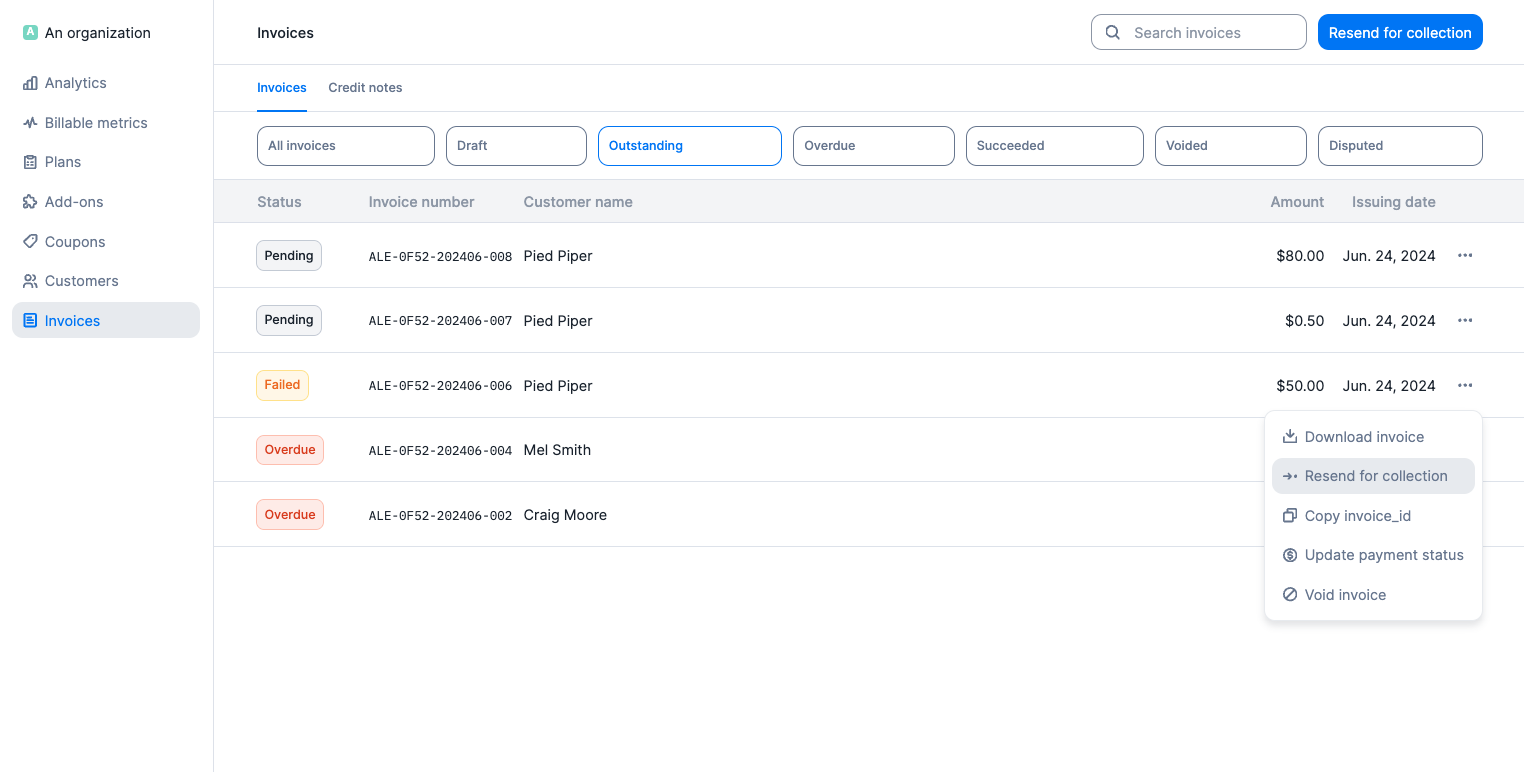 In the **"Outstanding"** and **"Overdue"** tabs of the **"Invoices"** section, you can also click **"Resend for collection"** in the upper right corner to re-trigger the payment process for all invoices in the respective lists.
Invoices that are overdue are available both on the **"Outstanding"** and the **"Overdue"** tabs. Make sure you resend for collection from the **"Overdue"** tab if you wish to collect payment for past due invoices only.
When you resend a payment for collection, Lago automatically attempts to process the payment.
* If the payment **succeeds**, an `invoice.payment_status_updated` webhook is sent.
* If the payment **fails**, an `invoice.payment_failure` webhook is sent.
* If the customer **doesn’t have a payment method** available for Lago to retry, an `invoice.payment_failure` webhook is also sent.
It is also possible to trigger payment retries via the API ([learn more](/api-reference/invoices/retry)).
## Generate a payment url
If you’re using a payment provider integration, you can generate a payment URL [for unpaid invoices](/api-reference/invoices/payment-url) or [unpaid wallet transactions](/api-reference/wallets/wallet-transaction-payment-url) to share with the end customer. This URL initiates a checkout flow where the customer can pay the invoice or wallet transaction by providing a payment method.
To prevent duplicate payments, the generated URL is idempotent. It remains valid and unchanged for 24 hours, regardless of how many times the endpoint is called. After this period, a new URL will be issued upon the next call to the endpoint, valid for the following 24 hours.
In the **"Outstanding"** and **"Overdue"** tabs of the **"Invoices"** section, you can also click **"Resend for collection"** in the upper right corner to re-trigger the payment process for all invoices in the respective lists.
Invoices that are overdue are available both on the **"Outstanding"** and the **"Overdue"** tabs. Make sure you resend for collection from the **"Overdue"** tab if you wish to collect payment for past due invoices only.
When you resend a payment for collection, Lago automatically attempts to process the payment.
* If the payment **succeeds**, an `invoice.payment_status_updated` webhook is sent.
* If the payment **fails**, an `invoice.payment_failure` webhook is sent.
* If the customer **doesn’t have a payment method** available for Lago to retry, an `invoice.payment_failure` webhook is also sent.
It is also possible to trigger payment retries via the API ([learn more](/api-reference/invoices/retry)).
## Generate a payment url
If you’re using a payment provider integration, you can generate a payment URL [for unpaid invoices](/api-reference/invoices/payment-url) or [unpaid wallet transactions](/api-reference/wallets/wallet-transaction-payment-url) to share with the end customer. This URL initiates a checkout flow where the customer can pay the invoice or wallet transaction by providing a payment method.
To prevent duplicate payments, the generated URL is idempotent. It remains valid and unchanged for 24 hours, regardless of how many times the endpoint is called. After this period, a new URL will be issued upon the next call to the endpoint, valid for the following 24 hours.