> ## Documentation Index
> Fetch the complete documentation index at: https://docs.getlago.com/llms.txt
> Use this file to discover all available pages before exploring further.
# Charges with filters
> Charge your customers by leveraging a combination of filters specified in the billable metric.
## Define a price for a combination of filters[](#define-price-for-filters "Direct link to heading")
When a billable metric has defined filters, establish a set of filters to refine an event and assign a price to this combination.
1. Add a charge to a plan (this charge should be associated with a billable metric containing filters);
2. Add a new filter;
3. Choose a combination of filters, either specifying a key and its value or simply the key itself (covering all values);
4. Set a price for this combination of filters; and
5. Optionally, provide an Invoice display name.
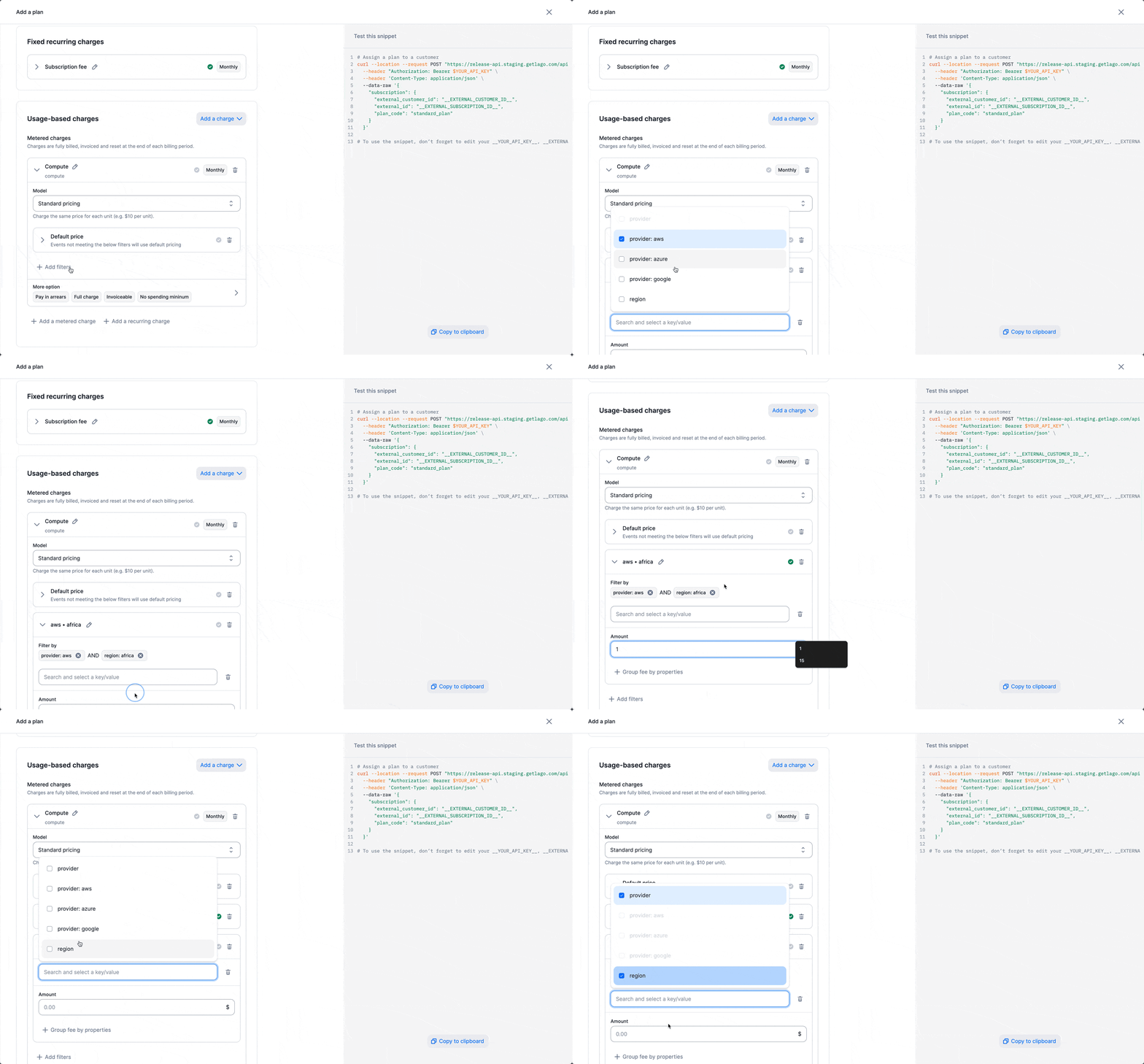 Here is an example of a plan you can create:
```bash Charge with filters {22-43} theme={"dark"}
LAGO_URL="https://api.getlago.com"
API_KEY="__YOUR_API_KEY__"
curl --location --request POST "$LAGO_URL/api/v1/subscriptions" \
--header "Authorization: Bearer $API_KEY" \
--header 'Content-Type: application/json' \
--data-raw '{
"name": "Standard plan",
"code": "standard_plan",
"interval": "monthly",
"pay_in_advance": false,
"amount_cents": 1000,
"amount_currency": "USD",
"charges": [
{
"billable_metric_id": "5d387072-e1f2-416f-b981-135c2f177069",
"invoice_display_name": null,
"charge_model": "standard",
"properties": {
"amount": "2"
},
"filters": [
{
"values": {
"region": ["africa"],
"provider": ["aws"]
},
"invoice_display_name": "Africa & AWS",
"properties": {
"amount": "1"
}
},
{
"values": {
"region": ["__ALL_FILTER_VALUES__"],
"provider": ["__ALL_FILTER_VALUES__"]
},
"invoice_display_name": "Other regions and providers",
"properties": {
"amount": "0.5"
}
}
]
}
]
}'
```
## Define a default price[](#define-default-price "Direct link to heading")
When a billable metric has filters defined, set a default price on the charge level to cover all the other combination of filters not defined in the charge.
1. Add a charge to a plan (this charge should be associated with a billable metric containing filters);
2. Add a default price;
3. Set a price for this default price
Here is an example of a plan you can create:
```bash Charge with filters {22-43} theme={"dark"}
LAGO_URL="https://api.getlago.com"
API_KEY="__YOUR_API_KEY__"
curl --location --request POST "$LAGO_URL/api/v1/subscriptions" \
--header "Authorization: Bearer $API_KEY" \
--header 'Content-Type: application/json' \
--data-raw '{
"name": "Standard plan",
"code": "standard_plan",
"interval": "monthly",
"pay_in_advance": false,
"amount_cents": 1000,
"amount_currency": "USD",
"charges": [
{
"billable_metric_id": "5d387072-e1f2-416f-b981-135c2f177069",
"invoice_display_name": null,
"charge_model": "standard",
"properties": {
"amount": "2"
},
"filters": [
{
"values": {
"region": ["africa"],
"provider": ["aws"]
},
"invoice_display_name": "Africa & AWS",
"properties": {
"amount": "1"
}
},
{
"values": {
"region": ["__ALL_FILTER_VALUES__"],
"provider": ["__ALL_FILTER_VALUES__"]
},
"invoice_display_name": "Other regions and providers",
"properties": {
"amount": "0.5"
}
}
]
}
]
}'
```
## Define a default price[](#define-default-price "Direct link to heading")
When a billable metric has filters defined, set a default price on the charge level to cover all the other combination of filters not defined in the charge.
1. Add a charge to a plan (this charge should be associated with a billable metric containing filters);
2. Add a default price;
3. Set a price for this default price
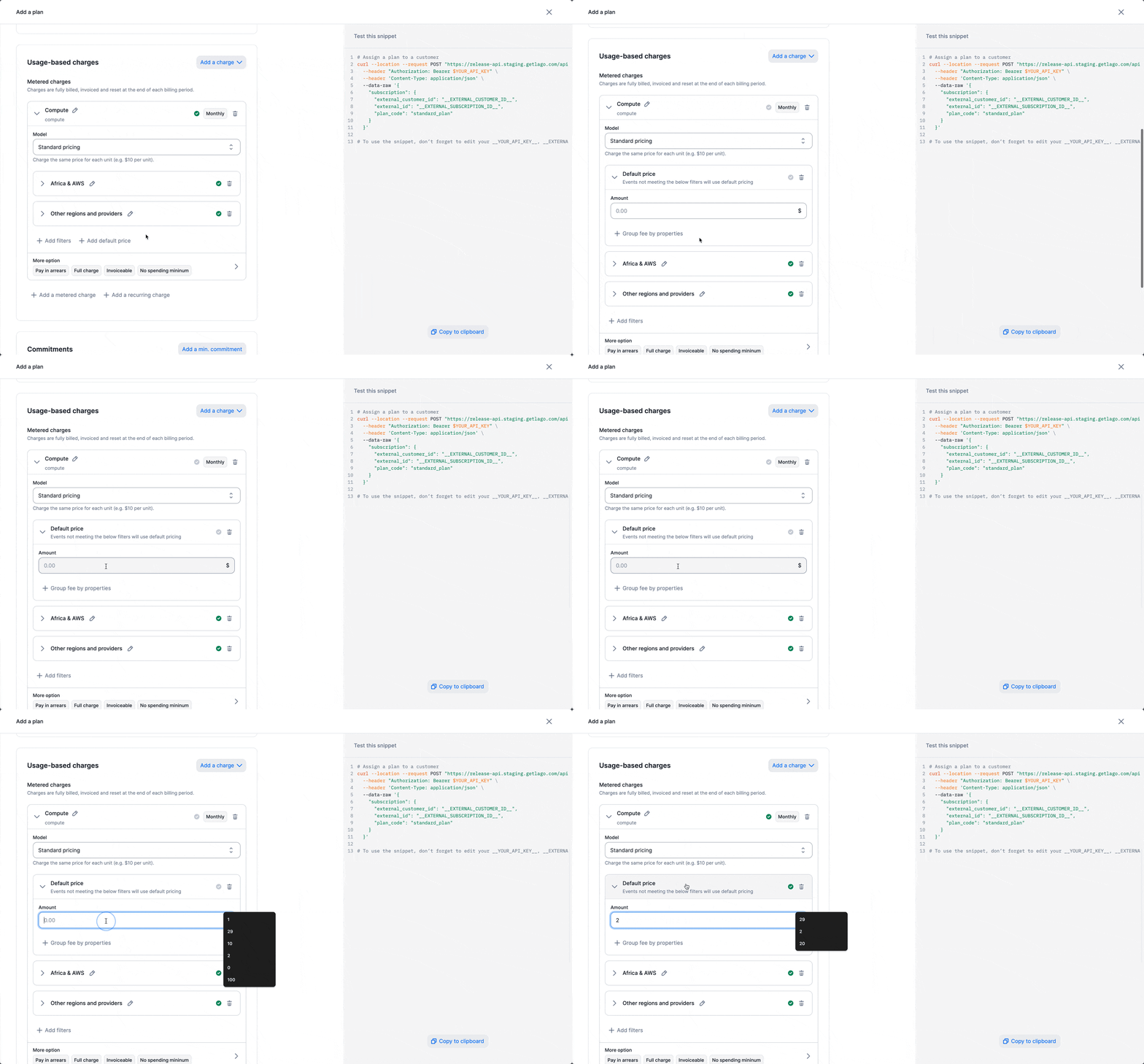 Here is an example of a plan you can create:
```bash Storage theme={"dark"}
LAGO_URL="https://api.getlago.com"
API_KEY="__YOUR_API_KEY__"
curl --location --request POST "$LAGO_URL/api/v1/subscriptions" \
--header "Authorization: Bearer $API_KEY" \
--header 'Content-Type: application/json' \
--data-raw '{
"name": "Standard plan",
"code": "standard_plan",
"interval": "monthly",
"pay_in_advance": false,
"amount_cents": 1000,
"amount_currency": "USD",
"charges": [
{
"billable_metric_id": "5d387072-e1f2-416f-b981-135c2f177069",
"invoice_display_name": null,
"charge_model": "standard",
"properties": {
"amount": "2"
}
}
]
}'
```
Here is an example of a plan you can create:
```bash Storage theme={"dark"}
LAGO_URL="https://api.getlago.com"
API_KEY="__YOUR_API_KEY__"
curl --location --request POST "$LAGO_URL/api/v1/subscriptions" \
--header "Authorization: Bearer $API_KEY" \
--header 'Content-Type: application/json' \
--data-raw '{
"name": "Standard plan",
"code": "standard_plan",
"interval": "monthly",
"pay_in_advance": false,
"amount_cents": 1000,
"amount_currency": "USD",
"charges": [
{
"billable_metric_id": "5d387072-e1f2-416f-b981-135c2f177069",
"invoice_display_name": null,
"charge_model": "standard",
"properties": {
"amount": "2"
}
}
]
}'
```
If the default price is not set, Lago will automatically define it as 0 based on the charge model.
## Editing filter pricing mid-period[](#editing-filter-pricing-mid-period "Direct link to heading")
When you update a charge's filter configuration or pricing, for example by adding new filter
combinations, changing per-filter rates, or removing the default price, Lago applies the
updated pricing rules to **all usage in the current open billing period**. Fees are not
locked at event ingestion time. They are evaluated against the active charge configuration
at the time of calculation.
This means that events received earlier in the period are repriced under the new
configuration, not the one that was active when they were ingested.
Once an invoice is finalized, amounts are permanently locked. Charge configuration
changes only affect the current open billing period. To preserve existing pricing
on already-received usage, finalize the invoice before updating the charge.