> ## Documentation Index
> Fetch the complete documentation index at: https://docs.getlago.com/llms.txt
> Use this file to discover all available pages before exploring further.
# Revenue share
> Model your revenue-sharing structure within Lago.
**PREMIUM ADD-ON** ✨
This revenue-share feature is available upon request only. Please **[contact us](mailto:hello@getlago.com)** to get access to this premium feature.
If you’re selling your product or service through a partner, model this revenue-share in Lago.
Mark your customer as a partner, and Lago will generate all invoices as self-billed invoices.
Self-billing is a billing arrangement where the customer creates and issues the invoice on behalf of the supplier for goods or services received.
That said, **please ensure** an agreement is in place with your partner to allow Lago to issue these invoices on their behalf.
## Create a partner
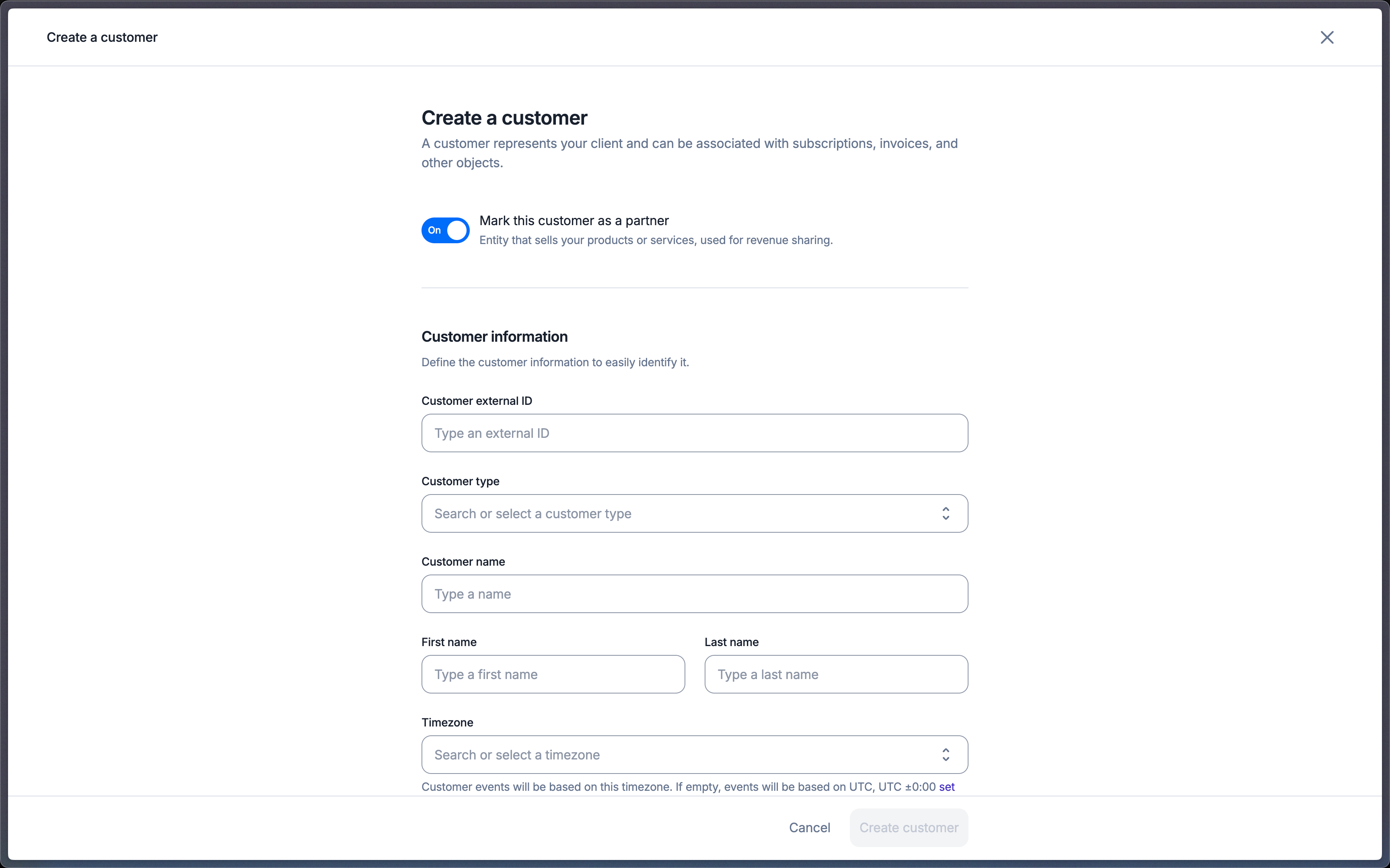
To generate self-billed invoices, create your first partner by following these steps:
1. Go to the **Customers** navigation tab.
2. Click on **Create a Customer**.
3. Enable the **Partner** option by toggling it on.
4. Fill in the customer’s billing information—this will be used to generate invoices.
 ```bash Create a customer theme={"dark"}
LAGO_URL="https://api.getlago.com"
API_KEY="__YOUR_API_KEY__"
curl --location --request POST "$LAGO_URL/api/v1/customers" \
--header "Authorization: Bearer $API_KEY" \
--header 'Content-Type: application/json' \
--data-raw '{
"customer": {
…
"account_type: "partner",
…
}
}'
```
## Generate invoices
To simplify your payment process, Lago will generate invoices on behalf of partners.
All invoices generated for a partner will be marked as **self-billed**. As a result, they won’t appear in revenue analytics in Lago.
The PDF invoice will explicitly mention **Self-billing Invoice** and will not be affected by the custom footer.
A specific notice will be displayed to indicate that the invoice was generated on behalf of the partner with their consent.
These invoices follow a specific numbering system tied to the customer.
Regardless of whether your organization’s invoice numbering is scoped per **organization** or **customer**, all partner invoices will adhere to the **partner invoice numbering**.
```bash Create a customer theme={"dark"}
LAGO_URL="https://api.getlago.com"
API_KEY="__YOUR_API_KEY__"
curl --location --request POST "$LAGO_URL/api/v1/customers" \
--header "Authorization: Bearer $API_KEY" \
--header 'Content-Type: application/json' \
--data-raw '{
"customer": {
…
"account_type: "partner",
…
}
}'
```
## Generate invoices
To simplify your payment process, Lago will generate invoices on behalf of partners.
All invoices generated for a partner will be marked as **self-billed**. As a result, they won’t appear in revenue analytics in Lago.
The PDF invoice will explicitly mention **Self-billing Invoice** and will not be affected by the custom footer.
A specific notice will be displayed to indicate that the invoice was generated on behalf of the partner with their consent.
These invoices follow a specific numbering system tied to the customer.
Regardless of whether your organization’s invoice numbering is scoped per **organization** or **customer**, all partner invoices will adhere to the **partner invoice numbering**.