> ## Documentation Index
> Fetch the complete documentation index at: https://docs.getlago.com/llms.txt
> Use this file to discover all available pages before exploring further.
# API Keys
## Reveal and copy API key
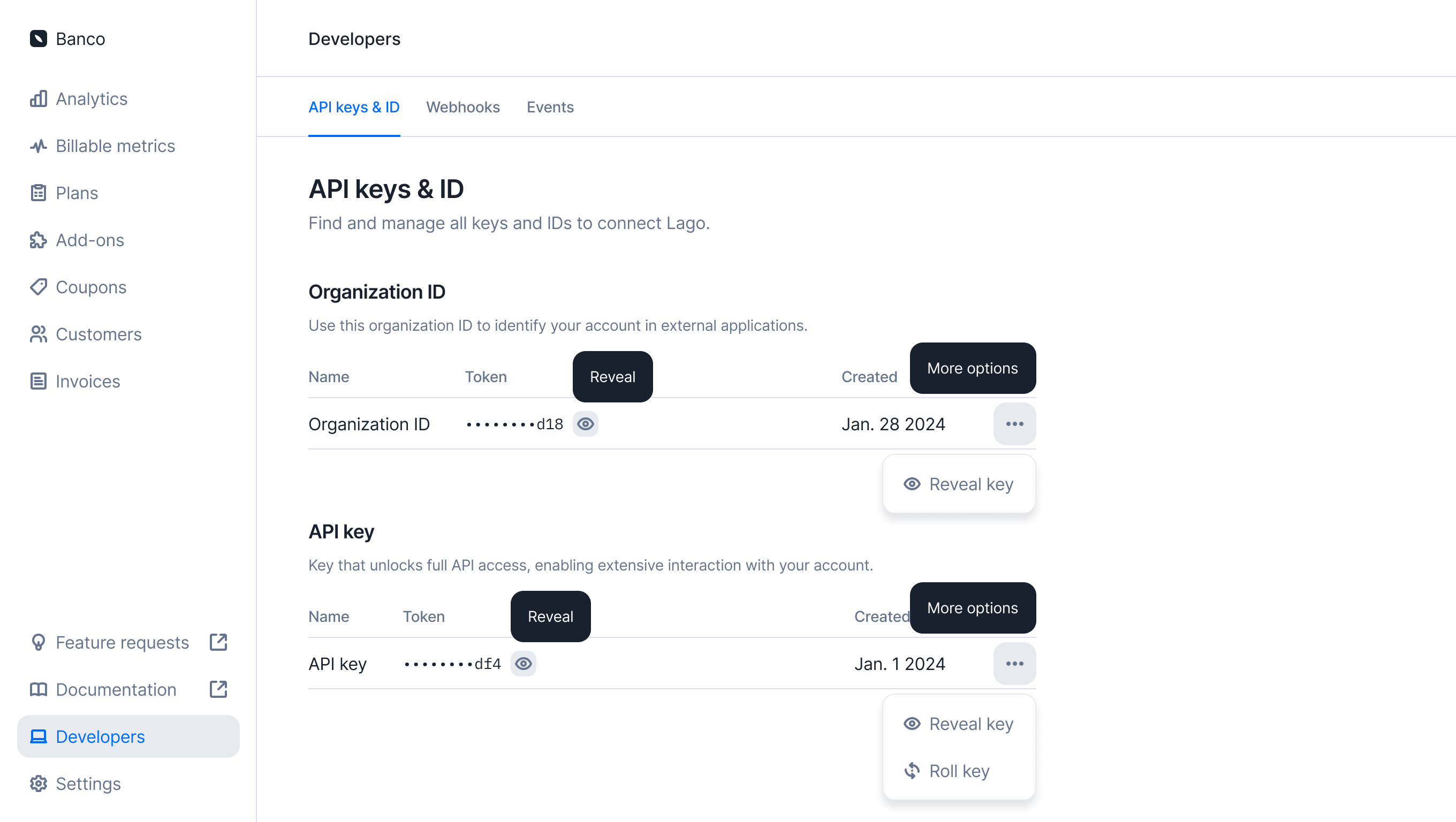
To copy your API key, go to the **Developers > API keys** section and click the Reveal button.
This will display the selected API key, allowing you to copy it to your clipboard.
 ## Create an API key
**PREMIUM FEATURE** ✨
This feature is only available to users with a premium license. Please
**[contact us](mailto:hello@getlago.com)** to get access to Lago Cloud and Lago
Self-Hosted Premium.
To create a new API key, navigate to the **Developers > API keys** section and click the Add a key button.
You will be prompted to provide an optional Name. While naming the key is not mandatory, it is highly recommended to make it easier to identify later. Once created, the API key will be ready for immediate use.
Whenever a new API key is created, all organization admins are notified via email. The key becomes active and usable instantly.
## Rotate an API key
### Rotate API key instantly
To rotate an API key, navigate to the **Developers > API keys** section and click the Rotate API key button. A new API key will be generated instantly, and the previous key will immediately become inactive and unusable.
Whenever an API key is rotated, all organization admins receive an email notification. The newly generated key becomes active and ready for use immediately.
### Schedule an API key rotation
**PREMIUM FEATURE** ✨
This feature is only available to users with a premium license. Please
**[contact us](mailto:hello@getlago.com)** to get access to Lago Cloud and Lago
Self-Hosted Premium.
With this feature, you can schedule an API key rotation for a future time. Options include rotating the key `now`, in `1 hour`, `24 hours`, `48 hours`, or `7 days`. By hovering over the current API key, you can view the scheduled rotation time.
Whenever an API key is rotated, all organization admins receive an email notification. The newly generated key becomes active and ready for use immediately, while the previous key remains available until the scheduled rotation time is reached.
## Set API key permissions
**PREMIUM FEATURE** ✨
This feature is only available to users with an enterprise add-on. Please
**[contact us](mailto:hello@getlago.com)** to get access to this feature.
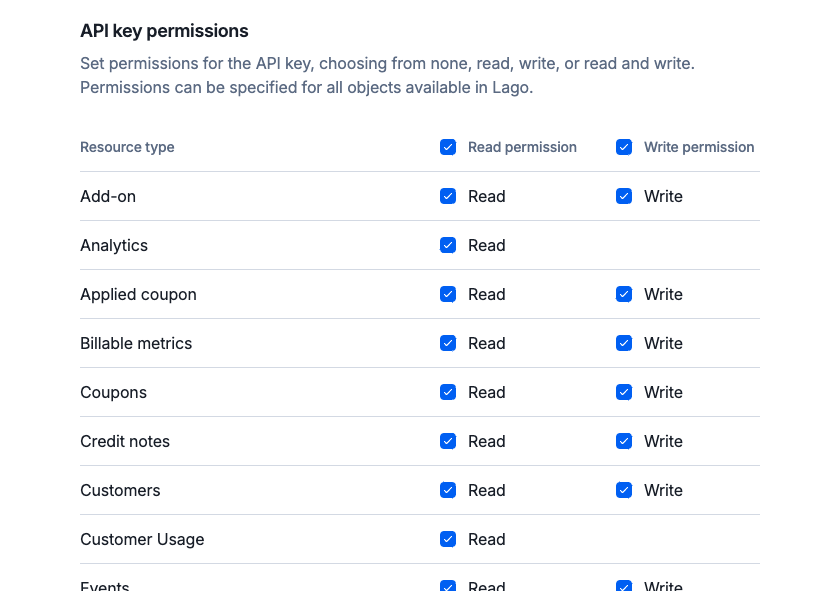
When creating or editing an API key, you can configure permissions for all objects exposed in the Lago API.
Permissions can be set individually for each object, allowing `read`, `write`, or `read and write` access.
If an API key lacks the necessary permissions to access a specific endpoint, the API will deny the request and return an appropriate error response.
## Create an API key
**PREMIUM FEATURE** ✨
This feature is only available to users with a premium license. Please
**[contact us](mailto:hello@getlago.com)** to get access to Lago Cloud and Lago
Self-Hosted Premium.
To create a new API key, navigate to the **Developers > API keys** section and click the Add a key button.
You will be prompted to provide an optional Name. While naming the key is not mandatory, it is highly recommended to make it easier to identify later. Once created, the API key will be ready for immediate use.
Whenever a new API key is created, all organization admins are notified via email. The key becomes active and usable instantly.
## Rotate an API key
### Rotate API key instantly
To rotate an API key, navigate to the **Developers > API keys** section and click the Rotate API key button. A new API key will be generated instantly, and the previous key will immediately become inactive and unusable.
Whenever an API key is rotated, all organization admins receive an email notification. The newly generated key becomes active and ready for use immediately.
### Schedule an API key rotation
**PREMIUM FEATURE** ✨
This feature is only available to users with a premium license. Please
**[contact us](mailto:hello@getlago.com)** to get access to Lago Cloud and Lago
Self-Hosted Premium.
With this feature, you can schedule an API key rotation for a future time. Options include rotating the key `now`, in `1 hour`, `24 hours`, `48 hours`, or `7 days`. By hovering over the current API key, you can view the scheduled rotation time.
Whenever an API key is rotated, all organization admins receive an email notification. The newly generated key becomes active and ready for use immediately, while the previous key remains available until the scheduled rotation time is reached.
## Set API key permissions
**PREMIUM FEATURE** ✨
This feature is only available to users with an enterprise add-on. Please
**[contact us](mailto:hello@getlago.com)** to get access to this feature.
When creating or editing an API key, you can configure permissions for all objects exposed in the Lago API.
Permissions can be set individually for each object, allowing `read`, `write`, or `read and write` access.
If an API key lacks the necessary permissions to access a specific endpoint, the API will deny the request and return an appropriate error response.
 ## Delete an API key
To delete an API key, navigate to the **Developers > API keys** section and click the delete button. The API key will be permanently deleted and immediately rendered unusable.
Please note that you can only delete an API key if your organization has more than one API key defined.
## API key "Last used" field
For security purposes, a Last used field displays the last time this API key was accessed. This serves as a helpful indicator to determine if the key is still actively in use.
For scalability reasons and to avoid adding complexity to a high-traffic endpoint, we have decided that the events endpoint will not update the `Last used` field.
## Delete an API key
To delete an API key, navigate to the **Developers > API keys** section and click the delete button. The API key will be permanently deleted and immediately rendered unusable.
Please note that you can only delete an API key if your organization has more than one API key defined.
## API key "Last used" field
For security purposes, a Last used field displays the last time this API key was accessed. This serves as a helpful indicator to determine if the key is still actively in use.
For scalability reasons and to avoid adding complexity to a high-traffic endpoint, we have decided that the events endpoint will not update the `Last used` field.