> ## Documentation Index
> Fetch the complete documentation index at: https://docs.getlago.com/llms.txt
> Use this file to discover all available pages before exploring further.
# Terminate a subscription
> You can terminate a subscription at any time, whether it's active or pending.
## Terminate an active subscription
Subscriptions in the `incomplete` state (held by an [activation rule](/guide/subscriptions/activation-rules)) can't be terminated manually. They cancel on their own if the rule fails or its timeout is reached.
To terminate an active subscription through the user interface:
1. Access the **"Customers"** section via the side menu;
2. Select a customer from the list;
3. In the **"Overview"** tab, select an active subscription; and
4. Click **"Terminate subscription"**.
```bash Terminate an active subscription theme={"dark"}
LAGO_URL="https://api.getlago.com"
API_KEY="__YOUR_API_KEY__"
EXTERNAL_ID="__YOUR_SUBSCRIPTION_ID__"
curl --location --request DELETE "$LAGO_URL/api/v1/subscriptions/$EXTERNAL_ID" \
--header "Authorization: Bearer $API_KEY"
```
### Generate a closing invoice at subscription termination
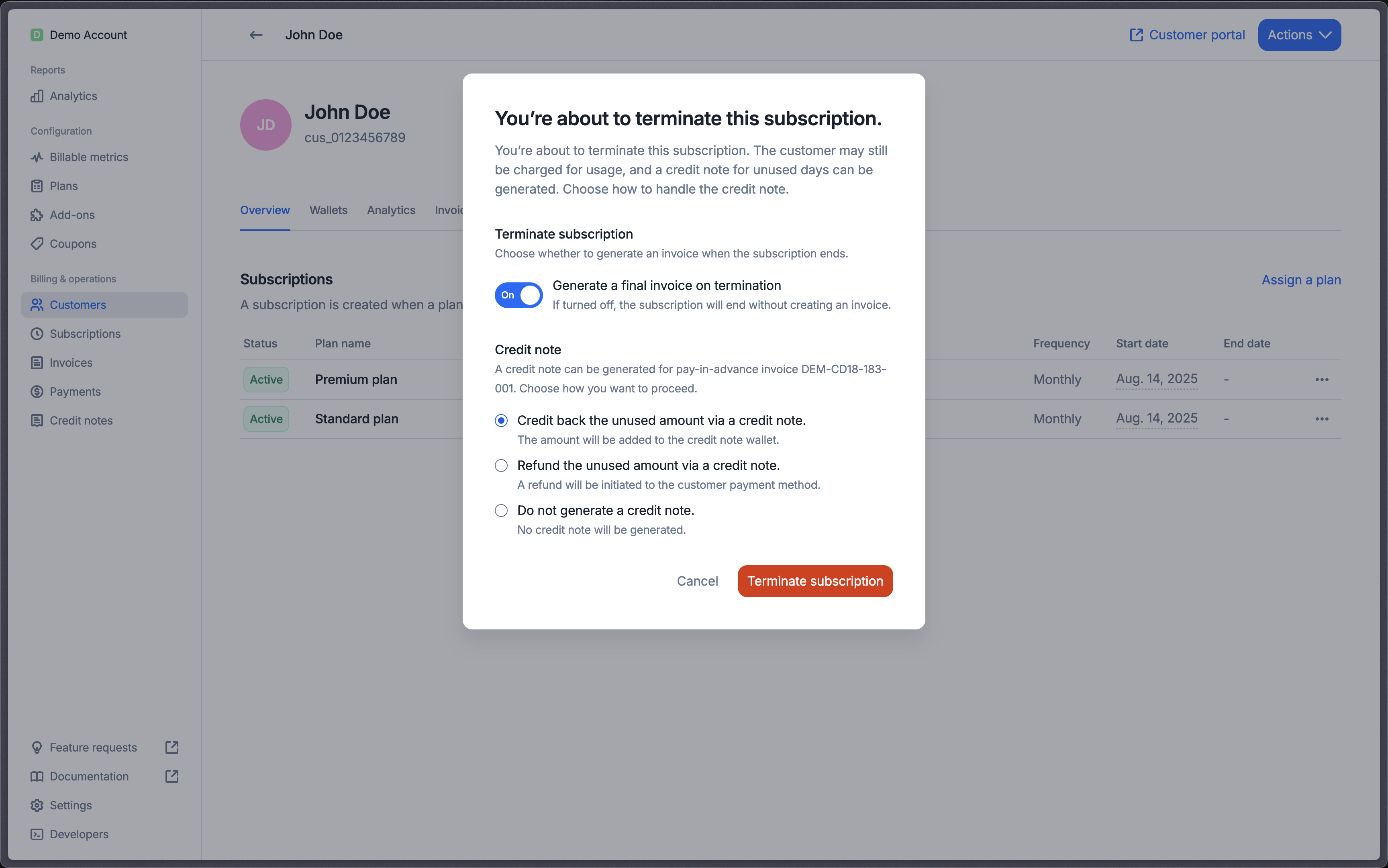
By default, Lago automatically generates a closing invoice for any **outstanding usage-based charges** or **pay-in-arrears subscription fees** that haven’t yet been invoiced.
If you don’t want to generate an invoice at termination:
In the Termination dialog, simply switch off the **Generate final invoice** option.
```bash Terminate a subscription without closing invoice theme={"dark"}
LAGO_URL="https://api.getlago.com"
API_KEY="__YOUR_API_KEY__"
EXTERNAL_ID="__YOUR_SUBSCRIPTION_ID__"
curl --location --request DELETE "$LAGO_URL/api/v1/subscriptions/$EXTERNAL_ID?on_termination_invoice=skip" \
--header "Authorization: Bearer $API_KEY"
```
### Generate a closing credit note at subscription termination
If the subscription fee has been **paid in advance**, Lago automatically issues a credit note for the **unused days**.
At termination, you can :
In the Termination dialog, you can choose how to handle unused amounts:
* **Skip** – Don’t generate a credit note.
* **Offset** — The unused due amount is offset against the invoice, reducing the remaining amount due.
* **Refund** – If the invoice is paid or partially paid, the unused paid amount is refunded; any unpaid unused amount is credited back to the customer.
* **Credit** (default) – The unused amount is credited back to the customer.
 ```bash Terminate a subscription without closing credit note theme={"dark"}
LAGO_URL="https://api.getlago.com"
API_KEY="__YOUR_API_KEY__"
EXTERNAL_ID="__YOUR_SUBSCRIPTION_ID__"
curl --location --request DELETE "$LAGO_URL/api/v1/subscriptions/$EXTERNAL_ID?on_termination_credit_note=skip" \
--header "Authorization: Bearer $API_KEY"
```
## Terminate a pending subscription
To terminate a pending subscription through the user interface:
1. Access the **"Customers"** section via the side menu;
2. Select a customer from the list;
3. In the **"Overview"** tab, select a pending subscription (subscription set in the future or pending downgrade); and
4. Click **"Terminate subscription"** to cancel a pending subscription.
```bash Terminate a pending subscription theme={"dark"}
LAGO_URL="https://api.getlago.com"
API_KEY="__YOUR_API_KEY__"
EXTERNAL_ID="__YOUR_SUBSCRIPTION_ID__"
curl --location --request DELETE "$LAGO_URL/api/v1/subscriptions/$EXTERNAL_ID?status=pending" \
--header "Authorization: Bearer $API_KEY"
```
To ensure the termination of a pending subscription, it is crucial to include the `?status=pending` filter in your endpoint.
Neglecting to do so will render any termination attempts ineffective.
```bash Terminate a subscription without closing credit note theme={"dark"}
LAGO_URL="https://api.getlago.com"
API_KEY="__YOUR_API_KEY__"
EXTERNAL_ID="__YOUR_SUBSCRIPTION_ID__"
curl --location --request DELETE "$LAGO_URL/api/v1/subscriptions/$EXTERNAL_ID?on_termination_credit_note=skip" \
--header "Authorization: Bearer $API_KEY"
```
## Terminate a pending subscription
To terminate a pending subscription through the user interface:
1. Access the **"Customers"** section via the side menu;
2. Select a customer from the list;
3. In the **"Overview"** tab, select a pending subscription (subscription set in the future or pending downgrade); and
4. Click **"Terminate subscription"** to cancel a pending subscription.
```bash Terminate a pending subscription theme={"dark"}
LAGO_URL="https://api.getlago.com"
API_KEY="__YOUR_API_KEY__"
EXTERNAL_ID="__YOUR_SUBSCRIPTION_ID__"
curl --location --request DELETE "$LAGO_URL/api/v1/subscriptions/$EXTERNAL_ID?status=pending" \
--header "Authorization: Bearer $API_KEY"
```
To ensure the termination of a pending subscription, it is crucial to include the `?status=pending` filter in your endpoint.
Neglecting to do so will render any termination attempts ineffective.