> ## Documentation Index
> Fetch the complete documentation index at: https://docs.getlago.com/llms.txt
> Use this file to discover all available pages before exploring further.
# Moneyhash
> Moneyhash is a leading payment infrastructure software in Africa and the Middle East.
This integration is community-maintained, and therefore Lago provides only limited support.
## About Moneyhash
Moneyhash is a leading payment infrastructure software in Africa and the Middle East.
They help businesses across Emerging Markets to optimize payment performance, scale operations, cut costs, and grow revenue through their all-in-one orchestration platform.
## Connect Moneyhash to Lago
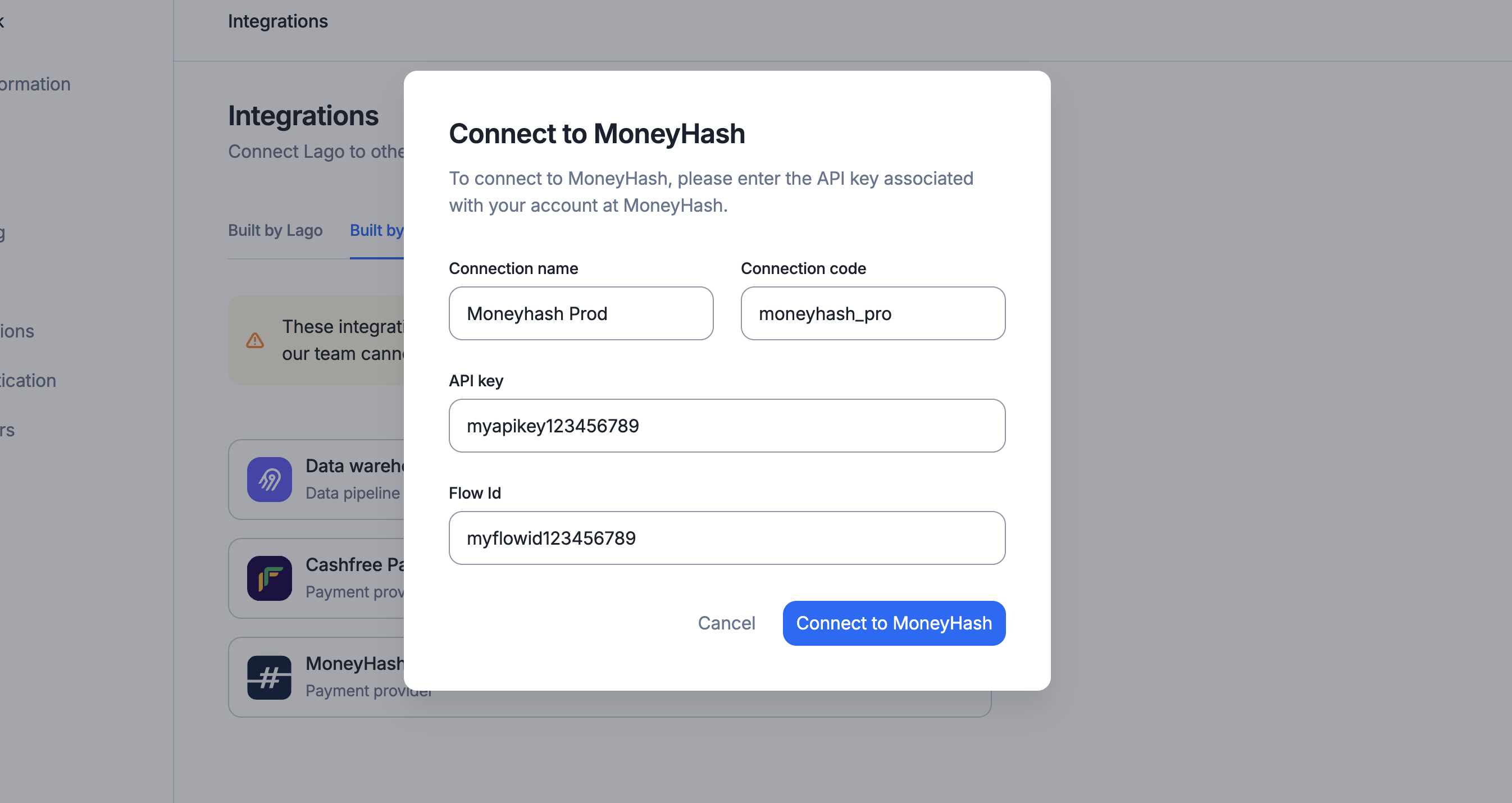
To connect Moneyhash to Lago, navigate to your Lago UI, then go to **Integrations** > **Built by community**, and add a new **Moneyhash Payments** connection:
1. Click **Add a connection**;
2. Type a connection **name**;
3. Type a unique connection **code**;
4. Paste your Moneyhash **API key**; and
5. Paste your Moneyhash **Flow Id**.
 ## Create a webhook endpoint
To complete this process, you will need:
* Your Lago **organization ID**, available in the **"API keys & ID"** tab of the
**"Developers"** section;
* The **connection code** you created during the Moneyhash setup process.
If you want Lago to automatically retrieve the status of the payments processed
via Moneyhash, you must create a webhook endpoint in Moneyhash. To do so:
1. Log in to your Moneyhash account;
2. Add the following Webhook URL in the **Webhooks** section of the Moneyhash dashboard;
3. Enter the following URL: `https://api.getlago.com/webhooks/moneyhash/{{__YOUR_ORG_ID__}}?code={{__YOUR_CONNECTION_CODE}}` (you must replace `organization_id` with your Lago organization ID, and the `connection_code` by the targeted Lago connection); and
4. Save the creation of this webhook endpoint.
## Collect payments via Moneyhash
### Connect a Lago Customer to Moneyhash
To begin collecting payments for your Lago invoices via Moneyhash, you need to link a Lago customer to a Moneyhash connection.
When creating or editing a customer in Lago, simply select the relevant Moneyhash connection under **external apps** to enable invoice payments.
### Generate a checkout link
Note that payments through Moneyhash does not automatically proceed when Lago generates an invoice. You need to programmatically generate a checkout link by calling the [following endpoint](/api-reference/invoices/payment-url):
```bash Request theme={"dark"}
curl --request POST \
--url https://api.getlago.com/api/v1/invoices/{lago_id}/payment_url \
--header 'Authorization: Bearer '
```
By generating this checkout link, you can forward it to your customer to complete payment using their preferred method from India. Once the payment is processed, Lago automatically retrieves the invoice status from Moneyhash.
```json Response theme={"dark"}
{
"invoice_payment_details": {
"lago_customer_id": "13b901a90-1a90-1a90-1a90-1a901a901a90",
"lago_invoice_id": "1e501a90-938s-1a90-1a90-1a901a901a80",
"external_customer_id": "53dj371e-4ea2-bcf9-57d3a41bc6ba",
"payment_provider": "moneyhash",
"payment_url": "https://moneyhash.payment_link"
}
}
```
### Moneyhash payment errors
If an error occurs during the Moneyhash payment process for a Lago invoice, Lago sends a [`payment_request.payment_failure`](https://docs.getlago.com/api-reference/webhooks/messages#param-payment-request-payment-failure) webhook containing the error details.
## Create a webhook endpoint
To complete this process, you will need:
* Your Lago **organization ID**, available in the **"API keys & ID"** tab of the
**"Developers"** section;
* The **connection code** you created during the Moneyhash setup process.
If you want Lago to automatically retrieve the status of the payments processed
via Moneyhash, you must create a webhook endpoint in Moneyhash. To do so:
1. Log in to your Moneyhash account;
2. Add the following Webhook URL in the **Webhooks** section of the Moneyhash dashboard;
3. Enter the following URL: `https://api.getlago.com/webhooks/moneyhash/{{__YOUR_ORG_ID__}}?code={{__YOUR_CONNECTION_CODE}}` (you must replace `organization_id` with your Lago organization ID, and the `connection_code` by the targeted Lago connection); and
4. Save the creation of this webhook endpoint.
## Collect payments via Moneyhash
### Connect a Lago Customer to Moneyhash
To begin collecting payments for your Lago invoices via Moneyhash, you need to link a Lago customer to a Moneyhash connection.
When creating or editing a customer in Lago, simply select the relevant Moneyhash connection under **external apps** to enable invoice payments.
### Generate a checkout link
Note that payments through Moneyhash does not automatically proceed when Lago generates an invoice. You need to programmatically generate a checkout link by calling the [following endpoint](/api-reference/invoices/payment-url):
```bash Request theme={"dark"}
curl --request POST \
--url https://api.getlago.com/api/v1/invoices/{lago_id}/payment_url \
--header 'Authorization: Bearer '
```
By generating this checkout link, you can forward it to your customer to complete payment using their preferred method from India. Once the payment is processed, Lago automatically retrieves the invoice status from Moneyhash.
```json Response theme={"dark"}
{
"invoice_payment_details": {
"lago_customer_id": "13b901a90-1a90-1a90-1a90-1a901a901a90",
"lago_invoice_id": "1e501a90-938s-1a90-1a90-1a901a901a80",
"external_customer_id": "53dj371e-4ea2-bcf9-57d3a41bc6ba",
"payment_provider": "moneyhash",
"payment_url": "https://moneyhash.payment_link"
}
}
```
### Moneyhash payment errors
If an error occurs during the Moneyhash payment process for a Lago invoice, Lago sends a [`payment_request.payment_failure`](https://docs.getlago.com/api-reference/webhooks/messages#param-payment-request-payment-failure) webhook containing the error details.