

API
Lago Open API
We have developed an Open API to help you get started with Lago and make it easier to test our solution.Please refer to the documentation to learn how to import the Lago Open API into Postman and create a new collection.Our public repository is also available on GitHub.InvoicingSubscriptions
Apply several coupons
You can now apply several coupons to a customer account.When several coupons are applied to a customer, they will be deducted according to the date on which they were applied: the coupon that was applied first will be deducted first.The remaining value / number of remaining periods for each coupon will be visible in the Overview tab of the customer view.You can also useGET /api/v1/applied_coupons to retrieve all coupons applied to a customer.Invoice details
To review the invoice details through the user interface:- Go to the Customers section
- Select a customer to open the customer view
- Open the Invoices tab
- Click the invoice to see its details

SubscriptionsUsage & meteringPaymentsIntegrations
Integration with GoCardless
Lago now offers native integration with GoCardless, including (but not limited to):- Ability to define GoCardless as the default payment provider for a customer
- Ability to automatically create Lago customers in GoCardless and retrieve their customer ID
- Ability to automatically collect payments via direct debit
- Ability to automatically update the status of an invoice depending on the payment status
- Ability to automatically resubmit failed payments with GoCardless Success+
Subscription date
It is now possible to set a start date in the past or in the future for a new subscription.Setting a start date in the past can be useful when migrating existing customers to Lago, while setting a start date in the future can be useful for scheduling upcoming subscriptions.For more information about the impact of the start date on the invoicing process, please refer to the documentation.Dimensions for grouping events
When creating a new billable metric, you can define dimensions that will be used to group events according to their properties.For example, if you want to charge your customers for compute capacity according to the cloud provider and server region, you can create acompute billable metric with two dimensions (learn more).Changes to the API include:- Ability to add a
groupparameter with one or two dimensions when creating or updating billable metrics - Ability to add a
group_propertiesparameter when creating or updating a plan - Ability to retrieve customer usage by group
- New
lago_group_idfor fees (see invoice object)
Enhanced coupon model
We have improved the coupon model to offer more flexibility.Changes include (but are not limited to):- Ability to define the value of a coupon as a fixed amount or percentage
- Ability to create recurring coupons that apply over several billing periods
- Ability to set an expiration date (i.e. date after which the coupon can no longer be redeemed)
Customer currency
It is now possible to define the currency at customer level.The currency associated with each customer was previously defined by the currency of the plan assigned to the customer. This logic prevented users from assigning a coupon or an add-on to a customer before creating a subscription.When creating a new customer via the user interface or the API, you can now select the currency associated with the customer. If the currency is not defined at customer level, it will be determined by the first object assigned to the customer (i.e. currency of the plan, add-on, coupon, or wallet).⚠️ Once an object has been assigned to the customer (i.e. plan, add-on, coupon, or wallet), the currency associated with the customer cannot be changed.
Error management
We have refactored the error management system to give more visibility to API users.Themessage attribute for errors has been replaced with code and error_details, which provide more information about the errors. There are several codes associated with each error.For example, when creating a new billable metric, the API may return "error": "Unprocessable entity" with the code value_is_mandatory for the name field (i.e. the name of the billable metric is missing).Please refer to the documentation available for each endpoint for more information on error codes.SubscriptionsSecurity & access
Invite members
You can now invite your teammates to join your Lago account.To add a new member via the user interface:- Go to the Settings section of the app
- Open the Members tab
- Click Invite a member on the right
- Enter the email address of your teammate
- Click Generate invitation link to confirm
- Copy the invitation link to share it with your teammate
ℹ️ All members have the same role and permissions.
Overwrite plans
If after a negotiation phase, you need to create a custom plan for an important customer, you can use the ‘overwrite’ feature, available through the user interface.This feature allows you to create a new plan from an existing one, in order to adjust the plan model and charges according to your business needs.Overwriting a plan has no impact on the original plan or existing subscriptions.Learn moreRecurring count
Companies with fair and transparent pricing models are often praised by customers. If you are considering implementing seat-based pricing for instance, thereccuring_count aggregation is exactly what you need.This new aggregation type allows you to push events for persistent units.Consider the following example:Your customer is on a monthly plan and adds a new user to their account on September 15th, so you generate an event that corresponds to one billing unit. At the end of September, Lago will automatically create a prorated charge for this user, based on the number of days of activity (i.e. from September 15th to September 30th). This billing unit will remain valid until you generate another event to remove it. For instance, if your customer deletes the user on October 22nd, Lago will create another prorated charge for the period October 1st to October 22nd.Consult our guide to learn more about persistent units.
External IDs
We are introducing changes to the API that will make it easier to manage subscriptions:- For the creation of new subscriptions,
subscription_idandunique_idwill be removed and replaced withexternal_id(required) - For all other endpoints,
subscription_idwill be replaced withexternal_subscription_id
- For the creation of new customers,
customer_idwill be replaced withexternal_id - For all other endpoints,
customer_id will be replaced withexternal_customer_id`
SubscriptionsAnalyticsAPI
Volume charge model
The new volume charge model allows you to create a tiered pricing structure and then calculate a unit price that applies to all units depending on total volume.It is similar to the graduated charge model, except that only one price tier applies at the end of the billing period.Please refer to the guide and API documentation for more information.Anniversary dates for subscriptions
When assigning a plan to a customer, you can now choose whether the subscription should be renewed at the beginning of the period or on its anniversary date.For instance, if a monthly plan is assigned to a customer on August 10th and you choose to align the billing cycle with the anniversary date of the subscription, the customer will be billed every 10th of the month.With the API, you can use thebilling_time attribute to choose your preferred option. If not provided, Lago will base the subscription on calendar periods.Learn moreFree units for the percentage charge model
We have released an enhanced version of the percentage charge model, including:- Ability to define free units based on the number of events (e.g. first 3 events are free)
- Ability to define free units based on the total amount (e.g. first $500 are free)
Multiple plans
It is now possible to assign multiple plans to a customer (e.g. if your customer needs to create several workspaces on your platform, you can link a plan to each workspace).To help differentiate each plan, you can add display names that will appear in the user interface and on invoices.Kindly note that:- All plans must be denominated in the same currency
- You must now specify the
subscription_idfor each event or create batch events
Tracking & Analytics
To help us better understand your needs, we have added a tracking module to the self-hosted version of Lago.Data analytics will help us improve the quality of our product and performance of the API.As the privacy of our users is of paramount importance, we will not collect any personal information about your customers or the amount of your invoices, and you can opt out at any time.Learn moreGo client
We have added a new API client to make it easier for Go users to set up their billing system with Lago.Click here to see the documentationInvoicingAPIUsage & metering
App version
It is now possible to check the version of the Lago application you are using.Click on of yourorganization's name in the top-left corner of the user interface to see the app version currently in use.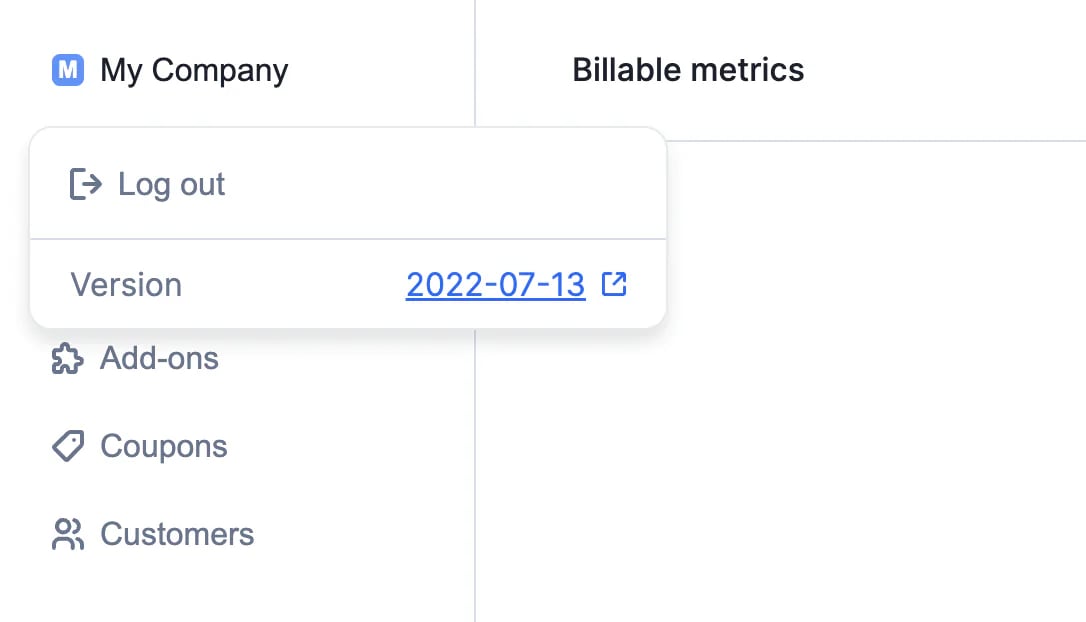
Current usage
Good news for those who follow closely the consumption of their customers. You can now track the current billing usage of your customers either from the UI or from the API.To access this Usage tab:- Access your list of customers
- Select a specific customer that is already linked to a subscription
- Access the usage tab
- Get a complete view of usage-based consumption that is going to be billed on the next invoice
GET /api/v1/customers/:customer_id/current_usage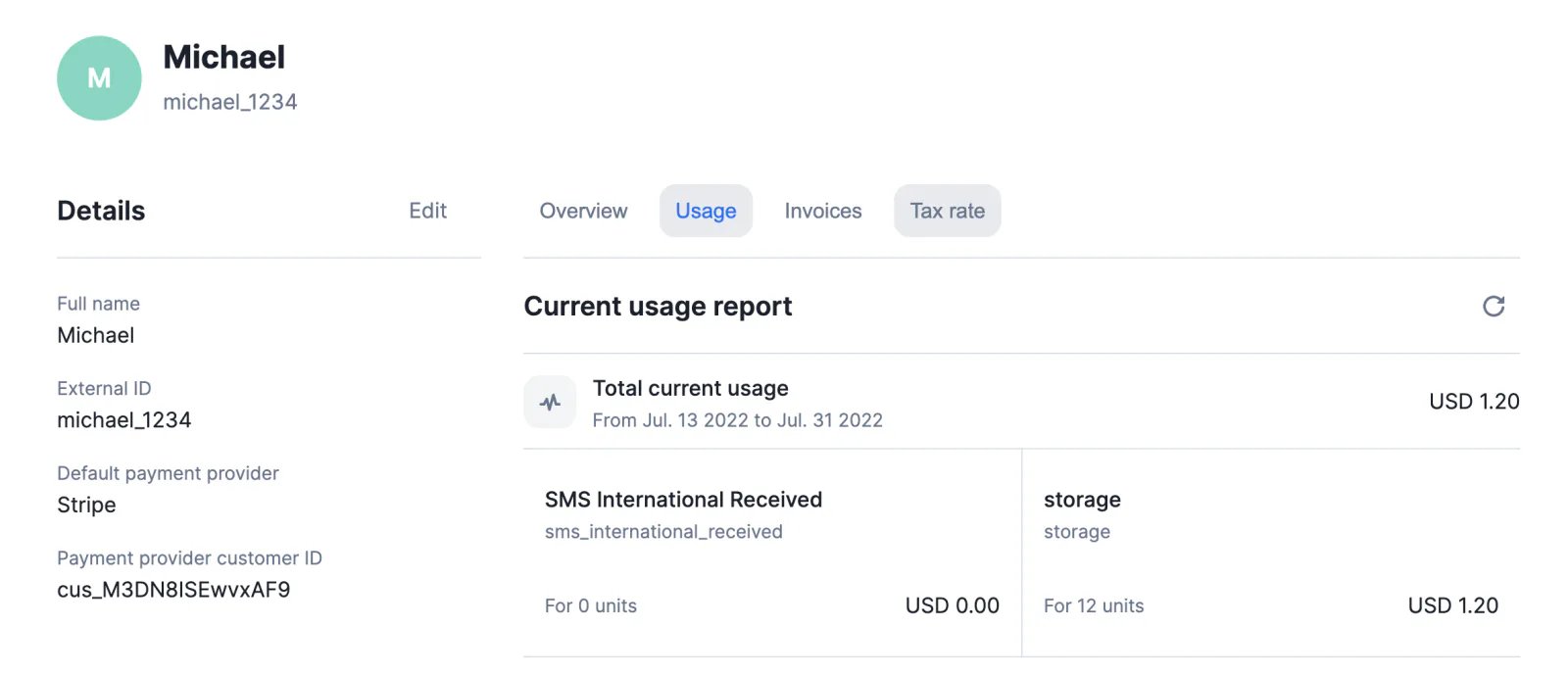
PDF invoices
Lago will generate a PDF file for each new invoice.You can download invoices via the user interface or the API and can also modify some of the elements included in the invoice template.Full documentation available here.New API endpoints
We like our users when they use our nice and clean UI, but we also love when they use our API. One of the usecase could be to use Lago as a white-labeled solution.Here is the full list of endpoints we have just released:Billable metrics- Create a billable metric
POST /api/v1/billable_metrics - Update a billable metric
PUT /api/v1/billable_metrics/:code - Destroy a billable metric
DELETE /api/v1/billable_metrics/:code - Fetch a specific billable metric
GET /api/v1/billable_metrics/:code - Fetch all billable metrics
GET /api/v1/billable_metrics?per_page=2&page=1
- Create a plan
POST /api/v1/plans - Update a plan
PUT /api/v1/plans/:code - Destroy a plan
DELETE /api/v1/plans/:code - Fetch a specific plan
GET /api/v1/plans/:code - Fetch all plans
GET /api/v1/plans?per_page=2&page=1
- Create a coupon
POST /api/v1/coupons - Update a coupon
PUT /api/v1/coupons/:code - Destroy a coupon
DELETE /api/v1/coupons/:code - Fetch a specific coupon
GET /api/v1/coupons/:code - Fetch all coupons
GET /api/v1/coupons?per_page=2&page=1
- Create a add_on
POST /api/v1/add_ons - Update a add_on
PUT /api/v1/add_ons/:code - Destroy a add_on
DELETE /api/v1/add_ons/:code - Fetch a specific add_on
GET /api/v1/add_ons/:code - Fetch all add_ons
GET /api/v1/add_ons?per_page=2&page=1
- Get the current usage of a specific customer
GET /api/v1/customers/:customer_id/current_usage
- Update the information of your organization
PUT /api/v1/organizations
PaymentsSubscriptionsInvoicingUsage & metering
Integration with Stripe Payments
Lago now offers native integration with Stripe, including (but not limited to):- Ability to create Lago customers in Stripe automatically and retrieve their customer ID
- Ability to define Stripe as the default payment provider for a customer
- Ability to generate payment intents automatically
- Ability to update the status of an invoice depending on the payment status
- Ability to receive a webhook when a payment fails
Weekly plan interval
When setting up a plan, you can select the weekly interval to define a weekly billing period.The plan interval applies to the subscription and charges, which means that:- For plans that must be paid in advance, the subscription fee is invoiced at the beginning of the week
- For plans that are paid in arrears, the subscription fee is invoiced at the end of the week
- Usage is calculated at the end of each week
Invoice monthly charges for a plan paid yearly
Before the release of this feature, usaged-based features (charges) were following the plan period. If the plan period was invoiced yearly, the charges were invoiced yearly.It’s now possible to invoice billable metrics on a monthly basis for a plan billed yearly. The base amount of the plan will be invoice yearly (in-arrears or in-advance), but your usage based features will be invoiced on a monthly basis.To do so:- Access a Plan
- Define a plan yearly
- Price additional charges from your billable metrics
- Turn
onthe toggle for applying charges monthly
ℹ️ The last invoice is gathering both the subscription and the usage-based charges
Events list
You are now able to view all the ingested events sent from your application to Lago. We called this featureEvents list because it makes the event ingestion easier and more understandable.- Access the
Developersidebar item - Click the
Eventstab - Take a look at the latest events ingested
ℹ️ If an event you sent is not shown in the UI, it means that it has not been ingested by Lago
- Warning 1 - The event code is not related to an existing billable metric
- Warning 2 - The property sent does not match the aggregation property defined in your billable metric

Add-ons
Add-ons are now available on Lago. Create add-ons to apply one-time fees (e.g. setup fee, one-time purchase, etc.) and generate the corresponding invoices instantly.Full documentation available here.Subscriptions
Pay-as-you-go template
We’ve added a new template to our collection: click here to learn how to replicate Algolia’s pay-as-you-go pricing.It’s a great starting point for companies whose pricing fully depends on usage, such as cloud service providers and API companies.With Lago, you can adapt this template to your products and services, using some of our most popular features, including the ‘sum’ aggregation type and the package charge model.Coupons
Introducing coupons, a new feature that allows you to offer discounts to your customers.Full documentation available here.Subscriptions
Subscription changes
You can now modify the subscription assigned to a customer through the user interface.To learn how to upgrade or downgrade a subscription and how it affects billing, please refer to the documentation.Package pricing for charges
It is now possible to apply a package pricing model to a charge. To do so:- Select an existing plan (or create a new one)
- Add a charge
- Select the package pricing model
Percentage charge model
Inside the plan, when creating a charge, you can now select the percentage charge model.This feature is useful for industries willing to take a% + fixed fee out of a usage-based features (for banking or charity industry, for instance). These fees are applied on the units to be charged (e.g. the aggregation result of your billable metric).