

payment_due_date within the invoice payload but also influences the due date mentioned in the downloadable PDF version of the invoice.
To illustrate, consider the following scenario:
a billing cycle spanning one month, accompanied by a net payment term of 15 days.
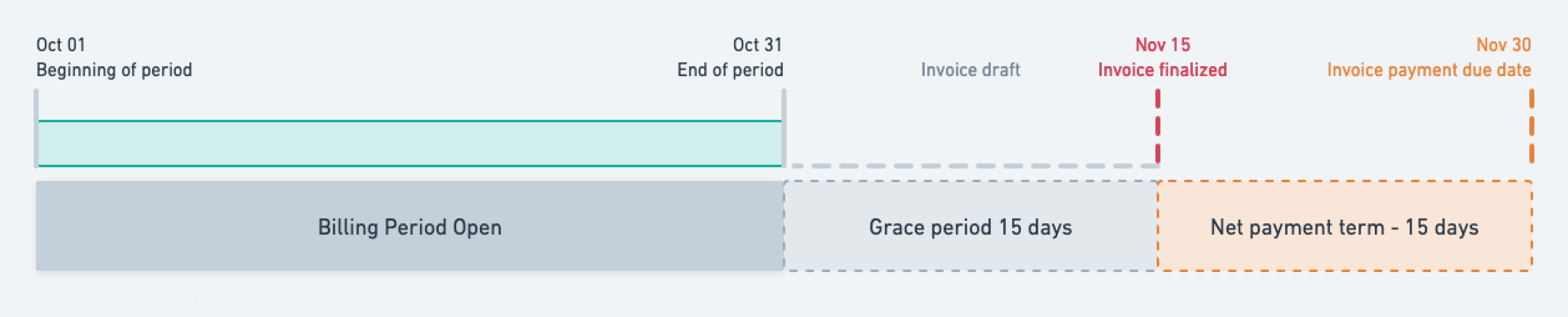
Illustration of the net payment term period
Application scope
The net payment term period applies to all types of invoices, and is used to compute the payment due date. When thepayment_due_date has passed, the invoice is flagged as overdue (payment_overdue = true), and Lago emits an invoice.payment_overdue
webhook message.
The invoice stays flagged as overdue until the payment is succeeded, or payment_dispute_lost_at is applied, or the invoice is voided.
Define a net payment term at entity level
The entity’s net payment term applies to all customers linked to this object by default.- Dashboard
- API
To define a net payment term at the entity level via the user interface, follow these steps:
- Access the Settings section using the side menu;
- Navigate to the Billing entity > Invoicing settings section;
- Click Edit in the Net payment term section;
- Select the desired number of days for the payment term or opt for a custom duration; and
- Confirm by clicking “Edit net payment term”.
Define a net payment term at customer level
- Dashboard
- API
To define a net payment term at the customer level through the user interface, follow these steps:
- Access the “Customers” section via the side menu;
- Select a customer from the list;
- Open the “Settings” tab of the customer view;
- Click “Add a net payment term” in the “Net payment term” section;
- Choose the desired number of days for the payment term or opt for a custom duration; and
- Click “Add net payment term” to confirm.