Group usage by event properties: either to price each group separately, or to break it down on invoices and usage for visibility only.
A charge can group usage by the properties carried on your events. Lago offers two kinds of group keys, answering two different questions:
Pricing group keys answer “how much should each group cost?” Each group becomes its own fee with its own price.
Presentation group keys answer “how is this fee broken down?” The fee stays whole and priced once; Lago just shows how its units split across the groups, for visibility only.
You can use either on its own, or combine them on the same charge.
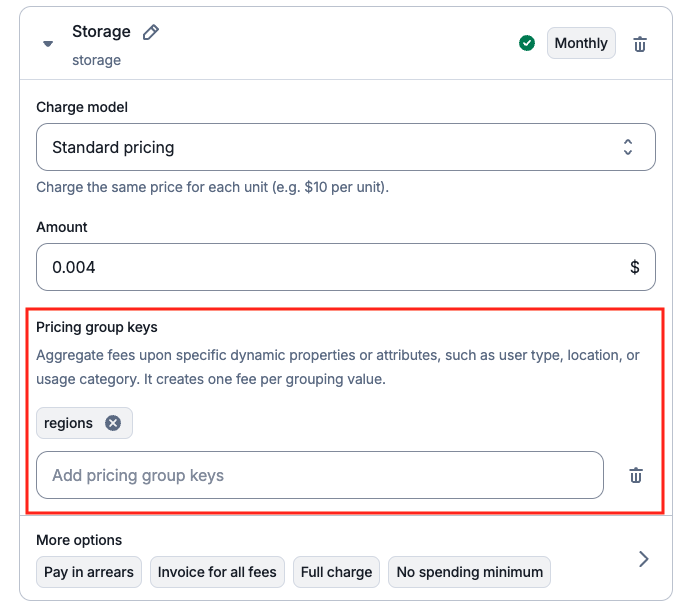
AI and infrastructure platforms often tailor pricing by geography, hosting provider, model type, or service tier. Pricing group keys let you reflect those real-world cost variations on a single charge, instead of duplicating products. Each group is metered and priced independently, and appears as its own fee on the invoice.You don’t predefine the values. Define the key on the charge, send events that carry it, and Lago routes each event to the right pricing group at runtime. Pricing group keys work with every charge model, and you can set more than one per charge.
Dashboard
API
On the charge, add a key in the Pricing group key field (e.g. region, cloud, instance_type), then send events that include that property.
Define a pricing group key
Pricing group keys live inside the charge properties:
Example. A Storage charge priced at $1 per GB (sum of gb) with pricing_group_keys: ["region"], receiving 10 GB in EU and 15 GB in US, produces two separate fees, each with its own units and amount:
Storage
  region = EU    10 units    $10.00
  region = US    15 units    $15.00
  ─────────────────────────────────
  Total                      $25.00
Sometimes you don’t want to charge differently for a dimension; you just want to see it. Finance teams need to attribute a line item back to a region, team, or project. Customers want to know where their usage came from before they pay for it. None of that should change the price.Presentation group keys give you exactly that: a breakdown of a fee’s units across one or two event properties, shown on the invoice and in usage responses, without affecting pricing, aggregation, or the number of fees. Group by, for display only. Doing the same thing with pricing keys would split one fee into many, re-price non-linear charge models (graduated, volume, package) per group, and bloat both the invoice and your usage queries.
Lago computes the fee exactly as it does today (pricing untouched), then runs one extra aggregation to split that fee’s units across the presentation keys and attaches the result as a units-only breakdown.Take the same Storage charge and events as the pricing example above ($1 per GB, EU = 10 GB, US = 15 GB), but with region as a presentation key instead of a pricing one:
Storage              25 units    $25.00
  └ region = EU      10 units
  └ region = US      15 units
One fee, priced once at $25.00. The same region split that pricing keys turned into two billable fees stays here as a units-only breakdown inside a single fee.
Good to know:
Up to 2 keys per charge.
A key can be both a pricing and a presentation key on the same charge; Lago de-duplicates them.
All aggregation types work. For additive aggregations (count, sum, weighted sum) the group units add up to the fee total. For non-additive ones (max, latest, count unique) they may not: each group is computed independently, so read the breakdown as what happened in each group, not how the total splits.
Groups can show negative units when their events net out negative (credits, reversals).
Events missing the property fall under a null group.
On the charge, open the Presentation group keys panel below the pricing model, add up to two keys (e.g. department, project), and choose per key whether it should show on the invoice. Then send events that carry those properties.
Presentation group keys live inside the charge properties, as objects with a value and optional options:
Set display_in_invoice to false to keep a key’s breakdown out of the invoice PDF while still returning it through the API. The breakdown also appears live in current, projected, and past usage.
The two compose cleanly: pricing keys decide how many fees there are and what they cost, presentation keys break down each of those fees. The hierarchy is always charge → pricing-group fee → presentation breakdown.A Storage charge at $1/unit with pricing_group_keys: ["instance_id"] and presentation_group_keys: [{ "value": "region" }] gives one fee per instance, each with its own region breakdown:
Storage
  Instance A             25 units    $25.00
    └ region = EU        10 units
    └ region = US        15 units
  Instance B              7 units     $7.00
    └ region = EU         4 units
    └ region = US         3 units
The amounts come entirely from the pricing keys; the region split is layered on for visibility. With two presentation keys, the breakdown is by the combination of values (e.g. region · city).